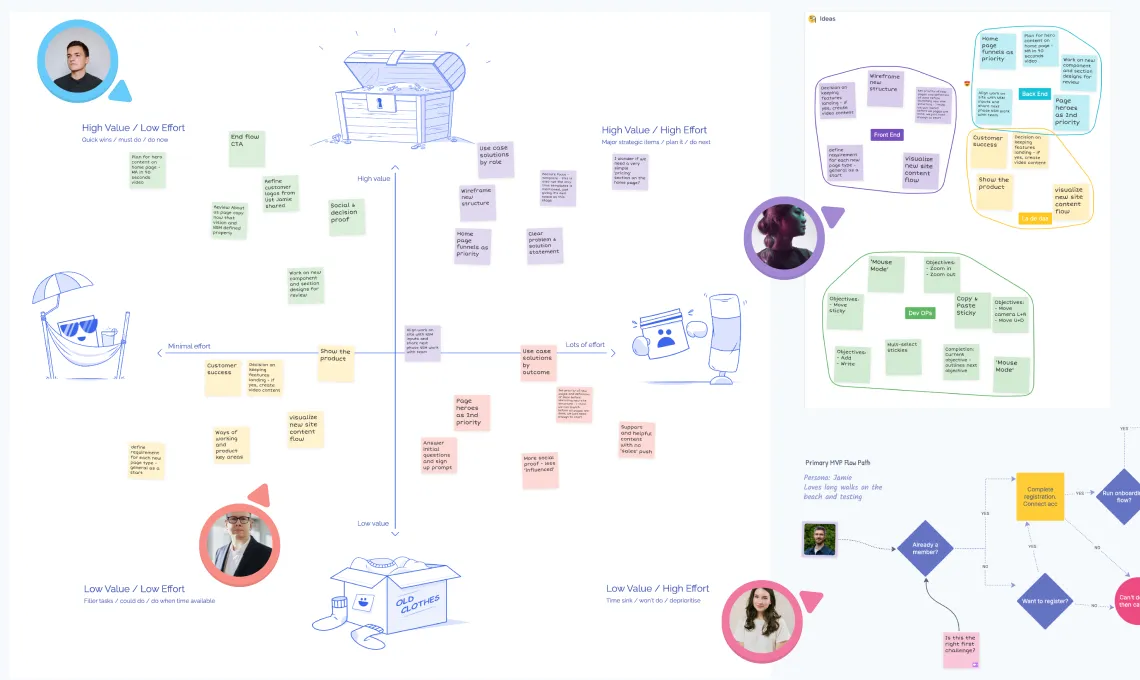
Instead of gathering around a physical whiteboard in the same room, participants can add notes, draw diagrams, and arrange ideas in real time through a web application.
Online whiteboards recreate the experience of working on a traditional whiteboard while adding digital capabilities such as templates, sticky notes, diagrams, and collaboration tools. Multiple participants can interact with the board at the same time, which makes them useful for distributed teams working remotely or in hybrid environments.
Today, online whiteboards are commonly used by product teams, engineering teams, facilitators, and consultants to run collaborative sessions, workshops, and planning meetings.
How Online Whiteboard Software Works
An online whiteboard provides a shared digital workspace where multiple participants can collaborate at the same time. Users interact with a visual canvas using tools such as text blocks, shapes, connectors, sticky notes, and drawing tools.
When one participant adds or edits something, everyone else viewing the board sees the change immediately. This allows teams to brainstorm ideas, move things around, and refine plans together in real time. Even if participants are in different locations, they can still collaborate visually as if they were in the same room.
Most online whiteboards run directly in a browser, so users can join a board through a shared link without installing software. Many platforms also integrate with video conferencing tools and project management software to support collaborative meetings and workshops.
Online whiteboard software is a digital collaboration tool that allows teams to brainstorm, plan, and organize ideas together on a shared visual canvas. Instead of working on a physical whiteboard in the same room, participants can add notes, diagrams, and ideas to a shared board in real time through a web application.
Online whiteboards recreate the experience of a traditional whiteboard while adding digital capabilities such as templates, sticky notes, diagrams, and real-time collaboration. Multiple users can work on the same board simultaneously, allowing distributed teams to collaborate visually even when working remotely.
Brainstorming and idea generation
Teams often use whiteboards to capture ideas quickly using notes, sketches, and diagrams. Visual brainstorming makes it easier for participants to build on each other’s ideas and organize thoughts than in text-based discussions.
Project planning and workflows
Product and engineering teams frequently use whiteboards to map workflows, user journeys, or project roadmaps. Visual diagrams help teams understand complex processes and plan work together.
Workshops and facilitation
Workshop facilitators use online whiteboards to guide group exercises. Structured sessions such as design thinking workshops, strategy sessions, and team alignment exercises often rely on visual collaboration.
Agile ceremonies
Many software teams use online whiteboards to run agile ceremonies such as sprint planning, retrospectives, and estimation sessions. Visual collaboration helps teams review work, discuss improvements, and plan future iterations.
Because these tools support real-time collaboration, they are widely used by distributed teams that need to coordinate work across locations.
Core Capabilities of Online Whiteboard Software
Although platforms differ in their feature sets, most online whiteboard tools share several core capabilities that support collaborative work.
Visual collaboration canvas
Online whiteboards provide a shared digital workspace where teams can organize ideas visually. Users can create diagrams, place notes, and connect related concepts across an open canvas. The visual layout makes it easier to see how ideas relate to each other than in traditional documents.
Real-time collaboration
Multiple participants can interact with the same board simultaneously. When one participant adds or edits content, everyone else viewing the board sees the change immediately. This makes it possible for teams to brainstorm, discuss ideas, and build on each other’s contributions during meetings or workshops.
Visual tools and objects
Most whiteboard platforms include tools that allow users to add different types of content to the board, including:
- sticky notes
- shapes and diagrams
- connectors and arrows
- text annotations
- images and attachments
These visual elements help teams organize information spatially rather than relying only on text.
Templates and frameworks
Many whiteboard tools include pre-built templates for common collaborative activities. Templates help teams structure sessions such as brainstorming workshops, retrospectives, planning sessions, and design exercises.
Facilitation features
Some platforms include features designed specifically for running structured sessions. These may include voting tools, timers, private idea writing, and activity areas that guide participants through collaborative exercises.
Examples of Online Whiteboard Software
Several platforms provide online whiteboard functionality for teams that need to collaborate visually.
Commonly used tools include:
- Ludi — an online whiteboard designed for agile teams running structured collaborative sessions such as retrospectives and planning meetings.
- Miro — a visual collaboration platform widely used for brainstorming, workshops, and product planning across distributed teams.
- Mural — a digital workspace often used for design thinking workshops and collaborative ideation.
- FigJam — a collaborative whiteboard tool developed by Figma for brainstorming and design discussions.
- Lucidspark — a virtual whiteboard designed for ideation and team alignment.
All of these tools provide a shared visual workspace where teams can brainstorm ideas, organize information, and collaborate in real time.
Online Whiteboard Software for Agile Teams
One example of an online whiteboard platform is Ludi, a collaborative whiteboard designed for agile teams running structured meetings and workshops.
Ludi provides a shared visual workspace where teams can brainstorm ideas, organize information, and collaborate during sessions such as sprint planning, retrospectives, project kickoffs, and product workshops. The platform combines a digital canvas with facilitation tools that help teams guide discussions and capture outcomes during collaborative meetings.
Unlike general-purpose whiteboard tools, Ludi focuses specifically on structured team collaboration. Templates, facilitation controls, and real-time collaboration features help agile teams run effective meetings while keeping discussions organized and productive.
Teams commonly use Ludi to run sessions such as:
- sprint planning
- retrospectives
- brainstorming workshops
- estimation sessions
- team alignment meetings
By combining visual collaboration with structured facilitation tools, Ludi helps distributed teams work together effectively even when participants are in different locations.
Why Teams Use Online Whiteboard Software
Organizations increasingly rely on online whiteboards because they make collaborative work easier, especially for distributed teams.
Online whiteboard tools help teams:
- collaborate visually rather than relying only on text
- capture ideas quickly during group discussions
- organize complex information using diagrams and visual structures
- involve all participants in collaborative sessions
- document the outcomes of workshops and meetings
By enabling teams to work together visually in real time, online whiteboards support many of the collaborative activities that previously required physical meeting rooms and whiteboards.
As remote and hybrid work have become more common, online whiteboard software has become a key tool for modern team collaboration.