

Ludi vs Lucidspark: Which Is Better for Agile Teams?
Lucidspark is Lucid Software’s online whiteboard for brainstorming and collaborative ideation, part of the Lucid Visual Collaboration Suite alongside Lucidchart. Ludi is a collaborative whiteboard built specifically for agile ceremonies: retrospectives, sprint planning, estimation, and team health checks.
If your team already uses Lucidchart and wants a brainstorming canvas that feeds into diagrams, Lucidspark makes sense. If your team needs a tool built for running agile meetings, with templates, facilitation, action tracking, and proper two-way Jira integration, that’s Ludi.
What is Ludi?
Ludi is an online whiteboard for agile teams — a visual canvas purpose-built for retrospectives, sprint planning, backlog estimation, team health checks, and workshops.
It’s been used by over 125,000 agile teams since 2019. The people who adopt it are typically Scrum Masters, Engineering Managers, and Agile Coaches who run these meetings every sprint and want a tool that makes facilitation easier.
What is Lucidspark?
Lucidspark is Lucid Software’s collaborative whiteboard for brainstorming and ideation — the freeform canvas component of the Lucid Visual Collaboration Suite, designed to work alongside Lucidchart’s structured diagramming.
It’s designed for cross-functional teams generating and organising ideas before turning them into diagrams, architecture docs, and workflows. The core value proposition is the Lucid ecosystem: ideas from Lucidspark can flow directly into Lucidchart without switching tools. Agile meetings are one use case in Lucidspark’s platform.
Ludi vs Lucidspark: See the Difference
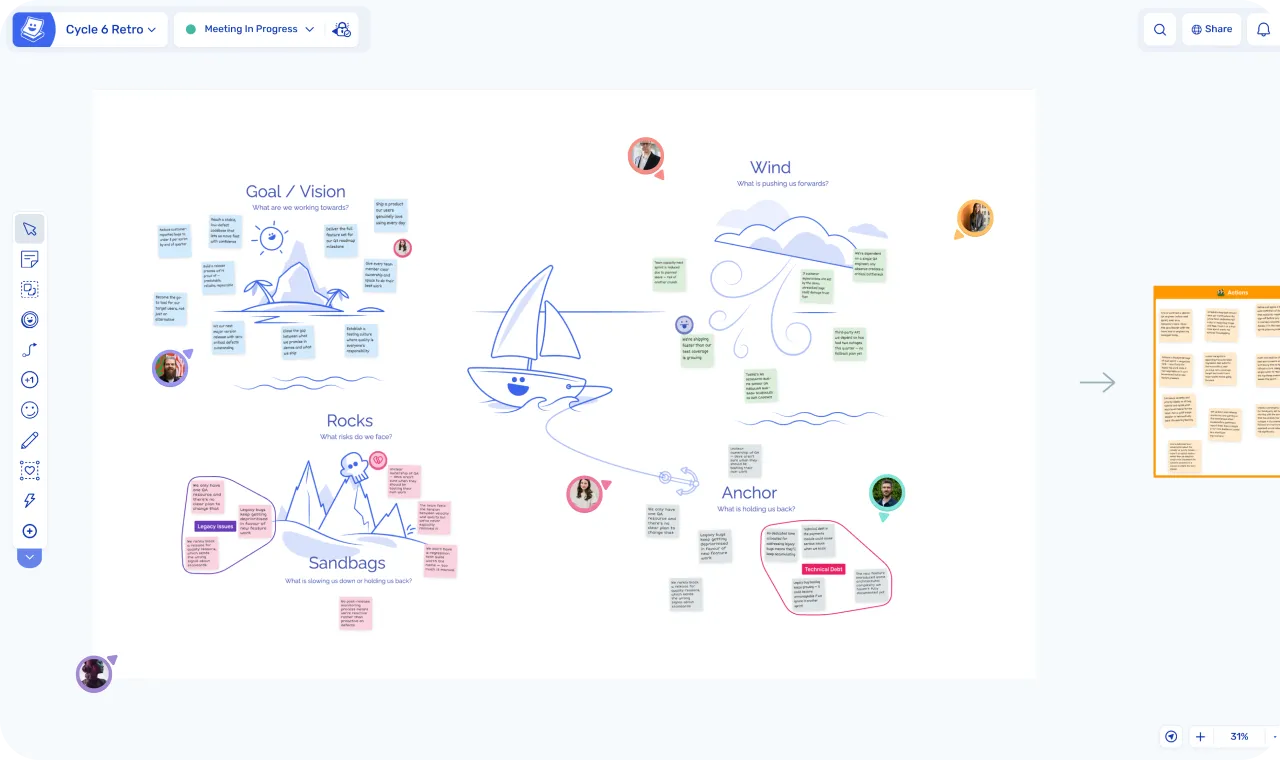
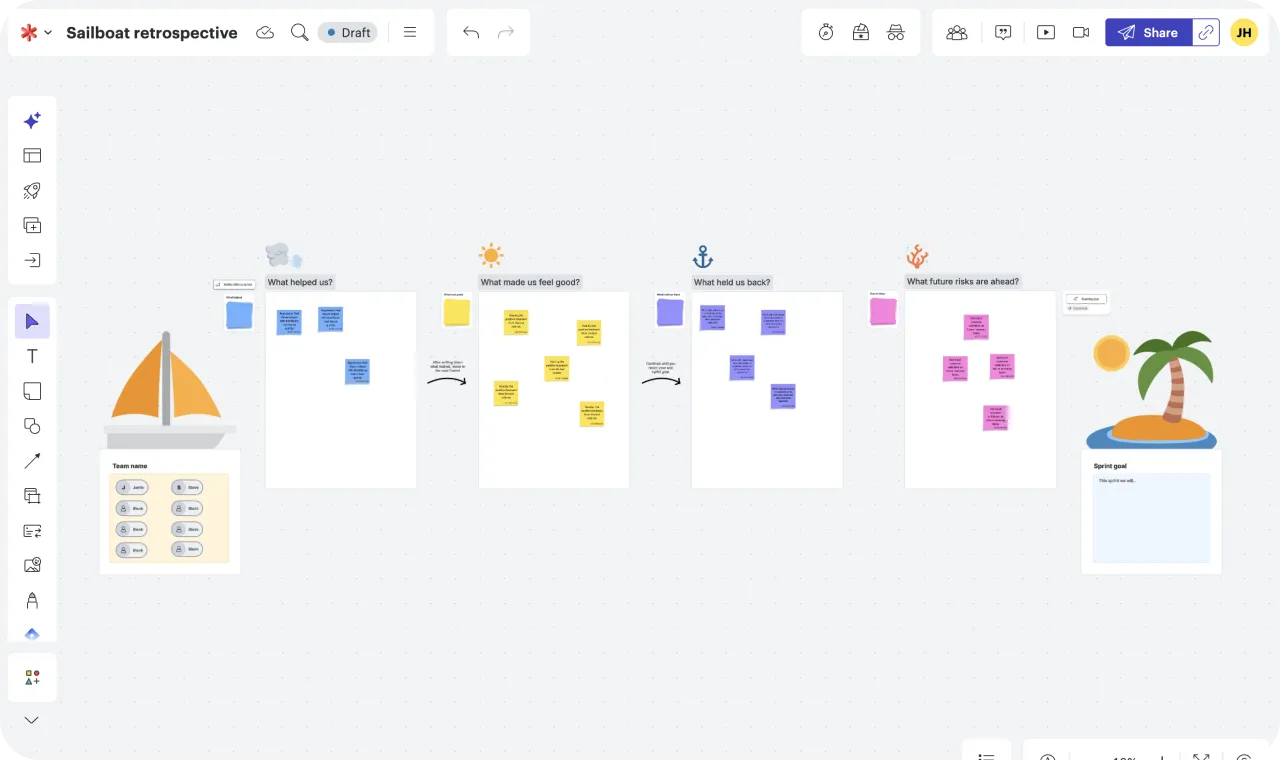
| Ludi | Lucidspark | |
|---|---|---|
| Format | Freeform whiteboard canvas | Freeform whiteboard canvas |
| Built for | Agile team ceremonies | Brainstorming, ideation, workshops |
| Key use case | Run every agile meeting in one tool | Generate and organise ideas |
| Team type | Scrum Masters, Engineering Managers, and teams who run collaborative meetings | Cross-functional teams brainstorming, often alongside Lucidchart |
| Starting price | $4/member/month | $9/user/month |
| 30 day free trial | ||
| Free plan | ||
| Agile templates | ||
| Private writing | Starter plan | Enterprise only |
| Topic grouping | ||
| Team voting | Starter plan | Team plan and above |
| Timer | Starter plan | Team plan and above |
| Meeting facilitation | ||
| Readiness checks | ||
| Action creation | ||
| Action reminders | ||
| Planning poker | ||
| Send actions to Jira | ||
| Full two-way Jira integration | ||
| Sprint planning | ||
| AI features | ||
| Engagement features | ||
| Lucidchart integration | ||
| SSO | ||
| Guest participants |
The Short Version
Lucidspark is a brainstorming tool. It says so itself: “where ideas take shape.” It’s designed to complement Lucidchart’s structured diagramming, giving teams a freeform canvas where they can generate and organise ideas before turning them into proper diagrams, architecture docs, or workflows. For teams already in the Lucid ecosystem, the integration between Lucidspark and Lucidchart is useful.
But brainstorming and agile ceremonies are different jobs.
When a Scrum Master opens Lucidspark to run a retro, they get a general-purpose whiteboard. Sticky notes are free. Voting and the timer require the Team plan ($9/user/month). Private writing, the feature that lets people add sticky notes without seeing each other’s first, requires the Enterprise plan (custom pricing). What they don’t get on any plan is host controls, readiness checks, or action tracking. They’re building the facilitation themselves: deciding when to reveal, how to vote, how to track outcomes. The canvas is designed for generating ideas, not running structured meetings.
Ludi was built to solve that specific problem. Lucidspark is a decent whiteboard for brainstorming. Ludi is a meeting tool for agile teams. Different jobs.
In-Depth Feature Comparison
Meeting Facilitation
Both tools take facilitation seriously, but they approach it differently.
Lucidspark gives you facilitation components. Frames mark sections of the board, Paths let the facilitator move collaborators through those Frames in a set sequence, Broadcast brings everyone to a specific area, Presentation Mode runs the board as slides, Breakout boards split larger groups into smaller ones, and private mode hides each person’s new sticky notes from other collaborators until the host turns it off. These are real tools, and a skilled facilitator can build a structured retro on top of them. The catch is which plan they’re on. Voting and the timer require Team. Private mode requires Enterprise.
Ludi gives you facilitation flows. Activity Frames work like Lucidspark’s Frames + Paths (designated board sections the host hides, reveals, and jumps between), but they come pre-assembled inside agile templates. Pick a Mad/Sad/Glad and the structure is already there: private writing on, voting set up in seconds, grouping stickies, capture actions and track in Ludi. The facilitator runs the meeting; the meeting isn’t built each time.
”Ludi has the best tools for the facilitator, it’s better than Miro, for instance. When you invite customers to your Ludi board, you don’t have to explain how to use Ludi, it is much simpler.”
— Aline Sillet, Agile Coach, XITASO
”Ludi takes the tool out of the equation and you can actually focus on having a retro. Previously I felt like half the time we were talking about the actual tool.”
— Tim Gaye, Senior Software Engineering Manager, Kaluza
The Differences That Remain
The differences that remain are real:
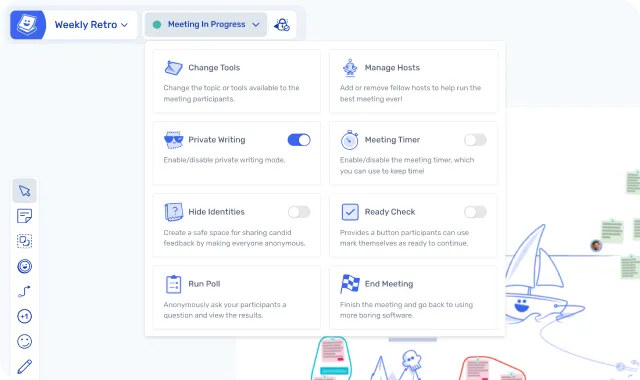
- Readiness checks in Ludi let the facilitator see who’s finished writing before moving on. Lucidspark doesn’t have an equivalent.
- Individual Reveal lets participants or the host reveal sticky notes one at a time, which is useful for focused discussions. Lucidspark’s private mode reveals everything at once when the host turns it off.
- Change Tools lets the host restrict the participant toolbar so contributors see only what they need for the current phase. Lucidspark doesn’t gate the toolbar by phase.
- Hide Identities is a permanent anonymity toggle on Ludi’s Starter plan ($4/member/month). Lucidspark’s “Keep authors hidden” sits inside private mode, which is Enterprise-only. Running an anonymous retro on Lucidspark means signing an Enterprise contract.
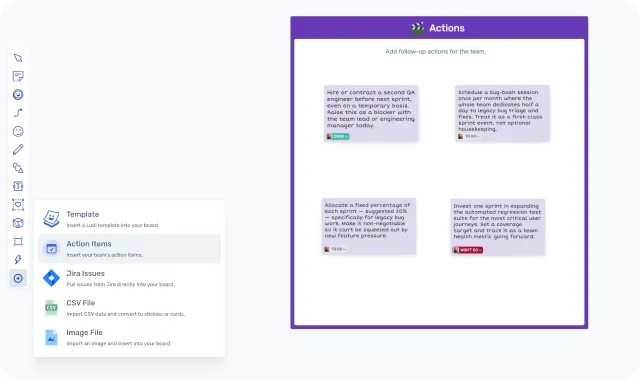
- Action tracking built into the meeting flow — any sticky becomes an assigned action with a due date and email reminders. Lucidspark doesn’t have native action tracking.
Bottom line: Lucidspark has the building blocks for a structured session and a facilitator who knows what they’re doing can run a good retro on it. Ludi has those blocks ready or quicker to set up, with readiness checks, individual reveal, toolbar control, and built-in action tracking on top.
Templates
Lucidspark has a library of templates including retro formats, brainstorming exercises, sprint planning, and story mapping. They’re functional whiteboard templates — they set up the canvas layout, not the facilitation flow.
Ludi has 125+ templates, all designed specifically for agile ceremonies. Every template is ready to use with Activity Frames, voting rounds, and facilitator controls built in. You open it and go — no configuration, no wondering which variant to pick.
The tradeoff is clear. Lucidspark templates set up a canvas for brainstorming. Ludi templates are built around the rhythm of an agile ceremony: write, reveal, group, vote, capture actions. If you want to open a template and run a retro without setup, Ludi’s are what that looks like.

”As with all busy teams, we don’t have a lot of spare time. I know that if I haven’t had time to prepare a retro, there will be a ready-made exercise in Ludi that I can use with the team.”
— Tim Gaye, Senior Software Engineering Manager, Kaluza
Action Tracking
Ludi has built-in action tracking. Any sticky note can become an action item with an assignee, due date, and automated email reminders. Actions can be pulled into the next meeting board, so the team reviews what they committed to last time before starting a new retro. There’s a dedicated dashboard for action management across boards.
Lucidspark doesn’t have native action tracking. You can write actions on sticky notes, but there’s no assignee, no due date, no reminder, and no carry-forward. Your retro outcomes stay on the board as text.
If your meetings regularly produce action items that nobody follows up on, this is the feature that changes that.
Jira Integration
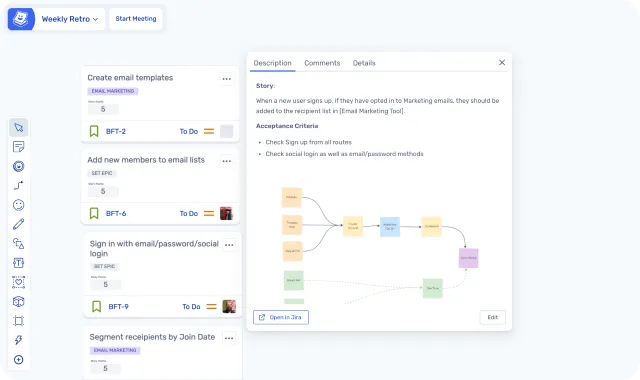
Both tools have two-way Jira sync. Lucidspark offers Lucidspark Cards for Jira with real-time sync. Ludi’s Jira integration also supports two-way creation and real-time editing of Jira issues.
The basic functionality overlaps. The difference is that Ludi’s integration is wired into the ceremony flow: estimation and planning happen in the same session as the discussion. And Ludi’s Jira integration is on the Business plan at $6/member/month, while Lucidspark’s requires the Team plan at $9/user/month.
AI
Lucidspark has more AI features than Ludi. Their “Collaborative AI” includes idea generation from prompts, expanding on existing sticky notes, sorting ideas into themed groups, summarising content with next steps, and AI-powered mind maps. It’s available on all plans, including free.
Ludi has AI-assisted sticky grouping — it automatically sorts your sticky notes into themed groups. It’s useful during retros, but it’s not an AI platform.
Lucidspark’s AI is designed for brainstorming: generating and organising ideas. None of it is agile-specific. There’s no retro sentiment analysis, no action tracking intelligence, no team health insights. If AI-powered brainstorming matters to you, Lucidspark has more of it. For agile ceremonies specifically, AI sticky grouping covers the most useful case, and more AI features are on Ludi’s roadmap.
Engagement Features
Ludi has gadgets designed to make remote meetings feel less like a chore: Jukebox, Spinner, Buzzer, Counter, placeable Timer, Object Trays, Voter Panels, confetti, virtual hats, and icebreakers. They’re a deliberate answer to the flatness of generic whiteboards, and often what gets quieter team members to engage.
Lucidspark has emoji reactions and some visual activities. They’re fine for brainstorming sessions, but there’s less ceremony-specific engagement tooling.
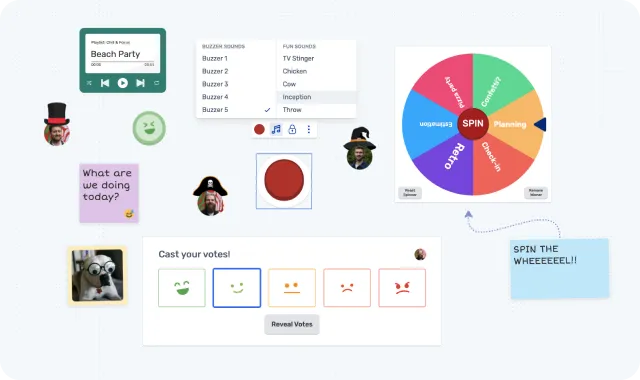
”Our engineering team has used Ludi for years. We love it! They’ve thought through all the small things that make a retro fun, as opposed to using a generic whiteboarding application. For us, it’s the small things. Hats, confetti, slaps. It makes retros super fun and engaging.”
— Anthony, CTO, Zable Health
Pricing
Ludi starts at $4/member/month (Starter) or $6/member/month (Business, with Jira integration). Lucidspark’s Team plan is $9/user/month.
For a team of 10 on the entry paid plan: Ludi is $40/month, Lucidspark is $90/month. For a team of 10 with Jira integration: Ludi Business is $60/month, Lucidspark Team is still $90/month.
A note on Lucidspark’s free tier: Lucidspark has a free plan and an Individual plan at $7.95/month. But the free tier is more restrictive than it looks for structured meetings. Voting, timer, laser pointer, and Collaborator Colors are gated to the Team plan ($9/user/month). Private mode — anonymous writing — is Enterprise-only. So if you’re trying Lucidspark free for retros, you can’t run a vote, can’t time a round, and can’t write privately.
Ludi has a 30-day free trial — full access to everything, then paid plans from $4/member/month. Nothing is deleted when the trial ends; boards go to read-only.
The bundling factor: If your company already pays for Lucid Suite (Lucidchart + Lucidspark), Lucidspark may be included at no extra cost. That’s the most common reason teams use it for agile ceremonies — not because it’s the best tool for the job, but because it’s already there. The question is whether “already there” is good enough, or whether a purpose-built tool would make those meetings noticeably better.
The Lucid Suite Advantage
If your organisation uses Lucidchart for architecture diagrams, process flows, or technical documentation, Lucidspark integrates directly. Ideas from the whiteboard can flow into structured Lucidchart diagrams without switching tools. That’s a genuine advantage for teams whose primary workflow is ideation-to-diagram.
Ludi doesn’t integrate with Lucidchart or any diagramming tool. It has its own basic diagramming (shapes and connectors), plus deep two-way Jira integration. If your team’s workflow runs from ideas into Lucidchart, Lucidspark’s suite integration is stronger for that specific path.
Ludi’s integration runs the other way: from ceremony to action. Retro insights become tracked action items. Planning sessions sync to Jira. The workflow is built around agile ceremonies, not diagrams. Most teams who use both Ludi and a diagramming tool use them independently — Ludi for meetings, the diagram tool for documentation.
Who Is Each Tool Best For?
Who Ludi is best for
- Scrum Masters who run retros regularly and want facilitation tools that give the host control over each phase — not just a blank canvas
- Teams that value simplicity — you want to open a template and go, not spend 10 minutes configuring a board
- Agile teams that need action tracking — retro actions with assignees, due dates, reminders, and carry-forward
- Teams doing sprint planning with Jira — collaborative estimation on a whiteboard that syncs back automatically, with native planning poker
- Budget-conscious teams where everyone needs a licensed seat for security purposes — Ludi is less than half the price of Lucidspark per member
- Teams that want meetings people enjoy — icebreakers, confetti, virtual hats, and engagement features that make remote sessions feel less like a chore
Who Lucidspark is best for
- Teams already using Lucid Suite — if you have Lucidchart and Lucidspark is bundled, it’s effectively free and integrates with your diagramming workflow
- Brainstorming and ideation-focused teams who need a freeform canvas for generating and organising ideas
- Architecture and design teams who want ideas to flow directly into Lucidchart diagrams
- Teams that want AI-powered ideation — Lucidspark’s AI features are broader than Ludi’s for brainstorming use cases
- Organisations that need breakout boards for splitting large groups into smaller sessions
- Solo users or freelancers who want the Individual plan at $7.95/month
What Customers Say
Aline Sillet, Agile Coach, XITASO
“Ludi has the best tools for the facilitator, it’s better than Miro, for instance. When you invite customers to your Ludi board, you don’t have to explain how to use Ludi, it is much simpler.”
Tim Gaye, Senior Software Engineering Manager, Kaluza
“Ludi takes the tool out of the equation and you can actually focus on having a retro. Previously I felt like half the time we were talking about the actual tool.”
Baptiste Grand, Agile Coach, XITASO
“Most of the other tools out there were either bland three-column templates or huge whiteboard monsters. Ludi was exactly what we needed.”
Bernhard Unger-Weber, Scrum Master, ryd
“Ludi is an intuitive product, the templates and user experience are ‘loveable’. It pulls you out of a stressful day of working and lets you enter a different mindset. It calms you and allows you to focus. It’s a place our teams like to be.”
Simone Greco, Scrum Master & Requirements Engineer, Eviden
“I’ve been using Ludi for a year and I couldn’t be happier. After trying many other tools, the ease of use along with the ad-hoc features have made Ludi my go-to platform for my team’s retrospectives. As a Scrum Master, providing an intuitive tool really facilitates the input from the most shy team members.”
On choosing the right tool for the job
“I was chatting to some leadership the other day about ‘why have you bothered with Ludi? Why don’t you just use one of our bigger more general tools like Miro?’ And it’s the little things for me. It’s not the big moves or big functionality. It’s almost the little things that make me think you’ve thought about how people want meetings to flow, how people use it.”
— Tim Gaye, Senior Software Engineering Manager, Kaluza
“Our conversations are more productive now — before we would often struggle to pick out the key topics to focus on. Ludi is the only retro tool that helps you focus on having the retro.”
— Tim Gaye, Senior Software Engineering Manager, Kaluza
Switching from Lucidspark
How to switch from Lucidspark to Ludi
If you’re currently running agile ceremonies in Lucidspark and want to try Ludi:
- Start with one ceremony. Most teams start with retrospectives — it’s the fastest way to see the difference in facilitation.
- No data migration needed. You’re not moving boards — you’re starting fresh sessions in a tool built for them.
- Your team picks it up immediately. Double-click to add a sticky note. That’s the learning curve.
”Three out of the 10 people there had literally never seen Ludi before. I didn’t really have to tell them anything about it. They just started using it.”
— Tim Gaye, Senior Software Engineering Manager, Kaluza
”Adoption of Ludi was the same across the company — it was so fast. It took like 30 seconds for people to be autonomous on it. You usually experience friction when switching people to a new product, but we had none of that with Ludi.”
— Alex Imbeaux, Head of Talent Management Products, Lucca
Final Verdict
Lucidspark is a capable brainstorming tool — and if your team lives in the Lucid ecosystem and needs a whiteboard that feeds directly into Lucidchart, it makes sense. Ludi doesn’t try to compete with that workflow.
But if your main need is running agile ceremonies well — retros that surface real issues, sprint planning with Jira sync, estimation sessions that stay on track — Ludi is the better fit. Facilitation is guided rather than assembled from parts, action tracking actually closes the loop, and it costs less than half the price per seat on paid plans.
If you’re using Lucidspark primarily because it’s bundled with Lucid Suite, that’s worth questioning. “Already there” is a real reason, but not an indication it’s the right tool for structured agile meetings. A 30-day trial costs nothing — run one retro in Ludi and see if the difference matters to your team.
Frequently asked questions
Last updated: April 2026. Pricing and features verified against lucidspark.com and ludi.co. Plan-gating (voting, timer, laser pointer, Collaborator Colors — Team; private mode — Enterprise) verified directly via in-app upgrade modals on lucidspark.com.