

Ludi vs Parabol: Which Is Better for Agile Teams?
Parabol is a structured agile meeting tool — it guides your team through step-by-step flows for retrospectives, sprint poker, and standups. Ludi is an online whiteboard for agile teams — a visual canvas with built-in facilitation for retros, sprint planning, estimation, health checks, and workshops. They solve the same problem with fundamentally different approaches.
If you’re looking for a Parabol alternative that gives your facilitator more flexibility, covers more ceremony types, and makes remote sessions something the team enjoys — Ludi is worth trying.
What is Ludi?
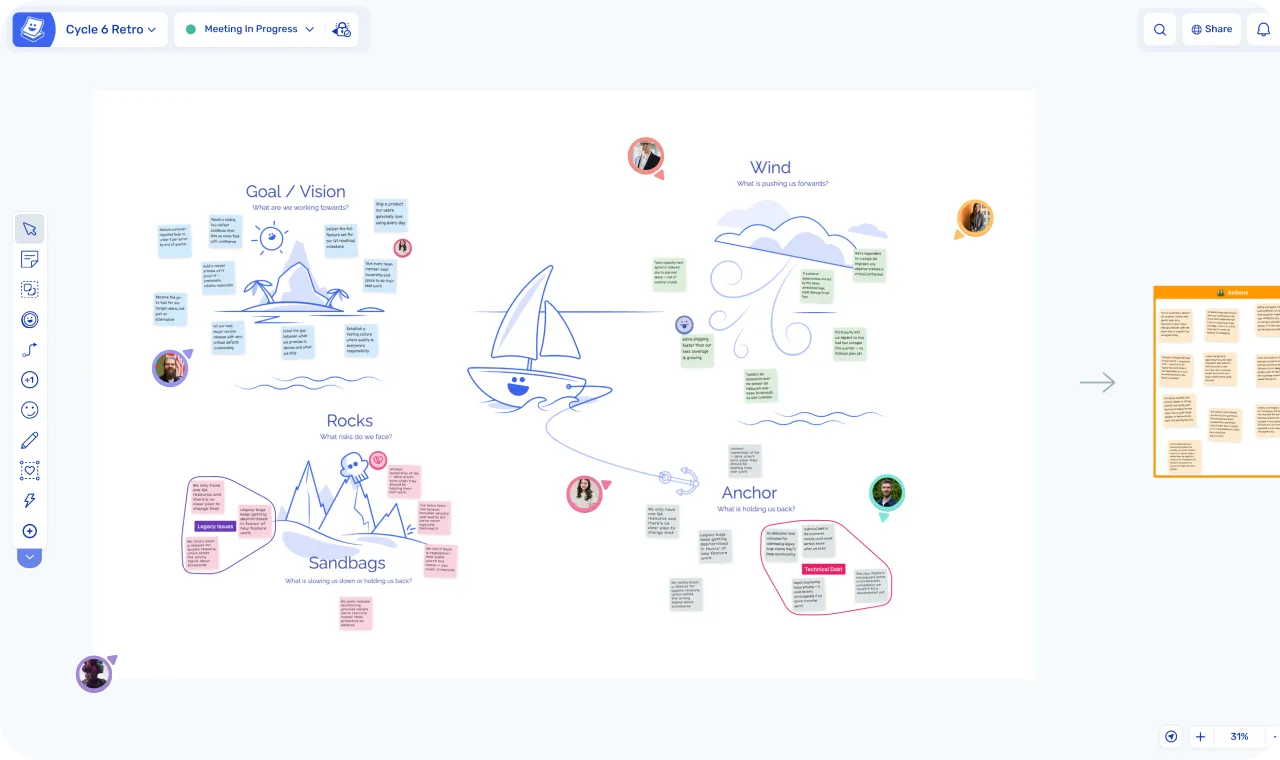
Ludi is an online whiteboard for agile teams — a visual canvas purpose-built for retrospectives, sprint planning, backlog estimation, team health checks, and workshops.
Agile teams use Ludi to run remote ceremonies that feel less like a chore — with fun touches, flexible facilitation, and everything you need to reflect, decide, and act.
What is Parabol?
Parabol is a structured agile meeting tool — open-source software (AGPL licence) that runs retrospectives, sprint poker, standups, and check-ins through predefined step-by-step flows.
Engineering-led teams, distributed teams, and budget-conscious teams use Parabol because its automated facilitation guides everyone through each meeting phase.
Ludi vs Parabol: See the Difference
| Ludi | Parabol | |
|---|---|---|
| What is it | Online whiteboard for agile teams | Structured agile meeting tool |
| Built for | Retros, sprint planning, estimation, health checks, workshops | Retros, sprint poker, standups, check-ins |
| Team type | Teams that want visual, flexible collaborative sessions | Engineering-led teams that want automated, structured flows |
| Key use case | Visual agile ceremonies with facilitation control | Guided agile meetings with minimal facilitator effort |
| Format | Whiteboard | Trello-like columns |
| Price | $4–$6/member/month | $8/user/month |
| Free to try | 30-day free trial, no card required | Free plan (up to 2 teams, 10 meetings/month, 30-day history) |
| Core agile ceremonies | ||
| Other collaborative sessions | ||
| Unlimited Whiteboard Canvas | ||
| Full two-way Jira integration | ||
| Session Energy | Icebreaker games, reactions, music, gadgets, hats | Icebreaker question, music |
| Template Library | 125+ templates | 100+ templates |
| Flexible meeting facilitation | ||
| Action tracking | ||
| Estimation integrations | Jira | Jira, GitHub, GitLab, Azure DevOps |
| AI features | AI-assisted sticky grouping | AI grouping, meeting summaries, cross-retro theme detection, org insights |
| Unlimited Meetings | 10/month (free), unlimited (paid) | |
| Full Meeting History | 30 days (free), unlimited (paid) | |
| Open source | (AGPL) |
In-Depth Feature Comparison
Facilitation Features
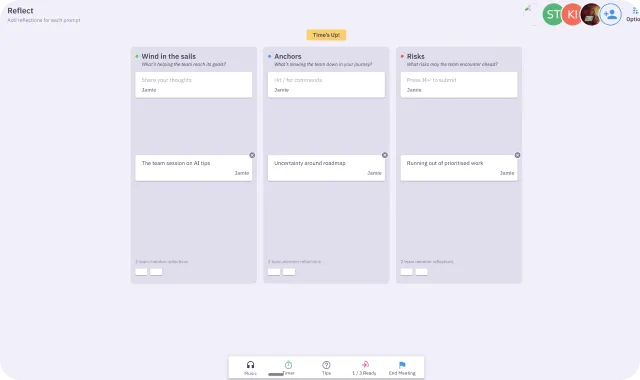
Parabol has fixed phases for each meeting. In the example of a retro, the stages are set: reflect privately, then group cards, then vote, then discuss the top-voted topics one by one. Everyone clicks “ready” to advance. The facilitator advances each phase and Parabol handles the transitions. You can’t deviate.
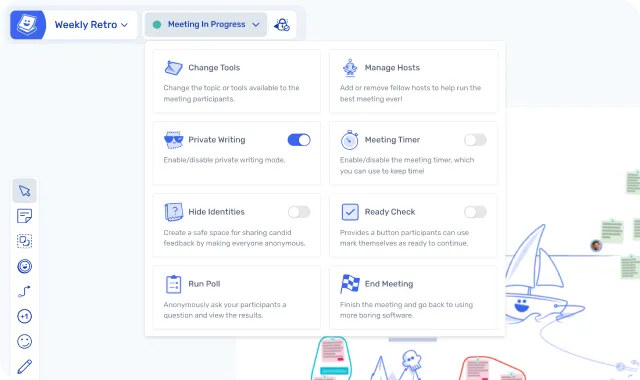
Ludi’s facilitation is more flexible. The facilitator is in charge with a wider range of options; the tool gives them the controls to run the session. They bring the team through designated board sections that can be hidden, revealed, and jumped to. The facilitator runs readiness checks that keep the flow going, manages participant tools, and focuses attention using live pointers.
The tradeoff: Parabol is easier if you’ve never facilitated before. Ludi gives you the flexibility and control to run sessions both from a structured format or a custom flow.
There’s a practical difference in how the “ready” mechanic works, too. In Parabol, everyone must click “ready” at each stage to advance and the facilitator sees a number. In Ludi, it is visually obvious who is ready or not.
”You need everyone to click ‘ready’ in Parabol at each stage, and people just weren’t paying attention. I asked my team ‘but are they not paying attention because the tool and process is a bit procedural.”
— James Robb, Engineering Manager
Templates
Parabol offers standard retro templates (Start/Stop/Continue, 4Ls, Sailboat, Mad/Sad/Glad, and more) plus custom templates on the Team plan. They cover the standard retro formats well.
Ludi has 125+ designed templates across retrospectives, sprint planning, estimation, health checks, brainstorming, story mapping, and workshops. Every template is a visual activity ready to use — not just a set of columns with different headings.
The bigger point: in Ludi, a template is a starting point. You can rearrange it, combine templates, build something entirely new on the same board. In Parabol, a template defines the structure of your meeting.
Ludi users can create, use, and share custom templates.

”There are constant requests to ‘facilitate a meeting for xyz’ and it doesn’t matter what they ask for — my thoughts are that I can build a board for that with Ludi. If you want to have a very structured, formally-designed meeting, Ludi has tools for that. Or if you want to have a bit of a free for all, figure it out as you go meeting, there are tools for that too.”
— Jason Martin, Agile Coach, Meltwater
Action Tracking
Parabol creates actions during the discussion phase — you can push them to Jira, GitHub, or GitLab as issues. But there’s no carry-forward between meetings, no due dates, and no reminders. Actions live in the meeting summary and, in most teams’ experience, stay there.
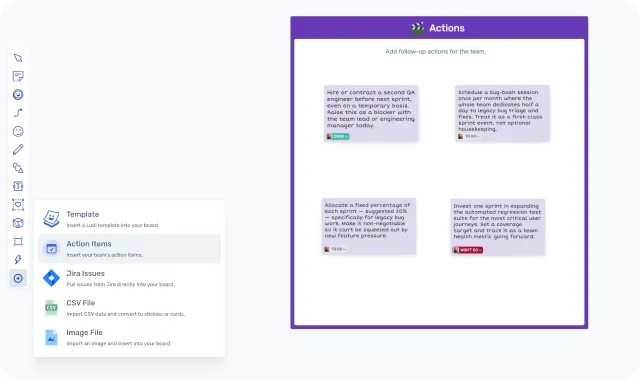
In Ludi, a sticky note can be converted to an action with an assignee, due date, and automated email reminders. Actions can be added to any board quickly — so the team reviews what they committed to last sprint before starting a new retro. There’s a dedicated action dashboard for managing actions across all boards, and actions can be pushed to Jira.
If your retros regularly produce actions that nobody follows up on, this is the feature that changes that.
Integrations
Parabol integrates with Jira, GitHub, GitLab, and Azure DevOps — but all four connections serve the same purpose: pushing tasks created in a meeting out to your issue tracker, or estimating stories in planning poker.
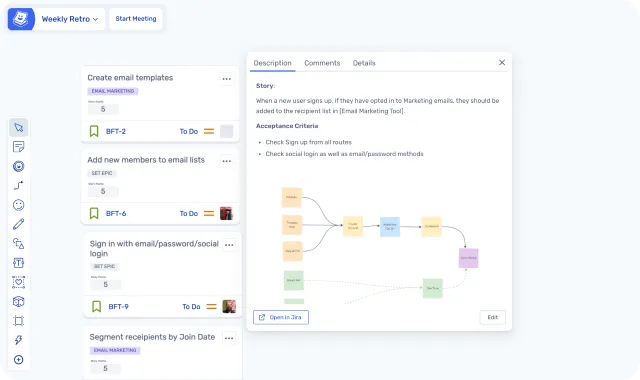
Ludi only integrates with Jira, but does far more with it. The integration is full two-way: pull in backlog items, visualise sprints, run estimation sessions, create issues, and sync back instantly. It’s Parabol’s task export and estimate field update vs Ludi’s full planning workflow.
Collaboration and Engagement
This is where the two tools diverge most visibly.
Parabol is functional. Fixed steps, gets the job done. It has lo-fi background music during the icebreaker phase and an optional icebreaker question added to the beginning of a meeting. An AI modifier that lets the facilitator adjust the icebreaker tone before the team sees it — a genuinely nice touch. But that’s about the extent of it.
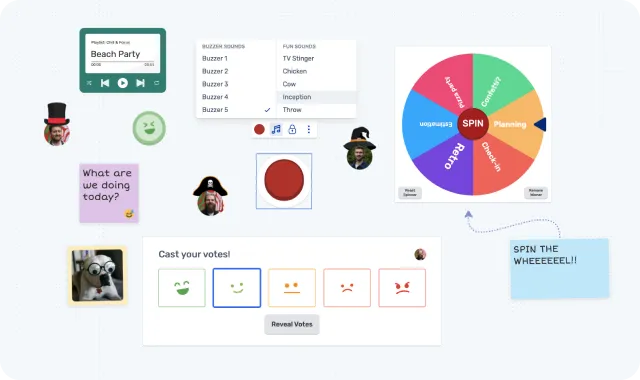
Ludi has polls, confetti cannons, virtual hats, a jukebox that plays music to the board, a spinner for random selection, emoji reactions to stamp, a buzzer, placeable timers, and even more interactive gadgets to make engaging sessions with. Sticky notes have auto-assigned colours depending on where they are placed, and unique handwriting per person so it feels like real life. It sounds whimsical, but there’s a serious point: remote ceremonies need energy to work. Teams that enjoy a tool will participate more earnestly.
”Our engineering team has used Ludi for years. We love it! They’ve thought through all the small things that make a retro fun, as opposed to using a generic whiteboarding application. For us, it’s the small things. Hats, confetti, slaps.”
— Anthony, CTO, Zable Health
UX and Ease of Use
Parabol’s UX is straightforward — you pick a meeting type, the tool walks you through it. There’s almost no learning curve because you’re never making decisions about how the session is structured. For teams that want to click “start” and follow along, it’s very low friction.
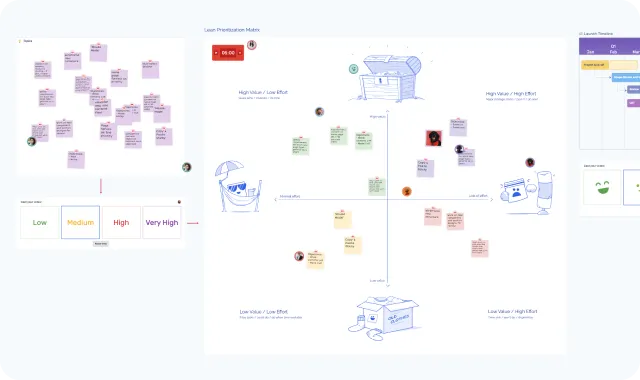
Ludi is a whiteboard interface. Double-click to add a sticky note, click-drag to pan. Teams already familiar with Miro or FigJam will feel at home immediately. There’s slightly more for the host to learn — the facilitation controls, activity frames, gadgets — but the payoff is far greater flexibility. Most teams are comfortable within their first session and actually prefer the natural feeling freedom of Ludi.
”With Ludi, it’s sort of taking the tool out of the equation and you can actually focus on having a retro. Previously I felt like half the time we were talking about the actual tool. Three out of the 10 people there had literally never seen Ludi before. I didn’t really have to tell them anything about it. They just started using it.”
— Tim Gaye, Senior Software Engineering Manager, Kaluza
Use Case Comparison
Retrospectives
Both tools run retrospectives well — that’s the core use case for each. The difference is the experience.
In Parabol, a retro is a fixed sequence: reflect, group, vote, discuss. The tool advances you through each step. It’s consistent and requires little facilitator skill. Templates define the prompts (Start/Stop/Continue, 4Ls, Sailboat, etc.) but the interface is written cards in columns.
In Ludi, a retro happens on a visual canvas. A Sailboat retro is an actual sailboat illustration, not columns with nautical headings. Sticky note colours change depending which part of the board they are dropped in, and each person has a unique handwriting font, so you can tell them apart, and the contributions actually feel like they’re from different people. The facilitator controls the flow and can rearrange the board, add sections, or deviate from the template mid-session if the conversation goes somewhere unexpected but useful.
Verdict: Ludi for teams that want variety, engagement, and richer contributions. Parabol for teams that want a fixed flow with minimal effort.
Sprint Planning and Estimation
With Parabol’s Sprint Poker you pull stories from Jira, GitHub, GitLab, or Azure DevOps, reveal estimates simultaneously, discuss differences. It covers the broadest set of backlog integrations on this list.
Ludi’s Jira integration is deeper within its scope. Pull backlog items onto the board, estimate with hidden votes and simultaneous reveal, and sync story points back. The difference is what happens around the estimation — you can update any field on a Jira issue, create new issues from stickies, and use the same board to expand or break down stories where the team needs clarity.
Verdict: Parabol if you estimate against GitHub, GitLab, or Azure DevOps. Ludi if your team uses Jira and wants to update all aspects of their backlog in the same place.
Team Health Checks
Parabol has a team health feature, but it’s a single emoji mood vote at the start of meetings — team members pick an emoji that reflects how they’re feeling, results are revealed anonymously, and the score appears in the meeting summary. It’s a paid feature on Team and Enterprise plans.
Ludi has purpose-built health check templates — structured facilitated exercises where the team rates multiple dimensions (delivery pace, team spirit, code quality, learning, etc.) and discusses the results together on a visual canvas. It’s a proper session, not a 30-second emoji vote bolted onto the start of a retro.
Verdict: Parabol’s mood check is better than nothing, but if team health checks are a real part of your practice — multi-dimension assessments, facilitated discussion, visual output — Ludi covers that properly.
Workshops and Brainstorming
Parabol is built for specific meeting types — retros, sprint poker, standups, check-ins. If you need to run any other type of session, Parabol can’t do it.
Ludi is a whiteboard. Any session format that works on a visual canvas — backlog refinement, brainstorming, workshops, roadmapping, story mapping, project kickoffs, diagramming — works in Ludi.
Verdict: Ludi. If you need anything beyond the four meeting types Parabol supports, a whiteboard tool like Ludi covers it.
Daily Standups
Parabol has a dedicated standup/check-in meeting type with async support. Team members answer structured questions (what did you do, what are you doing, any blockers) on their own schedule.
Ludi doesn’t have a standup-specific feature. Instead the team can create their own layout for standup — helping them share their blockers, progress, help required, parking lot, or anything else they want to capture and discuss.
Verdict: Parabol, if you want tooling for async standups. In practice, standups are a small fraction of what teams use Parabol for — retros and estimation dominate.
Pricing
Parabol’s free tier covers up to 2 teams with unlimited members — but it’s capped at 10 meetings per month, and meeting history expires after 30 days. For a team that only runs biweekly retros (2 meetings/month), that’s plenty. But if you use Parabol the way Parabol intends — retros, sprint poker, and standups — a single team can burn through 8 meetings/month. Add a second team and you’ll hit the cap before the month is halfway through. Team Health Checks and most AI features are also paid-only.
Ludi starts at $4/member/month (Starter) or $6/member/month (Business, with Jira integration). There’s no free plan — just a 30-day free trial with full access. No meeting caps, no history expiry.
For a team of 10 on paid plans: Ludi Starter is $40/month. Parabol Team is $80/month (but only active users are billed, so the real cost depends on participation).
| Ludi Starter | Ludi Business | Parabol Free | Parabol Team | |
|---|---|---|---|---|
| Price | $4/member/month | $6/member/month | Free | $8/user/month (active only) |
| Jira sync | Two-way | |||
| Custom templates | ||||
| Team limit | Unlimited | Unlimited | 2 teams | Unlimited |
| AI features | AI grouping | AI grouping | Basic | Full (summaries, Insights) |
What Customers Say
James Robb, Engineering Manager at Deutsche Fintech Solutions
The team at DFS compared Ludi and Parabol side-by-side for two months, and picked Ludi.
“Parabol is process-based. While you can change those steps you’re still really just in steps. Parabol feels jumpy, not fluid.”
“You make a mistake or want to change something in Parabol, you have to skip forward to take a look at that step, then go all the way back to the beginning, whereas Ludi you can just change it.”
“No one in our teams has said they don’t like Ludi, which I can’t say for the others.”
From a Parabol switcher
This customer came from Parabol and was being pushed towards Miro as a corporate standard. They evaluated Ludi as an alternative:
“We are particularly happy about Parabol and the flow/structure it provides for our meetings. Ludi does provide this structure as well by having the ability to customise phases of a meeting as well as timebox them.”
“The team seems to have liked all the bells and whistles like Hats and Confetti. Overall, the UX is pleasing.”
“Once we tried your Polls we all loved it and now wondering how come we never missed them in Parabol.”
Better Meeting Engagement in Ludi
“Ludi has created an obvious uptick in active participation, and shifted the tone of our retrospectives. Team members are now more proactive about suggesting improvements and celebrating wins openly.”
Bernhard Unger-Weber, Scrum Master, ryd
“Ludi has a well-balanced blend between user-friendliness, productivity and fun!”
Jakob Edholm, Freelance Agile Coach, Innomate
Final Verdict
Parabol and Ludi are both built for agile teams, but they represent genuinely different philosophies. Parabol is a structured meeting tool that automates facilitation — great for teams that want consistency, a free starting point, and don’t need a skilled facilitator. Ludi is a visual canvas that puts the facilitator in control — better for teams that want flexibility, more participant engagement, bigger session energy, and coverage beyond just retros and standups.
If your team has been running Parabol for a while and the sessions feel repetitive, or if you need to run workshops, team health checks, and planning or refinement sessions alongside your retros, Ludi is worth a 30-day trial.
Frequently asked questions
Last updated: April 2026. Pricing and features verified against parabol.co and ludi.co. Select features (music, icebreaker AI modifier, AI grouping trial mechanic, voting phase lock, meeting scheduling) verified first-hand via product walkthrough, April 2026.