

Ludi vs FigJam: Which Is Better for Agile Ceremonies?
Both FigJam and Ludi are playful and well-designed collaborative whiteboards — but Ludi is built specifically for running agile ceremonies and structured workshops such as sprint planning, user story estimation, retrospectives, and roadmapping. If your team already pays for full Figma licences and needs a space for casual brainstorming and design ideation, FigJam is hard to argue against. If your team needs to run structured agile ceremonies with real facilitation, action tracking, and deep Jira integration, that’s what Ludi is built for.
What is Ludi?
Ludi is an online whiteboard for agile teams — a visual canvas purpose-built for retrospectives, sprint planning, backlog estimation, team health checks, and workshops.
Agile teams use Ludi to run remote ceremonies that feel less like a chore — with fun touches, flexible facilitation, and everything you need to reflect, decide, and act.
What is FigJam?
FigJam is a collaborative whiteboard from Figma, designed for brainstorming, ideation, and design-adjacent work. It’s playful, colourful, and tightly integrated with Figma’s design ecosystem.
FigJam is included with Figma licences and is used by design and product teams who want a shared space for quick visual collaboration alongside their design files.
Ludi vs FigJam: See the Difference
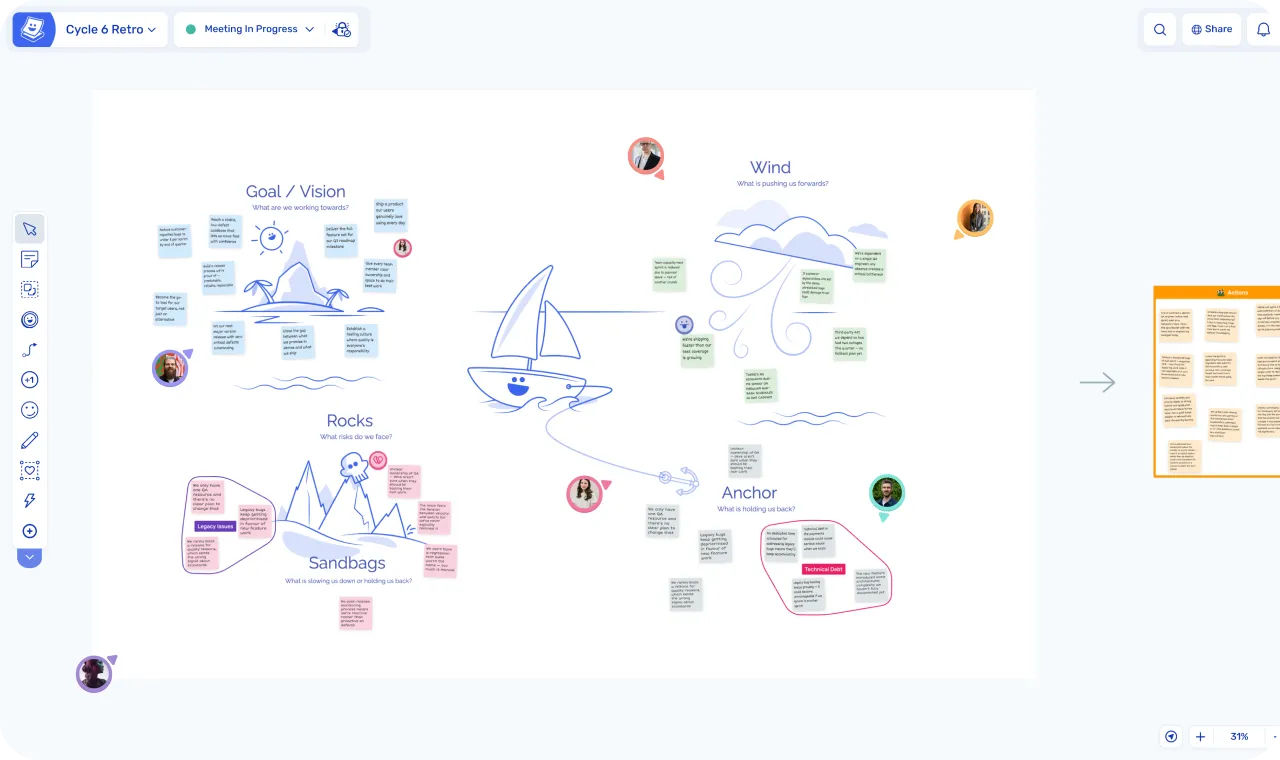
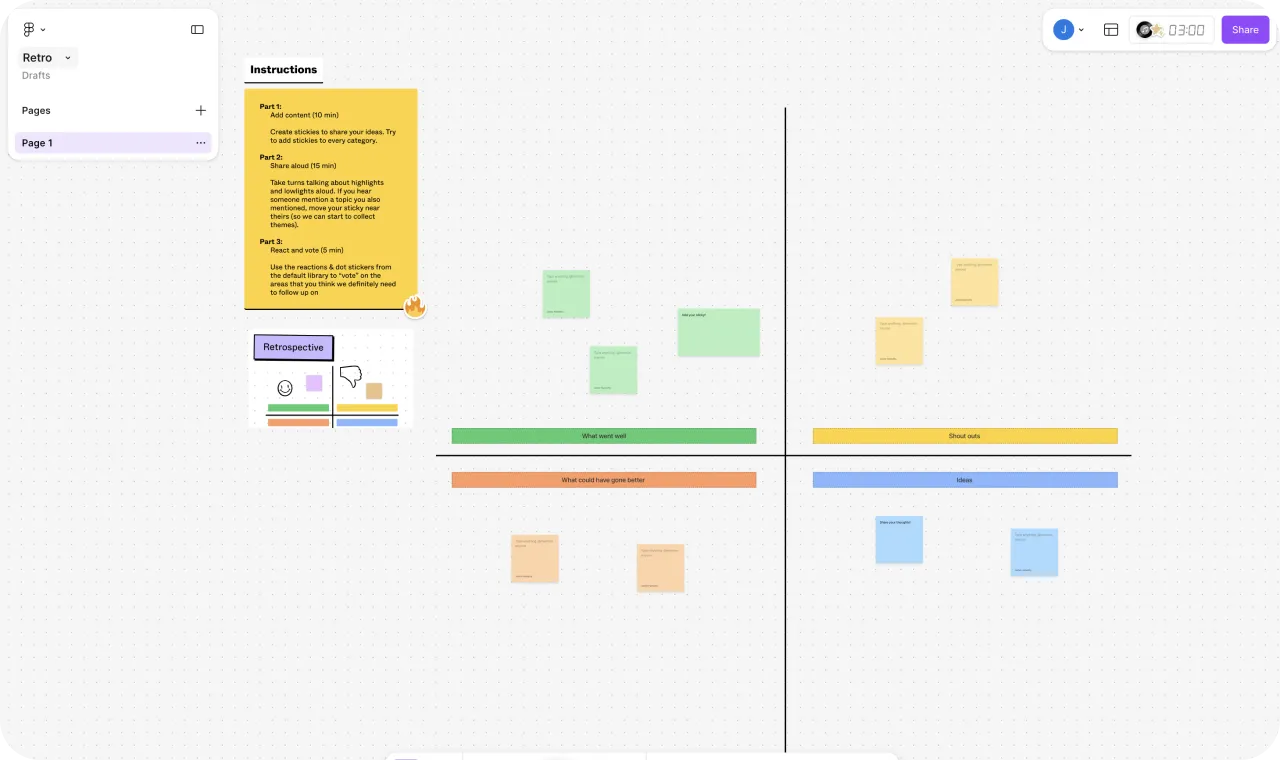
| Ludi | FigJam | |
|---|---|---|
| Built for | Agile ceremonies and workshops | Brainstorming, ideation, design collaboration |
| Starting price | $4/member/month | From $3/seat/month (Collab seat, Professional) |
| Free to try | 30-day free trial | 3 FigJam files (Starter) |
| Agile templates | 125+ expert-designed | Basic pre-sets and community library |
| Meeting facilitation | ||
| Private writing | ||
| Action tracking | ||
| Jira integration | Deep two-way integration | Convert stickies to Jira issues — no two-way sync |
| AI features | ||
| Audio/video | ||
| Diagrams | ||
| Integrations | Jira | Jira, Asana, Trello, GitHub, Slack + Figma design files |
| Viewer model | Free viewers | Free viewers/commenters |
When to Choose Ludi vs FigJam
Let’s address the elephant in the room: if your company already pays for full Figma licences, FigJam is included. That is genuinely the strongest argument for using it — and we’re not going to pretend otherwise.
The question isn’t whether FigJam is free. It’s whether “free and already there” is the same as “right for the job.”
FigJam is a collaborative whiteboard designed for brainstorming, ideation, and design-adjacent work. It’s playful, colourful, and great at that level of collaboration. Figma themselves position it this way — their own competitive comparisons acknowledge that other whiteboard tools like Ludi are stronger for agile workflows. That’s not a criticism; it’s just what FigJam was built for.
Ludi was built for something different. It exists because running a retrospective or sprint planning session isn’t the same as sketching ideas on a whiteboard. You need private writing so people contribute without being biased by others. You need board structure and phases so the team moves through the session at the right pace. You need features that help the facilitator know when everyone’s finished with the current task. You need tracking of actions so that commitments don’t evaporate after the meeting. You need a deep Jira integration for effective visual planning.
FigJam doesn’t have any of those things. Not because Figma made a bad product — because that’s not the problem FigJam is solving.
In-Depth Feature Comparison
Meeting Facilitation
This is the biggest gap between the two tools, and it’s not close.
In Ludi, the facilitator has a range of dedicated controls to run the session. The facilitator sets timers, decides which frames are visible, brings participants to the current one, and sets the pace. The team write privately (and anonymously if needed), reveal together, group related notes, vote on priorities, discuss the top themes, and assign actions. Readiness checks show when everyone’s finished before moving on. Super Lock protects the board from accidental edits. Spotlight, vanishing pen, and pointer arrows help with drawing attention.
FigJam has Spotlight (draw attention to where you are on the canvas) and observation mode (follow someone’s view). It has a timer widget. That’s the extent of its facilitation tooling. There’s no private writing — everything is visible as it’s typed. No anonymity mode. No host controls over what participants can do. No readiness checks. No way to hide upcoming activities until the team is ready for them.
If you’re running a casual brainstorm where everyone contributes openly, FigJam’s lightweight approach works fine. If you’re running a session like a retrospective where honest, unbiased input matters — the facilitation gap is the thing that matters.
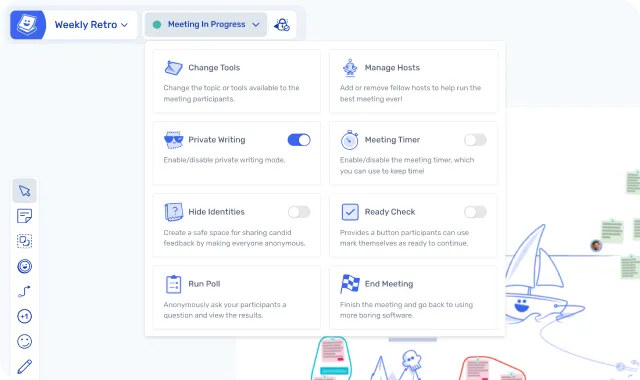
”The first thing that made me fall in love with Ludi was the facilitation tools, like the Ready Check that keeps the workshop moving efficiently — no need to waste time asking if people are done with the current activity.”
— Aline Sillet, Agile Coach, XITASO
Templates
FigJam has a simple pre-set template library, as well as a community template library. The volume is high. Quality is inconsistent — you’ll find multiple versions of the same format and need to evaluate which one actually works.
Ludi has 125+ templates, expert-curated and designed specifically for agile ceremonies. Every template is ready to run — no configuration, no guesswork. Open it, share the link, and your team is writing sticky notes instantly.
The tradeoff: if you want maximum variety and don’t mind sifting, FigJam’s community library has more. If you want one well-designed template per format that works out of the box, Ludi’s curation saves you the setup time.
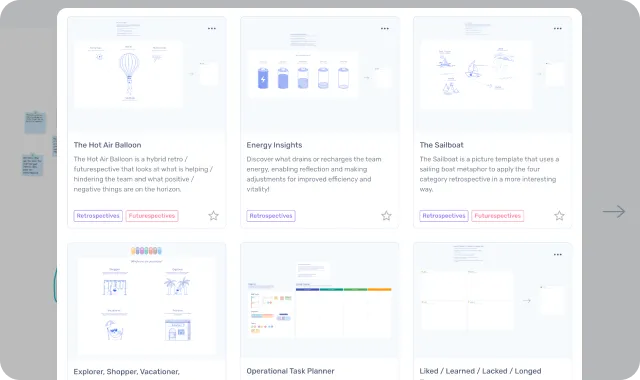
”The templates have been a lifesaver — a team can just pull up a template, read the instructions, and get going. This is great because if there were an extra step or thinking the teams had to do to set up their retro, the practice would probably fall off.”
— Samantha Corbett, Product Manager, Meltwater
Action Tracking
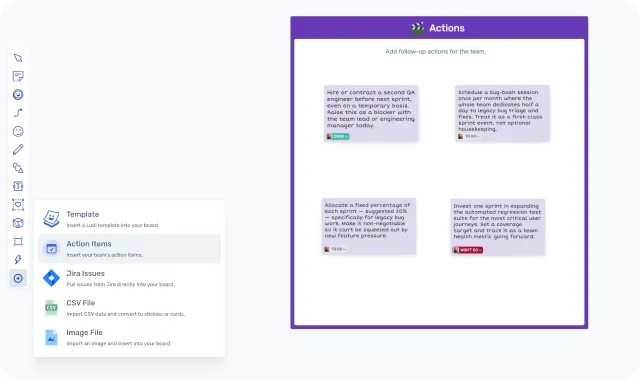
Ludi has built-in action tracking. Any sticky note can become an action item with an assignee, due date, and automated email reminders. Actions carry forward into the next meeting board, so the team reviews what they committed to last sprint before starting a new meeting.
FigJam has no native action tracking. You can write actions on sticky notes, but there’s no assignee, no due date, no reminder, and no carry-forward. They live on the board — and in most teams’ experience, they stay there, forgotten.
Native action tracking is the feature that turns retrospectives from a shallow exercise into a continuous improvement loop.
Jira Integration
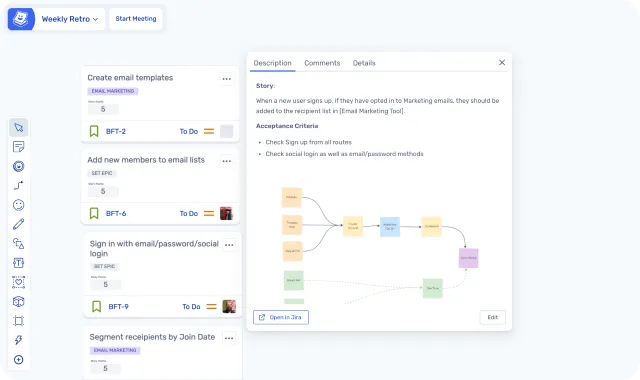
FigJam’s Jira integration lets you convert stickies directly into Jira issues and manage them on the canvas. However, Ludi’s Jira integration goes further with a deep two-way integration, with support for updating all fields.
For estimation sessions, pull backlog items onto the board, run planning poker or T-shirt sizing, and sync story points back to Jira automatically. When there is missing scope, just create new issues in Jira from your stickies. The integration is built into the ceremony flow.
The key difference: FigJam handles sticky-to-issue creation. Ludi handles the full agile workflow. Some teams even call it the front end to their Jira instance.
Collaboration and Engagement
FigJam has stamps (emoji stickers on objects), emotes (temporary emoji bursts), high-fives (bump cursors to celebrate), cursor chat, and built-in audio/video. It’s lightweight and playful.
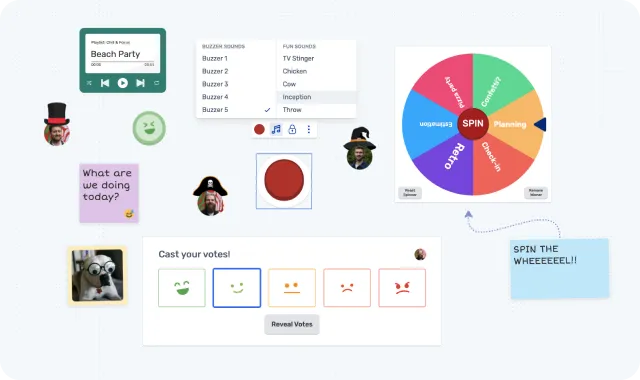
Ludi has icebreaker activities, a jukebox (play music to the board), gadgets (spinner, buzzer, counter), confetti cannon, virtual hats, voting panels with customisable mood voting, object trays, and placeable timers. No built-in audio/video — you use your existing Zoom, Teams, or Meet.
FigJam’s engagement features are charming but minimal. Ludi’s are designed to make remote sessions feel less like a chore — the kind of things that get quiet team members to participate and make people actually look forward to the retro.
UX and Ease of Use
FigJam inherits Figma’s design DNA — it’s polished and well-crafted. But it’s also a general-purpose whiteboard with pen tools, drawing tools, design components, connectors, shapes, and code blocks. For a Scrum Master who just wants to run a retro, there’s a lot of surface area that’s irrelevant.
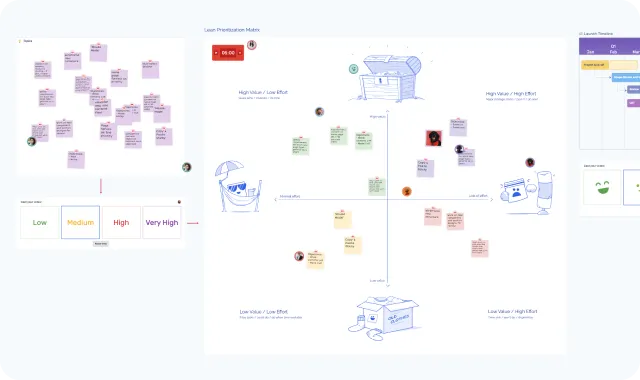
Ludi is delightfully simple to use. Click-drag pans the board. Double-click creates a sticky. Auto-assigned colours and unique handwriting per person mean participants don’t spend time choosing formatting. The UX is designed so that no minute is wasted on the tool — everything is in service of the meeting.
”I love the simplicity of Ludi and how easy it is to pick up and use; I’ve seen this first hand when I’ve used Ludi to run sessions with a mixture of people, some who have used it previously, others not — it was very hard to tell them apart.”
— Tim Gaye, Senior Software Engineering Manager, Kaluza
AI
FigJam has AI features for sorting sticky notes into clusters, generating one-click summaries, rewriting text, and creating boards from prompts. These are generic text-processing tools applied to stickies — useful, but not designed with meeting facilitation in mind.
Ludi has AI-assisted sticky grouping — it automatically sorts your notes into themed groups during a retro. It’s a narrower feature set.
Worth noting: Figma is enforcing AI credit limits from March 2026 (3,000 credits/seat/month on Professional), with paid add-ons for teams that need more. The “it’s all included free” story for FigJam’s AI has an asterisk now.
If AI-powered whiteboard features are a priority, FigJam currently offers more. However no AI replaces good facilitation.
Use Case Comparison
Retrospectives
Ludi wins — and this is the clearest gap between the two tools. Both tools can technically host a retrospective, but the difference is in how the retro actually runs.
Ludi was originally built as a retrospective tool and every feature is designed around making retros work. The facilitator controls the meeting flow through Activity Frames — guiding the team through write, reveal, group, vote, discuss, and actions in sequence. Private writing ensures people contribute honestly before seeing what others wrote. Readiness checks show when everyone’s finished before moving on. Actions get assignees, due dates, email reminders, and carry forward into the next retro automatically.
In FigJam, everyone writes on the same visible canvas in real time. There’s no way to hide contributions until a reveal. No facilitator controls over meeting phases. No host controls. No readiness checks. No action tracking. The retro lives and dies on the board — nothing carries forward.
Verdict: Ludi for any team running structured retrospectives. FigJam if all you need is an informal shared canvas where everyone writes openly.
Sprint Planning & Estimation
Ludi wins for Jira-integrated planning. Ludi has native planning poker with Fibonacci and T-shirt sizing, built into the board and integrated with a deep Jira two-way sync. Pull backlog items onto the board, estimate collaboratively, sync story points back automatically, and create new issues from stickies. All Jira fields can be updated from Ludi.
FigJam has third-party planning poker widgets from the community ecosystem. None are maintained by Figma, none sync estimates to Jira, and users report lag and missing features. FigJam’s own Jira integration converts stickies to Jira issues but has no backlog pulling, no estimation, and no sprint planning workflow.
Verdict: Ludi. If your team does collaborative estimation with Jira, this is a meaningful gap — Ludi handles the full workflow where FigJam handles only the output step.
Brainstorming and Ideation
FigJam wins. This is what FigJam was designed for — open, visual brainstorming alongside Figma design files. The tight integration with Figma’s design ecosystem, built-in audio/video, AI-powered board generation, and proximity to prototypes and wireframes make it the natural choice for design-adjacent ideation.
Ludi can run brainstorming sessions perfectly well — with private writing, voting, and grouping to make the output actionable — but it doesn’t have the Figma integration or the design-first features.
Verdict: FigJam for open-ended design ideation. Ludi if you want the brainstorm to produce structured outcomes.
Design Workshops
FigJam wins. If the workshop involves moving between design files and whiteboard collaboration — reviewing mockups, sketching flows, mapping user journeys alongside actual designs — FigJam’s integration with Figma is a genuine advantage Ludi can’t match. The design-to-whiteboard-to-design flow is seamless.
Verdict: FigJam for design-adjacent workshops where Figma files are involved. Ludi for agile workshops like story mapping, project kickoffs, or sprint reviews.
Team Health Checks
Ludi wins. Ludi has dedicated health check templates with structured formats for assessing team dynamics over time. Private voting matters here — people need to rate honestly without seeing what others chose first. FigJam can approximate a health check with sticky notes and its voting feature, but there’s no private writing phase and no structured health check format.
Verdict: Ludi for proper multi-dimension health checks. FigJam if all you need is an open discussion format.
Pricing
Here’s where it gets interesting, because the answer depends on whether your company already uses Figma.
If you already pay for Figma: FigJam is included in your licences. That’s genuinely the strongest argument for using it.
If not everyone has Figma: Figma licences are selective — designers get Full seats ($16/month), some devs get Dev seats ($12/month), PMs might get Collab seats ($3/month). Free seats are view-and-comment only — they can’t edit FigJam boards. To run a retro where everyone contributes, you’d need at minimum Collab seats ($3/month each) on Professional tier (required for voting).
If nobody has Figma: 10 Collab seats on Professional = $30/month. But you’re buying Figma seats for people who don’t need Figma — just to use a whiteboard that wasn’t built for agile ceremonies.
Ludi starts at $4/member/month (Starter) or $6/member/month (Business, with Jira integration). There’s a 30-day free trial with full access to everything, no credit card required.
| Ludi Starter | Ludi Business | FigJam Starter | FigJam Professional | |
|---|---|---|---|---|
| Price | $4/member/month | $6/member/month | Free (3 files) | From $3/seat/month (Collab seat) |
| Private writing | ||||
| Voting | ||||
| Action tracking | ||||
| Jira sync | Two-way | Create only | ||
| Planning poker | ||||
| AI features | AI grouping | AI grouping |
The Bundling Question
This deserves its own section because it’s the real competitive dynamic.
FigJam’s strongest argument isn’t its features — it’s that it’s already there. Every company with Figma licences has FigJam. When someone suggests trying a dedicated retro tool, the inevitable response is: “Can’t we just use FigJam?”
We’ve seen this play out. We’ve had satisfied customers leave — not because they were unhappy with Ludi, but because FigJam was bundled into their existing Figma investment and someone asked the cost-rationalisation question.
Here’s what we’d say honestly: if your team sessions are simple — a few stickies, a quick chat, no particular need for private writing or structured facilitation — FigJam will probably do the job. “Good enough and already paid for” is a perfectly rational choice.
But if your retros feel shallow, if the same problems come up every sprint with no follow-through, if quiet team members aren’t contributing, or if your sprint planning is one person screensharing Jira while everyone zones out — the gap between a generic whiteboard and a purpose-built whiteboard for agile meetings is where the value sits. The cost of Ludi isn’t $4/member/month. It’s the difference between retros that produce real change vs retros that just produce sticky notes.
Who Is Each Tool Best For?
Who Ludi is best for
- Scrum Masters who run retros regularly and want facilitation tools that give control over each phase — not just a blank canvas
- Teams that need private writing and anonymity — honest retrospectives require people to write before they see what others wrote
- Agile teams that need action tracking — retro actions with assignees, due dates, reminders, and carry-forward into the next session
- Teams doing sprint planning with Jira — collaborative planning and estimation on a whiteboard that syncs back automatically
- Organisations without Figma licences for everyone — at $4/member/month, Ludi is straightforward pricing vs buying Figma seats for people who don’t need Figma
- Teams that want structured ceremonies — Templates, Host Controls, and the right tools to keep things moving
- Teams that want meetings people enjoy — icebreakers, gadgets, confetti cannons, interactive widgets and engaging features that make remote sessions feel less like a chore
Who FigJam is best for
- Design-first teams who brainstorm alongside Figma design files and want everything in one platform
- Companies already paying for Figma where the cost of a separate tool is hard to justify for lightweight ceremonies
- Teams that value built-in audio/video — FigJam’s native voice and video chat means one fewer tool in the session
- Small teams with simple retro processes that don’t need structured facilitation, private writing, or action tracking
- Teams that want a hackable whiteboard — FigJam’s widget and plugin ecosystem allows more customisation than Ludi’s opinionated approach
- Cross-functional workshops that mix design ideation with brainstorming — FigJam’s proximity to Figma design files is a genuine strength
Can You Use Both?
Yes — and it’s a natural split. FigJam handles design ideation, brainstorming, and cross-functional workshops that live alongside Figma files. Ludi handles the ceremonies and execution: sprint planning, estimation, release planning, retrospectives.
The argument for a separate tool: having a dedicated space for retrospectives helps teams treat them as a regular practice, not something that gets squeezed into everyday whiteboard work. The distinct environment creates a ritual — and rituals make continuous improvement stick.
If your company already uses Figma, “FigJam for design work, Ludi for ceremonies” is a clean split that gives each activity the right tool.
What Customers Say
James MacEwan, Product Owner, MediaWorks
“Instead of using a generic whiteboarding tool, we are able to take advantage of the functionality you want during retrospectives. I especially like the private stickies feature and each person being in full control of what they share and when.”
Kathryn Begley, Lead Developer, Retail Insight
“Ludi has massively improved the quality of the retrospectives we were having… it has even won over the most sceptical members.”
On engagement and energy
“If your sprint is not going to plan or you’ve hit some blockers, the retro can be a challenge. So having a tool that offsets any negativity really lightens the mood. We even get different team members asking to lead the retrospective in Ludi — that’s something I’ve never seen before.”
Aimi Lightowler, Quality Engineering Manager, Gear4music
Final Verdict
FigJam is a well-designed collaborative whiteboard — and if your company already pays for Figma, it’s included. That’s a genuinely strong argument. But “already there” and “right for the job” aren’t the same thing.
If your team runs agile ceremonies that need real facilitation — private writing, structured phases, action tracking, collaborative estimation with Jira sync — FigJam doesn’t have those capabilities. Figma themselves position FigJam as a tool for brainstorming and design ideation, not structured agile meetings.
Ludi exists for exactly that purpose. Try it free for 30 days and run one retro — the difference is something you feel in the first session.
Frequently asked questions
Last updated: April 2026. Pricing and features verified against figma.com/pricing, figma.com/figjam, and ludi.co.