

Ludi vs Miro: Which Is Better for Agile Teams?
Miro is a visual collaboration platform — an “AI Innovation Workspace” — used by 100 million people for everything from product roadmaps to AI workflows. Ludi is an online whiteboard purpose-built for agile teams: retrospectives, sprint planning, backlog estimation, and team health checks. Both are good tools. They’re built for different things.
Miro is for product, design, and strategy teams who need a platform that does everything. Ludi is for Scrum Masters, Engineering Managers, and agile practitioners who need meetings that run well — without configuring a general-purpose canvas to do it.
What is Ludi?
Ludi is an online whiteboard for agile teams — a visual canvas purpose-built for retrospectives, sprint planning, backlog estimation, team health checks, and workshops.
It’s been used by over 125,000 agile teams since 2019. The people who adopt it are typically Scrum Masters, Engineering Managers, and Agile Coaches who run these meetings every sprint and want a tool that makes facilitation easier.
What is Miro?
Miro is a visual collaboration platform — they describe themselves as an “AI Innovation Workspace.” It’s built for product development, design, AI workflows, strategic planning, and agile — among many other use cases.
Miro serves product teams, designers, strategists, and enterprise organisations. It has 250+ integrations, 5,000+ community-submitted templates, AI agents, and interactive prototypes. Agile meetings are one use case in Miro’s platform.
Ludi vs Miro: See the Difference
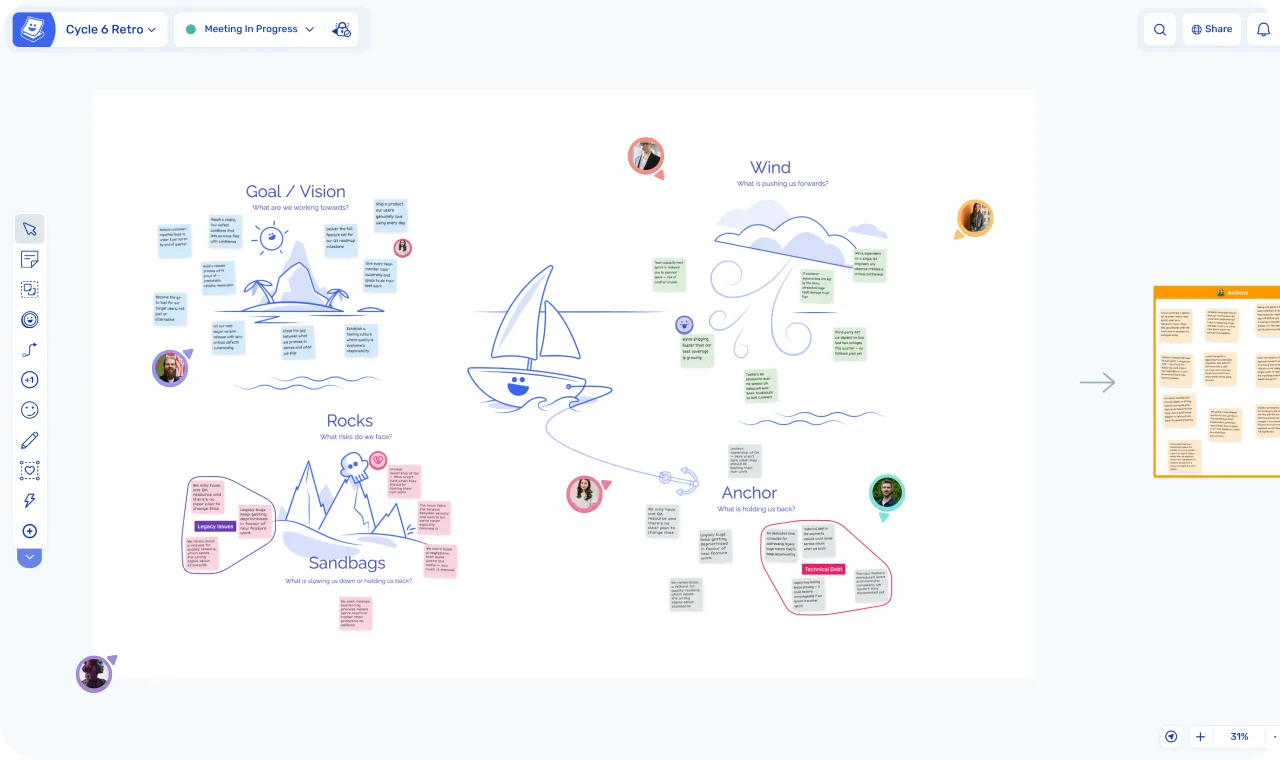
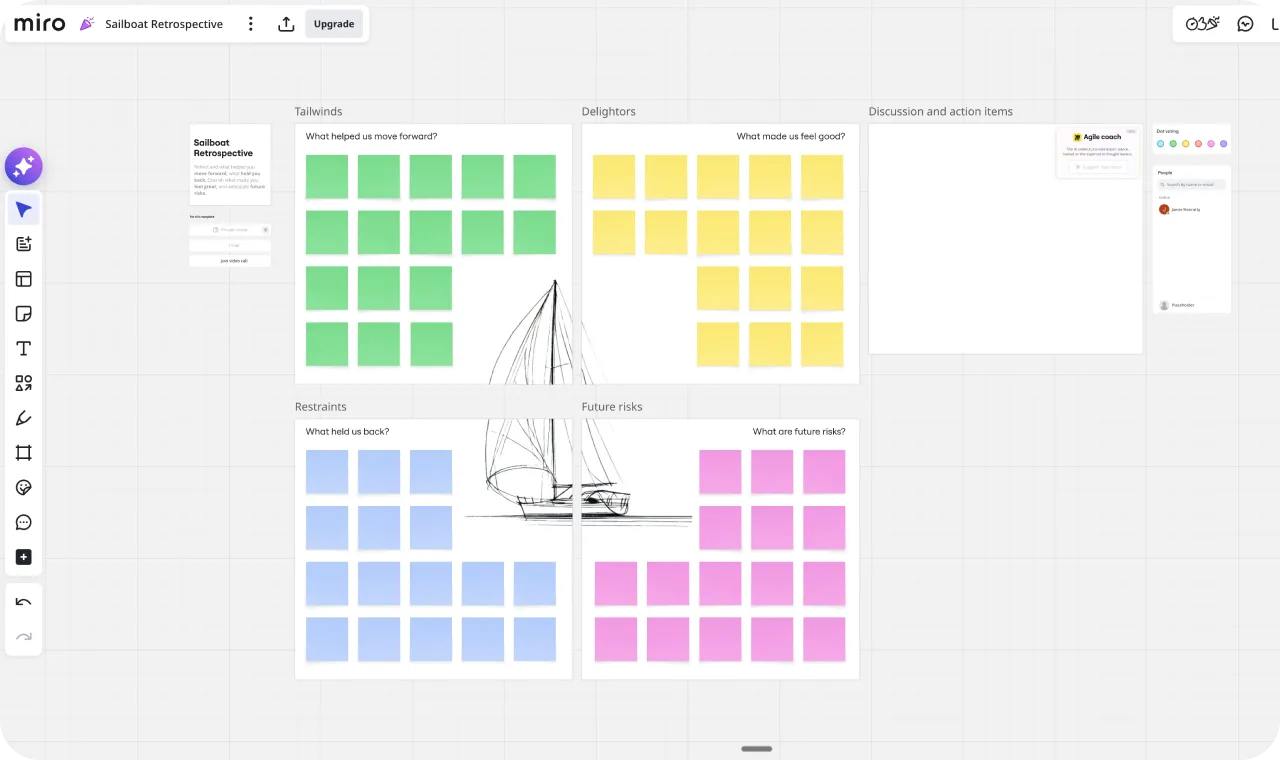
| Ludi | Miro | |
|---|---|---|
| Category | Online whiteboard for agile teams | Visual collaboration platform / AI Innovation Workspace |
| Starting price | $4/member/month (30-day free trial) | $8/member/month (free plan: 3 boards) |
| Free visitors | 2 guests/board on Business; unlimited on Consultant plan | Unlimited free collaborators on all plans |
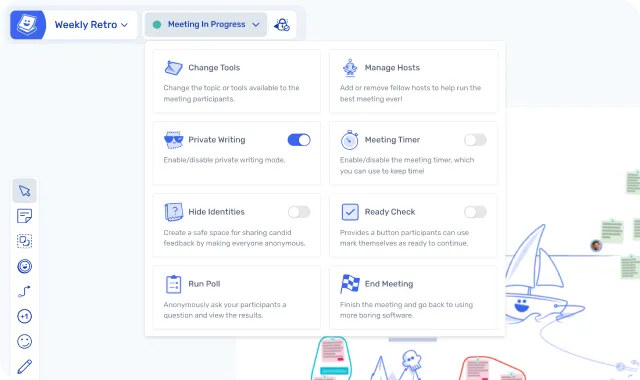
| Facilitation | Guided meeting flow: private writing, reveal, grouping, voting, readiness checks, host controls | Private mode, voting, timer, content locking, attention management — no guided flow |
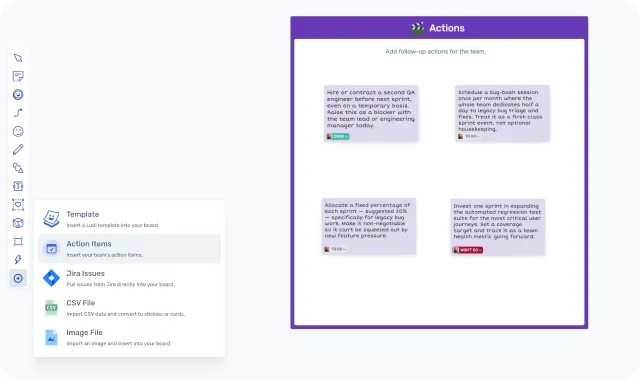
| Action tracking | Built-in: assignees, due dates, email reminders, carry-forward | No native action tracking |
| Grouping | Topics tool (organic lasso grouping, drag as unit, AI sub-grouping) | Rectangular frames and manual arrangement |
| Jira integration | Two-way sync (Business, $6/member/month) | Two-way sync, dependencies mapping (Business, $20/member/month) |
| Templates | 125+ expert-curated for agile | 5,000+ community-submitted via Miroverse (quality varies) |
| AI | AI-assisted sticky grouping | Flows, Sidekicks, clustering, summaries, image generation, prototypes |
| Integrations | Jira | 250+ apps |
| Engagement | Icebreaker games, confetti, hats, jukebox, spinner, buzzer, polls, object trays | Reactions (6 emojis), hand raising, spinner wheel, alignment scale, flip cards |
| Enterprise | SSO, team spaces, guest access controls | SCIM, data residency, audit logs, portfolio management, governance |
When to Choose Ludi vs Miro
When to choose Ludi
- You run retros regularly and want facilitation tools that guide the team through each phase — not a blank canvas you configure yourself
- You need action tracking — retro actions with assignees, due dates, automated reminders, and carry-forward to the next meeting
- You do sprint planning with Jira — collaborative estimation on a whiteboard that syncs back automatically, at a third of the price of Miro Business
- Budget matters and everyone needs a seat — Ludi is half the price per member on paid plans
- You want meetings people enjoy — icebreakers, engagement features, and a UX designed for participants, not power users
- You value simplicity — open a template, share the link, and your team is writing stickies before you’ve finished your coffee
When to choose Miro
- Your team needs a full product platform — roadmaps, prototypes, specs, AI workflows, and strategic planning in one workspace
- You need 250+ integrations across your entire tool stack — Figma, Linear, Asana, Microsoft 365, Google Workspace, and more
- AI-powered workflows are a priority — Miro’s investment in AI Flows, Sidekicks, and canvas intelligence is significant
- You’re a large enterprise with strict governance, data residency, SCIM, and compliance requirements
- You can leverage the free-visitor model — one paid seat with free collaborators keeps costs very low for small teams
- You want maximum template variety — Miroverse’s 5,000+ community library is genuinely massive
Key Differences
- Focus: Miro is a general-purpose visual collaboration platform expanding into AI and product development. Ludi is built exclusively for agile meetings — retros, sprint planning, estimation, health checks, and workshops.
- Facilitation: Ludi has a guided meeting flow — Activity Frames, readiness checks, private writing with host-controlled reveal, dynamic tool controls — designed so the facilitator runs the meeting. Miro has the individual facilitation tools but you assemble the flow yourself.
- Action tracking: Ludi has a complete action lifecycle — assignees, due dates, reminders, carry-forward, push to Jira. Miro has no native action tracking.
- Grouping: Ludi’s Topics tool creates organic, lasso-style visual groups that drag as a unit. Miro uses rectangular frames and manual arrangement.
- Pricing: Ludi starts at $4/member/month; Miro starts at $8/member/month. For Jira integration: Ludi Business is $6/member/month vs Miro Business at $20/member/month. But Miro allows unlimited free board visitors — a genuine pricing advantage in some setups.
- AI and ecosystem: Miro has a far broader AI offering (Flows, Sidekicks, prototypes, specs, model selection) and 250+ integrations. Ludi has AI-assisted sticky grouping and a Jira integration.
- UX philosophy: Ludi is designed for the ten people who show up to use the board. Miro is designed for the person building the board.
In-Depth Feature Comparison
Facilitation Features
Let’s be precise about what Miro can do, because it’s more than people think. Miro has private mode with anonymity and host-controlled reveal. It has configurable voting — anonymous, timed, with a max-votes-per-person setting. It has a countdown timer with built-in music. It has content locking including Protected Lock. It has attention management — “Bring everyone to me,” follow a collaborator, bring a specific individual. These are real facilitation tools, and they work.
What Miro doesn’t have: readiness checks. Guided meeting flow that connects write > reveal > group > vote > actions as an integrated sequence. Dynamic mid-session facilitation controls — toggling private writing on and off, changing participant tool visibility, force-revealing hidden stickies.
In Miro, the facilitator assembles the meeting manually. They start private mode, then end it. They create a voting session, then end that. Each tool is independent — the facilitator toggles them one at a time. In Ludi, Activity Frames let the facilitator hide and reveal sections of the board, herd participants to the current activity, run readiness checks, and manage the flow without verbal instruction. The facilitator runs the meeting; the tool gives them the controls to do it well.
”Ludi has the best tools for the facilitator, it’s better than Miro, for instance. When you invite customers to your Ludi board, you don’t have to explain how to use Ludi, it is much simpler.”
— Aline Sillet, Agile Coach, XITASO
Templates
Miro has over 5,000 templates via Miroverse — a community library that includes contributions from well-known agile practitioners and consultants. For Scrum Masters who actively rotate formats every sprint and want creative variety, Miroverse has more to browse.
Ludi has 125+ templates, expert-curated and designed specifically for agile meetings. One template per format, ready to run. No configuration, no sifting.
The quality variance in Miroverse is worth knowing about. Community-submitted templates range from polished to abandoned. Search “sailboat retro” in Miro and you get nine results — in Ludi there’s one, and it’s ready.

”When you search sailboat on Miro you get 9 results and have to pick the one you want to use.”
— Monika Golgowski, Agile Coach, Technical University of Munich
Action Tracking
Ludi has built-in action tracking. Any sticky note becomes an action item with an assignee, due date, status tracking, and automated email reminders. Actions live in a dedicated dashboard where teams can batch-update, filter, and create new actions outside of boards. Actions import into the next board automatically — so the team reviews what they committed to last time before starting a new retro. Actions can also be pushed to Jira.
Miro has no native action tracking. You can write actions on sticky notes, use @mentions in comments for assignment, and tag items — but there’s no due date system, no reminders, no dashboard, and no carry-forward. Actions live on the board and, in most teams, they stay there.
This is the clearest single feature gap. If your retros regularly produce action items that nobody follows up on, this is the feature that changes that.
Jira Integration
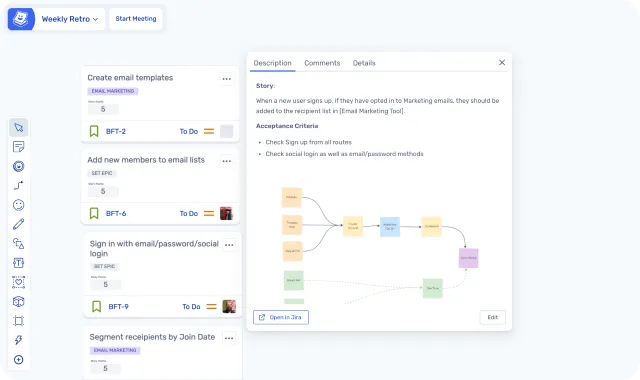
Both tools have two-way Jira sync. The functional overlap on the core planning workflow is high — pull backlog items, estimate collaboratively, sync back. Where they differ is price, context, and Jira depth.
Ludi’s advantage is that estimation happens inside the same guided meeting flow as the rest of the session — not a separate app you invoke alongside other canvas tools. And it costs a third of the price: Ludi’s Jira integration is on the Business plan at $6/member/month, while Miro’s requires Business at $20/member/month.
Miro’s advantage is deeper Jira integration. Miro additionally has a Dependencies app for mapping relationships between Jira cards, intelligent widgets that auto-update Jira fields, and the ability to embed Miro boards inside Jira issues. If Jira integration depth is your primary criterion and budget isn’t a concern, Miro’s is broader. If your planning sessions are straightforward estimate-and-commit workflows, Ludi covers the core workflow at a considerably lower price.
UX and Ease of Use
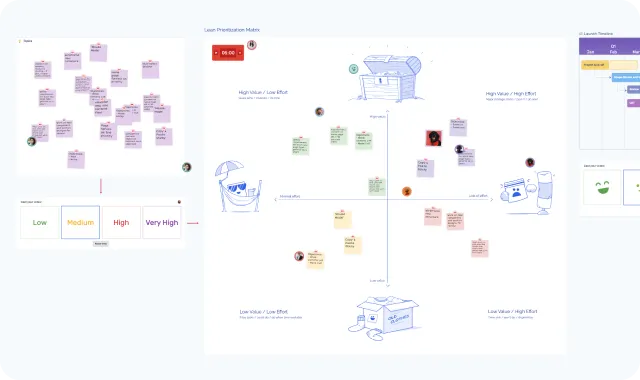
Both tools are whiteboards, but they’re designed for different people. Miro is designed for the person building the board — power users who create complex layouts, diagrams, and workflows. Ludi is designed for the ten people who show up to use it.
In Ludi, click-drag pans the board. Double-click creates a sticky, auto-coloured by the zone it’s in. No toolbar, no palette, no tool selection. Sticky notes are fixed-size. Each person gets a unique handwriting style, so you can scan the board and immediately see who wrote what. These are deliberate design choices for a 60-minute meeting where every minute spent figuring out the tool is a minute not spent on the work.
”I really don’t like Miro, it’s so uninspired. Ludi is so much better for it. They reinvented a few UX things that just makes everything nicer to use. It’s a pleasure and fun to use it. Reminds me about Apple products in the early days.”
— Mathias Nestler, CTO & Co-Founder, AccessOwl
Collaboration and Engagement
Miro has live emoji reactions (6 options), hand raising, a spinner wheel, an alignment scale with anonymous voting, flip cards, and polls. These are useful facilitation widgets, and the spinner wheel and alignment scale are genuinely clever additions.
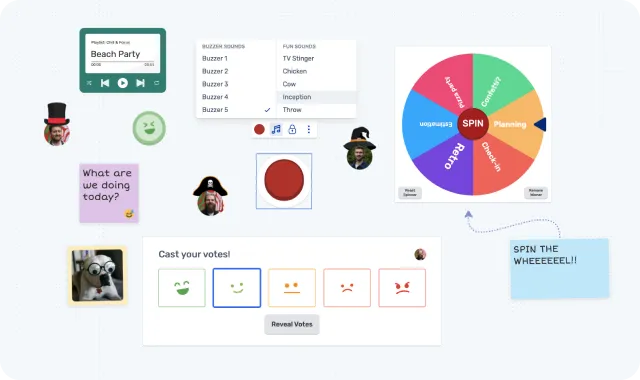
Ludi was built around the idea that remote meetings need energy to work. Beyond the basics: there are interactive icebreaker games (not just prompt questions), a jukebox that plays music to the whole board, confetti cannon, virtual hats, a buzzer with sound effects, a spinner, a counter, and a timer gadget you can place anywhere on the canvas. Object trays let you pre-set items for participants to grab. Voter panels put customisable mood and number voting directly on the canvas.
”Ludi is an intuitive product, the templates and user experience are ‘loveable’. It pulls you out of a stressful day of working and lets you enter a different mindset. It calms you and allows you to focus. It’s a place our teams like to be.”
— Bernhard Unger-Weber, Scrum Master, ryd
Use Case Comparison
Retrospectives
Ludi wins — this is the use case Ludi was originally built for, and where the gap is widest.
Ludi has guided facilitation flow, 125+ curated retro templates, and purpose-built tools for every phase of a retro. The Topics tool draws an organic, fluid-shaped coloured boundary around clustered stickies with an editable label. The whole group drags as a unit, and AI grouping can auto-sort stickies into topics. Miro has no equivalent — grouping means arranging stickies inside rectangular frames or positioning them manually.
Action tracking is the other key gap. In Ludi, any sticky becomes an action with an assignee, due date, automated reminders, and automatic carry-forward to the next meeting. Miro has no native action tracking — actions live on the board, and in most teams, they stay there.
Verdict: Ludi for structured retrospectives with follow-through. Miro can do retros; Ludi is built for them.
Sprint Planning
Ludi for most agile teams; Miro for teams that need advanced Jira features.
Both tools have two-way Jira sync and support estimation with Fibonacci and T-shirt sizing. The core planning workflow is similar — pull backlog items, estimate collaboratively, sync back. Ludi’s advantage is that estimation happens inside the same guided meeting flow as the rest of the session, and it costs a third of the price: Ludi Business at $6/member/month vs Miro Business at $20/member/month.
Miro’s advantage is deeper Jira integration — a Dependencies app for mapping relationships between cards, intelligent widgets that auto-update fields, and the ability to embed Miro boards inside Jira issues.
Verdict: Ludi for standard estimate-and-commit workflows at a lower price. Miro if Jira integration depth (dependencies, board embedding) is your primary criterion.
Workshops and Brainstorming
It depends on the workshop. For agile-specific workshops — project kickoffs, story mapping, Lean Canvas, sprint reviews — Ludi’s facilitation tools make it easier for the facilitator to keep things structured. For open-ended design workshops, strategy sessions, or cross-functional work that needs diagrams, prototypes, and integrations with design tools, Miro’s broader canvas and ecosystem is the better choice.
Verdict: Ludi for agile workshops. Miro for broader cross-functional or design-heavy sessions.
User Story Mapping
Either tool works. Both have story mapping templates and Jira integration. Ludi’s is simpler and more structured — you’re working within a purpose-built template. Miro’s is more flexible — you can build complex custom layouts and pull in content from more tools. For a standard story mapping session, the experience is similar. For larger, multi-team story mapping with many integrations, Miro has more room.
Verdict: Either. Ludi for simplicity; Miro for complex multi-team sessions.
Roadmapping and PI Planning
Miro wins. Large-scale roadmapping and PI Planning involve many teams, complex dependency mapping, integration with multiple project management tools, and strategic portfolio views. Miro’s platform — with 250+ integrations, structured tables, diagrams, and portfolio management — is built for this. Ludi has roadmap templates and timeline features, but it’s designed for team-level meetings, not programme-level planning across many teams.
Verdict: Miro for programme-level planning, roadmapping, and PI Planning.
Pricing
Ludi starts at $4/member/month (Starter) or $6/member/month (Business). Miro starts at $8/member/month (Starter) or $20/member/month (Business).
For a team of 10 on the entry paid plan: Ludi is $40/month, Miro is $80/month. For a team of 10 on Business with Jira: Ludi is $60/month, Miro is $200/month.
The honest caveat: Miro allows unlimited free board visitors who can collaborate without a paid seat. A team using 1 paid Miro seat and 9 free collaborators pays $8/month. Ludi’s Starter plan requires every collaborator to be a licensed team member. This is a real pricing advantage for Miro in some setups. But Miro’s facilitation features — private mode, voting, timers — require paid seats. And free collaborators can’t create or manage boards.
For teams where everyone needs full access and the facilitator needs facilitation tools, the per-seat comparison is the real one. Ludi is half the price.
| Ludi Starter | Ludi Business | Miro Free | Miro Starter | Miro Business | |
|---|---|---|---|---|---|
| Price | $4/member/month | $6/member/month | Free (3 boards) | $8/member/month | $20/member/month |
| Private writing | |||||
| Voting | |||||
| Action tracking | |||||
| Jira sync | Two-way | Two-way | |||
| Planning poker |
What Customers Say
Andrew Burns (switched back from Miro)
Andrew’s team used Miro for retros during a gap while waiting for their Ludi licence:
“We love Miro, but it was killing us for retros. I don’t want to talk badly about Miro because I think it’s a good product. However Miro is a poor experience for retros, at least compared to Ludi. So I am glad we no longer have to use Miro!”
Tim Gaye, Senior Software Engineering Manager, Kaluza
“I was chatting to some leadership the other day about ‘why have you bothered with Ludi? Why don’t you just use one of our bigger more general tools like Miro?’ And it’s the little things for me. It’s not the big moves or big functionality. It’s almost the little things that make me think you’ve thought about how people want meetings to flow, how people use it.”
Bernhard Unger-Weber, Scrum Master, ryd (switched from Miro)
“Ludi is an intuitive product, the templates and user experience are ‘loveable’. It pulls you out of a stressful day of working and lets you enter a different mindset. It calms you and allows you to focus. It’s a place our teams like to be.”
On why teams leave Miro for retros
“Miro is a great team whiteboarding tool overall. However, its flexibility when it comes to doing something that is structured by methodology (like retros) is somewhat its bane. It’s like a Swiss army knife — you surely can use it to open a bottle of wine, but there are designated tools to open bottles and it will be easier to use them instead.”
Anonymous customer (previously used Miro and Parabol)
“Private Writing is the most important part, and Miro doesn’t have it.”
Gaelle Duris, Freelance Scrum Master, ADEO
“We recently moved here from Miro. The feedback on the tool is very positive. Mostly pricing. It was too much functionality for us and the free plan excluded private mode which was essential for retros.”
“P”, Miro switcher
On focus and simplicity
“Ludi’s focused list of features combined with ease of use is a major differentiator and why we continue to prefer it over more complex online tools.”
Bertrand Potier, Head of Delivery Acceleration
“For retros and brainstorming it’s a level above the other tools out there.”
Samantha Corbett, Product Manager, Meltwater
“We were looking for an efficient tool to run our retros remotely. Most of the other tools out there were either bland three-column templates or huge whiteboard monsters. Ludi was exactly what we needed.”
Baptiste Grand, Agile Coach, XITASO
Can You Use Both?
Miro for the product layer, Ludi for the meeting layer
Yes — and many teams do. It’s not either/or.
The pattern we see again and again: Miro handles product work (roadmaps, architecture diagrams, design workshops, stakeholder alignment). Ludi handles the meetings (retros, sprint planning, estimation, health checks).
Meltwater did this deliberately. They made a conscious decision to split their tooling by audience — Miro for larger initiatives with many stakeholders, Ludi as the day-to-day tool for engineering. XITASO runs the same split: usability engineers use Miro for wireframes and workflow diagrams, agile coaches use Ludi for all facilitated collaboration.
There’s a less obvious argument for using a separate tool, too. Having a distinct space for retrospectives helps teams treat them as a regular practice — otherwise retros get lost in everyday Miro work and aren’t prioritised. The separate space creates a ritual. And rituals make continuous improvement stick.
Tim Gaye at Kaluza put it: “The tools coexist because they do different things well."
"Miro was being used for more of these larger initiatives that needed a lot of planning involved, maybe a lot of different stakeholders. And people really liked Miro. But then we were realizing that it actually was only used like a one-off, and what we needed as a tool was more of this day-to-day tool. So we transferred Miro to product marketing. For engineering, we were like — Ludi serves all of our purposes. And it’s much simpler to use.”
— Samantha Corbett, Product Manager, Meltwater
”Having a separate tool for retros helps teams institute retrospectives as a regular practice — otherwise retros get lost in everyday Miro work and aren’t prioritised.”
— Steffen, Digital Product School, Technical University of Munich
Switching from Miro
How to try Ludi alongside Miro
If you’re currently running agile meetings in Miro and want to try Ludi as an alternative:
- Start with one retro. Pick a template, share the link. The facilitation difference — guided flow, readiness checks, engagement — is obvious within five minutes.
- No data migration needed. You’re not moving boards. You’re starting fresh sessions in a tool built for them.
- Your team picks it up immediately. Double-click to add a sticky note. That’s the learning curve.
- Keep Miro for everything else. This isn’t a platform replacement — it’s adding the right tool for the meetings that matter most.
”Three out of the 10 people in a recent meeting had literally never seen Ludi before. I didn’t really have to tell them anything about it. They just started using it.”
— Tim Gaye, Senior Software Engineering Manager, Kaluza
”Adoption of Ludi was the same across the company — it was so fast. It took like 30 seconds for people to be autonomous on it. You usually experience friction when switching people to a new product, but we had none of that with Ludi.”
— Alex Imbeaux, Head of Talent Management Products, Lucca
”I requested feedback from the POs, and why they used it, and then explained the usefulness of having it for our retros. And how Miro was ok, but the ability to grab a template, and fire up a retro session in less than 5 mins, was clear that it would be useful.”
— Torquil Harkness, Enterprise
Final Verdict
Miro is a powerful visual collaboration platform — and if your team needs a single workspace for product development, design, strategy, and AI workflows, it’s a strong choice. Ludi doesn’t try to compete with that breadth.
But if your main need is running agile meetings well — retros that surface real issues, sprint planning with Jira sync, estimation sessions that stay on track — Ludi is the better fit. The facilitation tools are deeper, the UX is designed for participants rather than power users, action tracking actually closes the loop, and it costs roughly half the price per seat.
Many teams use both, and that’s a perfectly good setup. Miro for the product layer, Ludi for the meeting layer. Try one retro in Ludi and the difference is obvious.
Frequently asked questions
Last updated: April 2026. Pricing and features verified against miro.com, help.miro.com, and ludi.co.