

Ludi vs Mural: Facilitation Tools vs Facilitation Flow
Mural is the closest competitor to Ludi’s facilitation philosophy. They take facilitation seriously — “Facilitation Superpowers” on every plan, the LUMA Institute acquisition, and a genuine belief that meetings should be structured, not freeform. That puts them ahead of Miro, FigJam, and most other whiteboards on facilitation.
But Mural’s facilitation is a set of independent tools the facilitator toggles manually. Ludi’s facilitation gives the host connected controls — hide and reveal sections, herd participants, readiness checks, host-controlled reveal, tool restriction, content locking, action tracking — so the facilitator can run a structured meeting without assembling the pieces manually. Mural gives you facilitation tools. Ludi gives you facilitation control. And it costs a third of the price.
What is Ludi?
Ludi is an online whiteboard for agile teams — a visual canvas purpose-built for retrospectives, sprint planning, backlog estimation, team health checks, and workshops.
Agile teams use Ludi to run remote ceremonies that feel less like a chore — with fun touches, flexible facilitation, and everything you need to reflect, decide, and act.
What is Mural?
Mural is a visual collaboration platform for workshops, strategic planning, design, agile, and sales enablement. They acquired the LUMA Institute in 2022, adding a structured facilitation methodology — “Looking, Understanding, Making” — for collaborative problem-solving.
Mural serves product teams, designers, strategists, and enterprise organisations, with 95% of the Fortune 100 as customers. They have significant AI investment, 250+ integrations, and a Microsoft 365 Copilot partnership.
Ludi vs Mural: See the Difference
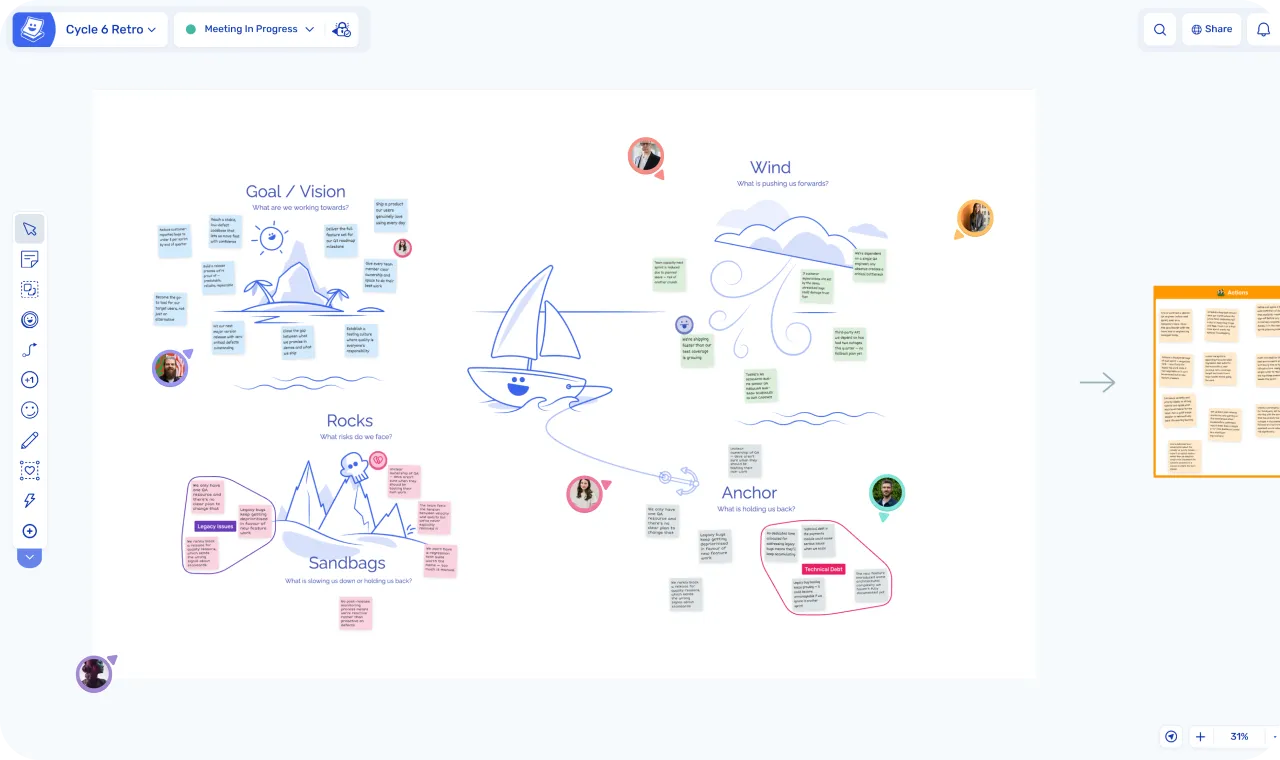
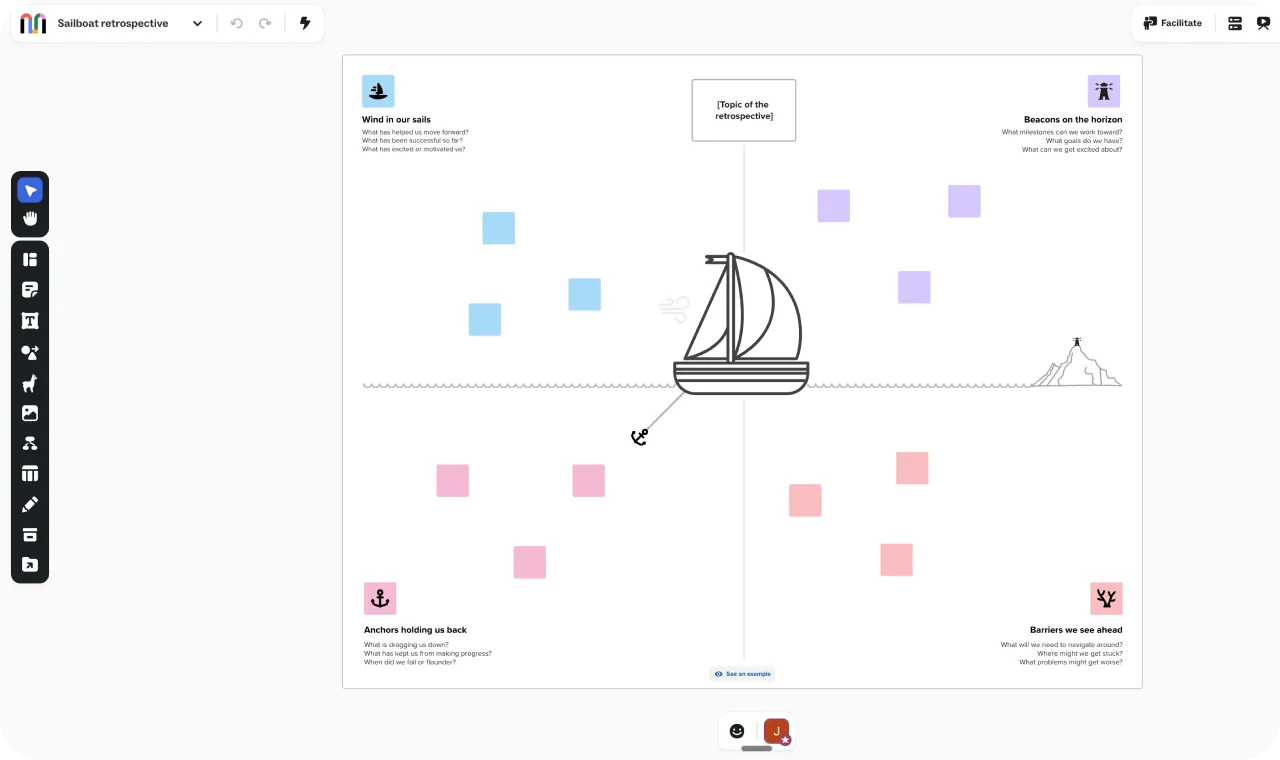
| Ludi | Mural | |
|---|---|---|
| Built for | Agile meetings: retros, planning, estimation, health checks | Visual collaboration: workshops, strategic planning, design, agile, sales enablement |
| Starting price | $4/member/month | $12/member/month (Team+) |
| Free plan | 30-day free trial (full access) | 3 murals, free forever |
| Facilitation | Guided meeting flow: activity frames, phases, readiness checks, host-controlled reveal, tool restriction | “Facilitation Superpowers”: private mode, voting, timer, summon — each toggled independently |
| Action tracking | Built-in: assignees, due dates, email reminders, carry-forward | No native action tracking |
| Privacy and anonymity | Private writing (auto-enabled), individual reveal, force reveal, permanent anonymity (Hide Identities) | Private mode (facilitator-toggled), no force reveal, no permanent anonymity |
| Agile templates | 125+ expert-curated for agile | Community library organised by role and use case |
| Jira integration | Two-way sync (Business, $6/member/month) | Two-way sync via Smart Planner (Business, ~$18/member/month) |
| AI features | AI-assisted sticky grouping | 35+ AI features (GPT-4o): content generation, clustering, sentiment, translate, AI chat |
| Integrations | Jira | Jira, Salesforce, Asana, Rally, Microsoft Planner, Microsoft 365 Copilot |
| Methodology | Agile-specific | LUMA Institute: structured collaborative problem-solving |
| Enterprise | SSO, team spaces, guest access | SCIM, data retention, session timeout, guest domain restrictions, dedicated CSM |
In-Depth Feature Comparison
Facilitation: Tools vs Flow
Mural has private mode that hides stickies until the facilitator reveals them. Voting works with dot voting. The timer is visible to everyone. Summon pulls participants to the facilitator’s view. The laser pointer highlights specific areas. These are available on every plan, including Free. That’s genuinely generous — most competitors gate facilitation behind paid tiers. These are real facilitation tools, and they work.
What Mural doesn’t have: readiness checks — the facilitator can’t see who’s still writing and who hasn’t. No force reveal — if a participant forgets to reveal their stickies, there’s no host override. No tool restriction — participants have full access to the toolbar at all times. And no action tracking at the end of the meeting.
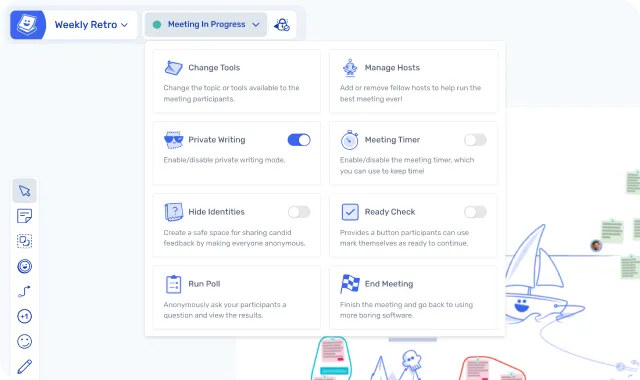
In Ludi, Activity Frames let the facilitator hide and reveal sections of the board, herd participants to the current activity, and control what’s visible and when. Readiness checks show the host who’s still writing. Force reveal lets the host surface any hidden stickies. Change Tools restricts participant toolbars mid-session. Super Lock prevents accidental editing. At the end, any sticky becomes an action with an assignee, due date, and automated follow-up. The facilitator runs the meeting; the tool gives them the controls to do it well.
”As an agile coach I need a tool like Ludi that is easy for my teams to use, and advanced enough for me as a facilitator so I can set my workshops the way I want them.”
— Jakob Edholm, Freelance Agile Coach, Innomate
The LUMA Institute Angle
Mural acquired LUMA Institute in March 2022, giving them a structured facilitation methodology — “LUMA provides the how, Mural provides the where, AI weaves throughout.” It’s a genuine differentiator. No other whiteboard has an equivalent methodology acquisition.
But LUMA is about collaborative problem-solving broadly — “Looking, Understanding, Making” methods for workshops, design thinking, innovation, and strategic planning. It’s not agile-specific. The methods are powerful for a half-day cross-functional workshop or a strategy session. They’re not designed for a 60-minute retrospective or a sprint planning session with Jira sync.
Ludi’s facilitation isn’t a methodology — it’s a meeting engine. It doesn’t teach you how to facilitate. It handles the mechanics of facilitation so you can focus on the content. Different problem, different solution.
If your primary use case is running broad workshops and you want structured methodology guidance, LUMA plus Mural is a strong combination. If your primary use case is running agile meetings every sprint, Ludi’s built-in flow is more relevant than a workshop methodology framework.
Privacy and Anonymity
Both tools have private writing. The depth differs.
In Mural, the facilitator toggles private mode on and off. While it’s on, stickies are hidden from other participants. When the facilitator turns it off, everything is revealed at once. There’s no individual reveal (each person revealing their own stickies at their own pace), no host-controlled force reveal for stragglers, and no permanent anonymity mode.
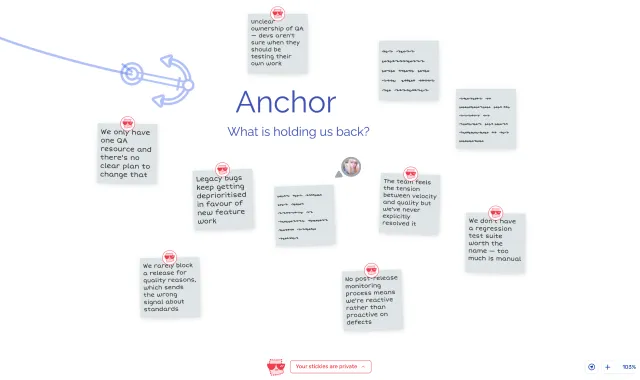
In Ludi, private writing auto-enables when Meeting Mode starts. Each participant reveals their own stickies when they’re ready — or the host can reveal all at once, or force-reveal specific hidden stickies. Hide Identities mode makes all contributions permanently anonymous — handwriting is normalised, avatars are removed, and nothing can ever be traced back to the author. This matters more than it sounds. In a retro where a team member raises a concern about leadership decisions, knowing their name is attached changes what they write. Hide Identities removes that entirely.
Action Tracking
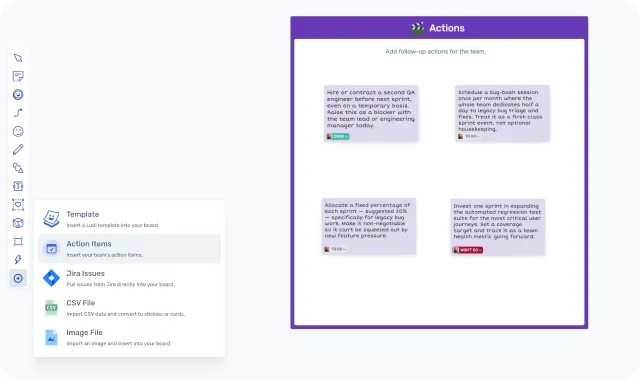
Ludi has built-in action tracking. Any sticky note becomes an action item with an assignee, due date, and automated email reminders. Actions carry forward into the next meeting board for review — so the team sees what they committed to last time before raising the same issues again. There’s a dedicated dashboard for batch management across boards. Actions can also be pushed to Jira.
Mural has no native action tracking. Actions live as sticky notes on the board. Maybe someone copies them into a project management tool afterwards. In most teams’ experience, they don’t.
This is the feature that turns retrospectives from a reflection exercise into a continuous improvement loop. Without it, your retro produces a board full of stickies that nobody looks at again.
”Ludi’s focused list of features combined with ease of use is a major differentiator and why we continue to prefer it over more complex online tools.”
— Bertrand Potier, Head of Delivery Acceleration, FIS Global
Jira Integration
Both tools have two-way Jira sync. Mural’s Smart Planner also supports Asana, Rally, and Microsoft Planner — broader coverage if your organisation uses multiple project management tools.
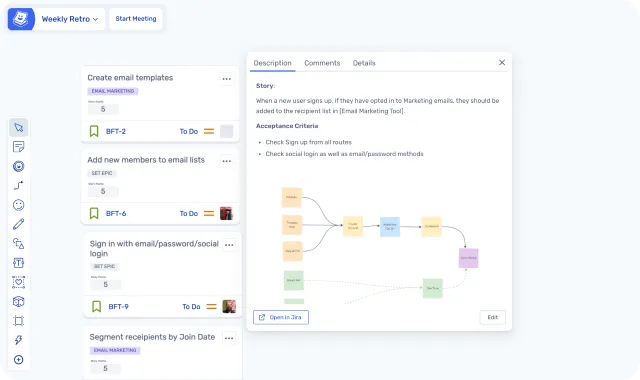
Ludi’s Jira integration is built for the agile meeting flow — pull backlog items onto the board, estimate collaboratively using planning poker (Fibonacci, T-shirt sizing), create new issues from stickies, and sync everything back. Estimation happens inside the same session as the planning discussion, not in a separate tool. Self-hosted Jira Data Centre is supported.
The cost difference is significant: Ludi’s Jira integration is on the Business plan at $6/member/month. Mural’s requires Business at ~$18/member/month. For a team of 10, that’s $60/month vs $180/month for Jira sync. If Jira is your primary integration, Ludi does it at a third of the price and it’s woven into the meeting flow.
AI: Mural Is Ahead — and It Matters Less Than You'd Think
Mural has 35+ AI features across five categories — content generation, content refinement, synthesis (clustering, sentiment analysis, tagging), facilitation control through AI chat, and a conversational interface powered by GPT-4o that can manipulate anything on the canvas and even control facilitation tools through natural language. Translation supports 50+ languages. It’s the broadest AI feature set of any whiteboard tool.
Ludi has AI-assisted sticky grouping. It’s not an AI platform.
But here’s the nuance: Mural’s AI is workshop-oriented. Sentiment analysis makes sense when you’re synthesising feedback from 50 people in a strategy session. Content generation makes sense when you’re building a new canvas from a brief. For a 60-minute retro with 8 people, the AI feature that matters is grouping related stickies — and both tools do that. The rest of Mural’s AI investment applies to use cases outside Ludi’s focus. Worth noting: Mural’s AI runs on a credit system — free plans get 10 credits per team (not per user), and credits don’t roll over.
Engagement
Mural’s engagement features are standard — confetti celebration, reactions, laser pointer. They’re functional for live sessions.
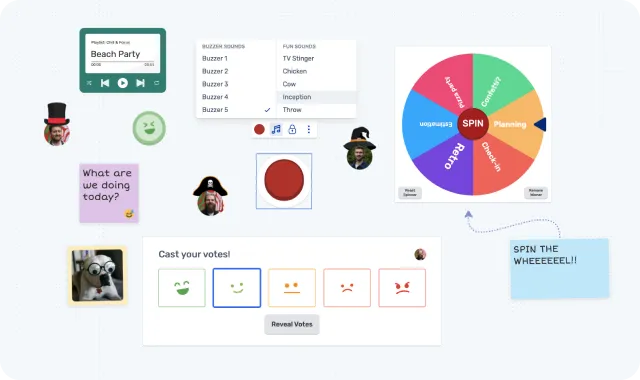
Ludi’s engagement features are designed to drive participation in structured agile meetings: interactive icebreaker games (not just text prompts), Jukebox, Spinner, Buzzer with sound effects, placeable Timers, Object Trays (pre-set objects for participants to grab), Voter Panels on the canvas, confetti cannons, virtual hats, and emoji stamp reactions that persist permanently on stickies.
It sounds whimsical, but there’s a serious point behind it. Remote agile meetings need energy to work. When the sprint was rough and the retro topic is heavy, the engagement layer is what keeps people present and contributing instead of muting and checking email. Teams that enjoy being in the tool participate more honestly and contribute more openly.
”When one of the team introduced Ludi, everyone saw it and loved it instantly. There was none of the friction that usually accompanies a change; everyone was extremely happy to adopt it.”
— Aimi Lightowler, Quality Engineering Manager, Gear4music
The Microsoft 365 Question
This deserves its own section because it’s a genuine strategic consideration, not just a feature comparison.
Mural was the first visual collaboration tool to integrate with Microsoft 365 Copilot (November 2023). That integration is deep — Copilot can find murals via natural language, summarise canvas content, and retrieve project boards. The majority of Mural’s customers are Microsoft 365 users, and the AI backend runs on Microsoft Azure OpenAI, which gives enterprises data residency and compliance confidence.
For organisations already on the Microsoft stack, Mural may already be embedded. The IT team approved it. The procurement process is done. It lives inside the tools people already use daily. That’s a real advantage that has nothing to do with features.
So why would a team within a Microsoft-stack organisation still want Ludi?
Because the Microsoft integration serves the organisation, not the meeting. Copilot finding a mural or summarising a board is useful for knowledge management and async work. It doesn’t help the Scrum Master run a better retro. It doesn’t give the facilitator readiness checks, force reveal, or action tracking. It doesn’t make the sprint planning session more collaborative.
The teams within Microsoft-stack organisations that adopt Ludi typically aren’t trying to replace Mural at the org level. They’re adding the right tool for a specific job — running agile meetings — alongside the platform their organisation already uses for broader visual collaboration. The two sit side by side.
Use Case Comparison
Retrospectives
Ludi wins. This is the use case Ludi was originally built for, and where the gap over Mural is widest in practice.
Ludi has guided facilitation flow, 125+ curated retro templates ready in seconds, and purpose-built tools for every phase of a retro. The Topics tool draws an organic, fluid-shaped coloured boundary around clustered stickies — the whole group drags as a unit, and AI grouping can auto-sort into topics and sub-topics. Mural uses rectangular frames and manual arrangement — no equivalent of the visual lasso, no organic boundary, no group-as-unit dragging with a label.
Action tracking is the other key differentiator. In Ludi, any sticky becomes a tracked action that follows the team from one meeting to the next. Mural has no native action tracking — actions live on the board and, in most teams, stay there.
Verdict: Ludi for structured retrospectives that drive continuous improvement. Mural has facilitation tools; Ludi has facilitation flow.
Sprint Planning
Ludi for most agile teams; Mural for teams that need broader Jira features or other integrations.
Both tools have two-way Jira sync and support collaborative estimation. The core planning workflow is similar. Ludi’s advantage is that estimation happens inside the same guided meeting flow as the rest of the session, and it costs a third of the price: Ludi Business at $6/member/month vs Mural Business at ~$18/member/month. For a team of 10, that’s $60/month vs $180/month.
Mural’s Smart Planner additionally supports Asana, Rally, and Microsoft Planner — broader coverage if your backlog lives outside Jira.
Verdict: Ludi for Jira-based sprint planning at a significantly lower price. Mural if you need multi-tool integration for planning.
Team Health Checks
Ludi wins. Ludi has purpose-built health check templates — structured facilitated exercises where the team rates multiple dimensions (delivery pace, team spirit, code quality, learning, etc.) and discusses the results together on a visual canvas. Private writing matters here — people need to rate honestly without seeing what others chose first.
Mural can approximate a health check with sticky notes and its voting feature, but there’s no private writing phase, no structured health check format, and no permanent anonymity mode.
Verdict: Ludi for proper multi-dimension health checks with private voting. Mural for open-format team discussions.
Cross-functional Workshops
Mural wins. For broad workshops that span departments — design thinking sessions, strategic planning, innovation sprints, or sales enablement — Mural’s platform and LUMA methodology is a genuine differentiator. The LUMA methods are built for collaborative problem-solving across disciplines. Add the broader integration ecosystem, and Mural is the stronger choice for multi-team, multi-stakeholder workshops.
Ludi’s facilitation tools (Activity Frames, private writing, readiness checks) work well for agile-specific workshops. But Ludi is designed for team-level meetings, not programme-level cross-functional sessions.
Verdict: Mural for cross-functional, multi-team, or strategy-level workshops. Ludi for agile team workshops.
Brainstorming
It depends on who’s brainstorming. For an agile team brainstorming improvement ideas or sprint themes, Ludi’s engagement features, icebreakers, and voting make it effective — and you stay in the same tool as your retros. For cross-functional brainstorming with design, strategy, or sales stakeholders, Mural’s broader canvas, integrations, and AI content generation are more relevant.
Verdict: Ludi for agile team brainstorming. Mural for cross-functional ideation at scale.
Pricing
Ludi starts at $4/member/month (Starter) or $6/member/month (Business, with Jira integration). Mural starts at $12/member/month (Team+) or ~$18/member/month (Business).
For a team of 10 on the entry paid plan: Ludi is $40/month. Mural is $120/month. That’s 3x the cost.
For a team of 10 on Business with Jira: Ludi is $60/month. Mural is ~$180/month.
The honest caveat: Mural has a free plan with 3 murals and facilitation features included. And like most whiteboard tools, Mural allows free collaborators to join sessions without a paid seat. Ludi’s Starter plan requires every collaborator to be a licensed team member. If you can work with one paid Mural seat and free collaborators, Mural may cost less overall. But if everyone on your team needs full access, the per-seat comparison is the real one — and Ludi is a third of the price.
| Ludi Starter | Ludi Business | Mural Free | Mural Team+ | Mural Business | |
|---|---|---|---|---|---|
| Price | $4/member/month | $6/member/month | Free (3 murals) | $12/member/month | ~$18/member/month |
| Private writing | |||||
| Force reveal | |||||
| Readiness checks | |||||
| Action tracking | |||||
| Jira sync | Two-way | Two-way | |||
| Planning poker |
Who Is Each Tool Best For?
Who Ludi is best for
- Scrum Masters who run retros regularly and want facilitation flow that guides the team through each phase — not a toolkit they have to orchestrate manually
- Teams that need action tracking — retro actions with assignees, due dates, email reminders, and carry-forward to the next meeting
- Agile teams that value simplicity — open a template, share the link, and your team is contributing immediately
- Teams doing sprint planning with Jira — collaborative estimation on a whiteboard that syncs back automatically, at a third of Mural’s price
- Budget-conscious teams — $4/member/month vs $12, and you get deeper meeting facilitation for the price difference
- Teams that want meetings people actually enjoy — icebreakers, music, confetti, hats, and engagement features that make remote sessions feel less like a chore
- Teams within organisations that already have Mural — use Ludi for agile meetings, keep Mural for broader visual collaboration
Who Mural is best for
- Enterprise organisations on the Microsoft stack where Mural is already embedded through the Copilot integration and IT has already approved it
- Workshop facilitators who want LUMA methodology for structured cross-functional workshops, design thinking sessions, and strategic planning
- Teams that need broad integration coverage — two-way sync with Jira, Salesforce, Asana, Rally, and Microsoft Planner in one platform
- Organisations with strict enterprise governance — SCIM, data retention policies, session timeout controls, and guest domain restrictions
- Teams where AI-powered collaboration is a priority — 35+ AI features for content generation, synthesis, and facilitation control
- Solo facilitators or small teams who want a free plan — 3 murals with facilitation tools included is a solid free offering
Can You Use Both?
Mural for the org layer, Ludi for the meeting layer
Yes — and this is the most common scenario in enterprises with existing Mural contracts.
Mural handles the broad visual collaboration: strategic planning workshops, cross-functional ideation, sales enablement, design sessions. It’s the organisation’s visual workspace, embedded into the Microsoft stack, approved by IT, managed by a dedicated CSM.
Ludi handles the agile meetings: retros, sprint planning, estimation, health checks. It’s the team’s meeting tool — adopted by the Scrum Master because it runs better meetings, not because someone made a procurement decision.
The two tools serve different audiences within the same organisation. Mural serves the org’s collaboration needs. Ludi serves the team’s meeting needs. They don’t conflict — they coexist.
Having a dedicated space for retrospectives also helps teams treat them as a distinct practice, not something squeezed into the same platform where everything else happens. When your team opens Ludi, they know it’s meeting time. That separation creates a ritual, and rituals make continuous improvement stick.
”Ludi helps our clients to get more creative — it gives them a way to express their ideas in workshops. We get much better results than we used to have with other tools.”
— Aline Sillet, Agile Coach, XITASO
Switching from Mural
How to try Ludi alongside Mural
If you’re currently running agile meetings in Mural and want to try Ludi:
- Start with one retro. Pick a template, share the link. Your team will notice the facilitation difference within five minutes — the guided flow, readiness checks, and private writing that just works without manual toggling.
- No data migration needed. You’re not moving boards. You’re starting fresh sessions in a tool built specifically for agile meetings.
- Your team picks it up immediately. Double-click to add a sticky note. That’s the learning curve. Teams coming from Mural are already familiar with the whiteboard concept — Ludi just focuses it on the meeting.
- Keep Mural for everything else. You don’t have to replace your organisation’s visual collaboration platform to give your agile team a better meeting tool.
”Adoption was the same across the company — it was so fast. It took like 30 seconds for people to be autonomous on it.”
— Alex Imbeaux, Head of Talent Management Products, Lucca
What Customers Say
Siobhan He, Product Manager, EZ Ops (used Mural at previous company)
“I would say Ludi is a more robust version of Mural, if you’re familiar with Mural. It’s got the planning poker, which is great — that’s a lot better, especially working on a virtual team. Being able to have a virtual version of it — you can see people thinking, you can see their cursor going back and forth where their hand of cards are — it’s really fun.”
On adoption speed
“When one of the team introduced Ludi, everyone saw it and loved it instantly. There was none of the friction that usually accompanies a change; everyone was extremely happy to adopt it.”
Aimi Lightowler, Quality Engineering Manager, Gear4music
“Adoption was the same across the company — it was so fast. It took like 30 seconds for people to be autonomous on it. You usually experience friction when switching people to a new product, but we had none of that with Ludi.”
Alex Imbeaux, Head of Talent Management Products, Lucca
On simplicity vs complexity
“I’ve experimented with other whiteboards but they were overcomplicated, whereas the teams embraced Ludi without hesitation.”
Veronica Onu, Agile Coach, Minsait
“Ludi helps our clients to get more creative — it gives them a way to express their ideas in workshops. We get much better results than we used to have with other tools.”
Aline Sillet, Agile Coach, XITASO
Final Verdict
Mural takes facilitation more seriously than any other generic whiteboard — the LUMA acquisition, Facilitation Superpowers on every plan, and enterprise governance depth make it a strong choice for organisations that need a single platform for broad visual collaboration.
But if your main need is running agile meetings well — retros that surface real issues, sprint planning with Jira sync, health checks that actually work — Ludi goes deeper. The facilitation flow is guided rather than manual, action tracking actually closes the loop, the UX is designed for participants rather than power users, and it costs a third of the price per seat.
Many organisations use both: Mural for the platform layer, Ludi for the meeting layer. Try one retro in Ludi and the facilitation difference is obvious within five minutes.
Frequently asked questions
Last updated: April 2026. Pricing and features verified against mural.co and ludi.co.