

Ludi vs Retrium: Which Is Right for Your Agile Team?
Retrium is a retrospective and team health platform. Ludi is an online whiteboard for agile teams. Both tools run good retros — but that’s where the overlap ends. Retrium focuses exclusively on retrospectives and team health analytics. Ludi covers retros, sprint planning, estimation, team health checks, workshops, and more on a single visual canvas.
For a 10-person team, both cost roughly $40/month. The difference is what you get for that price: Retrium covers retros. Ludi covers everything.
What is Ludi?
Ludi is an online whiteboard for agile teams — a collaborative visual canvas purpose-built for the ceremonies and workshops that software teams run every sprint.
With 125+ templates, two-way Jira integration, planning poker, facilitation controls, and engagement features like icebreakers and interactive activities, Ludi replaces the patchwork of tools most agile teams cobble together.
What is Retrium?
Retrium is a retrospective and team health platform — a structured workflow tool that guides teams through a step-by-step retrospective process: brainstorm, group, vote, discuss, and create actions.
Retrium’s strongest feature is Team Radar, which runs recurring health surveys and tracks trends across sprints with visualisations — giving agile coaches hard data on whether continuous improvement is actually happening.
Ludi vs Retrium: At a Glance
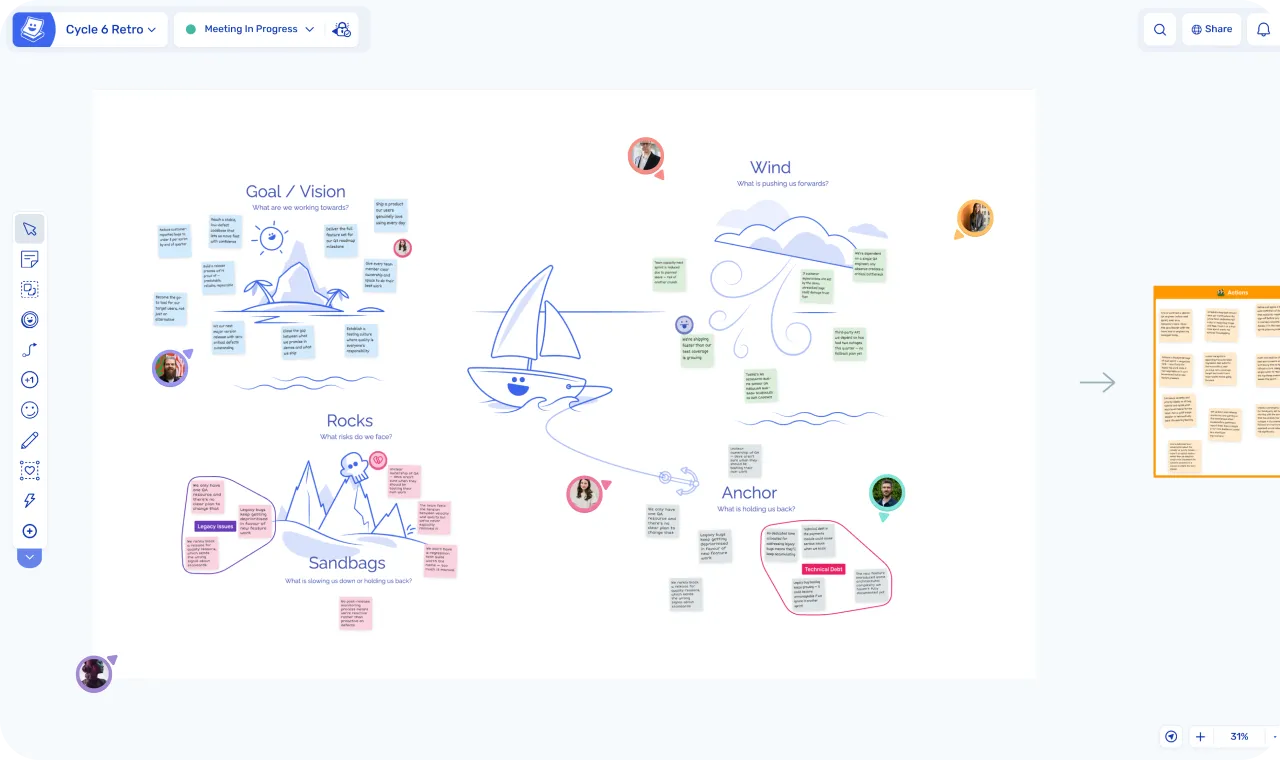
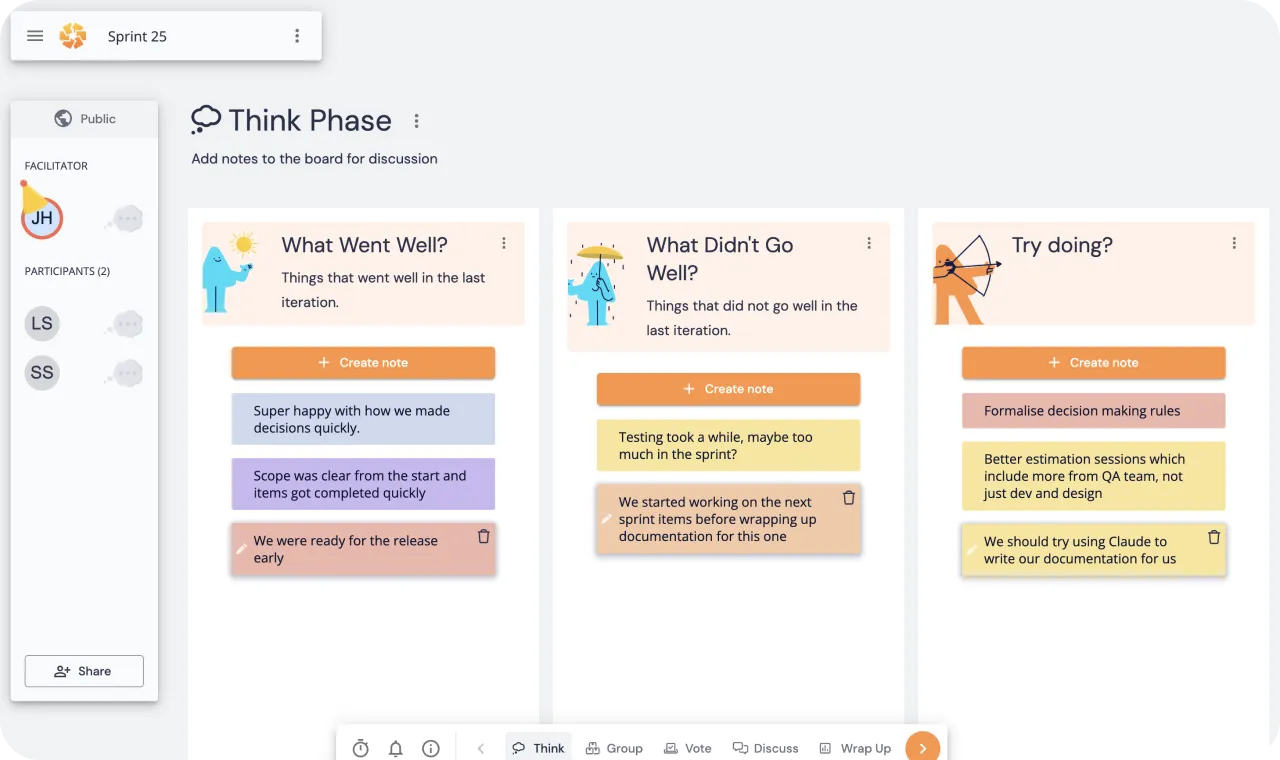
| Ludi | Retrium | |
|---|---|---|
| Category | Online whiteboard for agile teams | Retrospective and team health platform |
| Built for | All agile ceremonies (retrospectives, planning, estimation, health checks, workshops) | Retrospectives and team health |
| Key use case | Run every agile ceremony in one tool | Run retros with analytics and health tracking |
| Team type | Scrum Masters, Engineering Managers, and teams who run collaborative meetings | Agile coaches focused on retro and team health analytics |
| Format | Freeform whiteboard canvas | Fixed columns and cards |
| Starting price | $4/member/month | $39/month per team room |
| 30-day free trial | ||
| Free plan | ||
| Retro techniques | 60+ | 15 |
| Private writing | ||
| Topic grouping | ||
| Team voting | ||
| Meeting facilitation | ||
| Action creation | ||
| Action reminders | ||
| Send actions to Jira | ||
| Full two-way Jira integration | ||
| Sprint planning | ||
| Team health capture | ||
| Team health analytics | ||
| AI features | ||
| Engagement features | ||
| SSO | ||
| Guest participants |
When to Choose Ludi vs Retrium
When to choose Ludi
- You run more than retros. If you also facilitate sprint planning, estimation, workshops, or brainstorming, one tool covers it all. No second subscription needed.
- You want a whiteboard, not a form. Freeform canvas with meeting templates, interactivity, zones, images, spatial layout, and diagrams.
- You’re consolidating tools. Replace Retrium plus other tools with a single platform for all ceremonies.
- Cost-effectiveness. Why pay the same price for a retro-only tool when a Retrium alternative covers every ceremony at the same cost?
- Your team values engagement. Icebreakers, gadgets, confetti, and features that make remote meetings feel less like a chore.
- You use Jira for planning. Two-way sync for refinement, estimation, and sprint planning — not just pushing actions.
When to choose Retrium
- You need retro analytics and reporting. Dashboards showing participation, sentiment, and action completion across teams over time.
- You need to prove retro ROI to leadership. Retrium’s reporting gives you hard data on whether continuous improvement is actually happening.
- Basic facilitation is enough. Retrium’s rigid guided workflow removes all facilitation decisions — the tool runs the meeting.
- Team health trends are critical. Team Radar’s structured longitudinal data is useful and hard to replicate elsewhere.
- You have large teams in a single room. Per-room pricing makes Retrium cheaper for teams of 20+ in one space.
- You only need retros and already have a separate tool for everything else.
Key Differences
- Scope: Retrium is a retro-only tool. Ludi is an online whiteboard for agile teams that covers retros, sprint planning, estimation, team health, workshops, and more. Teams using Retrium still need other tools for everything else.
- Format: Retrium uses fixed columns and cards. Ludi is a freeform visual canvas — run more formats than a column structure allows and get genuine engagement from a visual experience.
- Facilitation philosophy: Retrium automates the facilitation — the tool moves everyone through each phase. Ludi gives the facilitator control over the session with Activity Frames, readiness checks, and host controls.
- Team health: Retrium’s Team Radar tracks health dimensions over time with trend charts. It’s their strongest differentiator. Ludi has health check templates but not the same longitudinal analytics.
- Action tracking: Both carry actions forward between sessions. Retrium action items are separate from a session. Ludi’s are created from stickies and always retain context.
- Jira integration: Ludi has two-way sync — pull backlog, estimate on-board, sync back. Retrium can push actions to Jira but nothing more.
- Sprint planning and estimation: Ludi has planning poker, capacity planning, and Jira sync. Retrium doesn’t do planning or estimation at all.
- Value for money: Both cost roughly $40/month for a 10-person team. Ludi covers every ceremony. Retrium covers retros only.
In-Depth Feature Comparison
Facilitation Features
Retrium gives you a guided workflow that moves the whole team through brainstorm, group, vote, discuss, and actions — step by step, locked in sequence. The facilitator can’t adjust pacing or structure depending on the meeting flow. For teams where the person running the retro isn’t experienced, that hand-holding is helpful.
Ludi’s facilitation works differently. Activity Frames are designated board sections the facilitator can hide, reveal, and jump to — giving the host control over visibility and pacing. They can bring participants to specific areas, lock content, run readiness checks to see who’s finished before moving on, reveal individual sticky notes, and use Hide Identities for permanent anonymity. Co-hosts can share facilitation duties.
The tradeoff: Retrium is more guided and requires less facilitation skill. Ludi gives the facilitator more depth and flexibility.
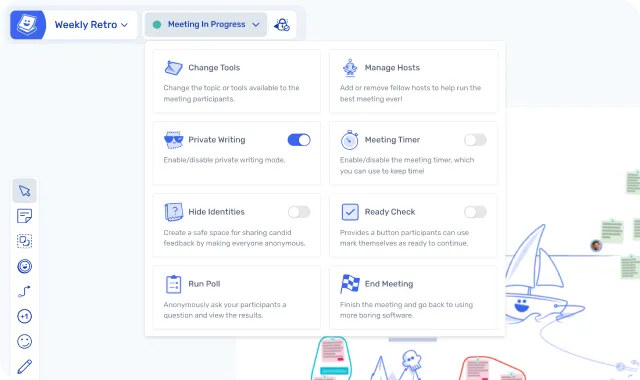
Team Health
Retrium’s Team Radar is their best feature. It runs recurring health surveys across dimensions like teamwork, process, and fun, and tracks trends with visualisations over time. After six months of data, you have a clear picture of how team health is evolving. That historical data creates real switching costs.
Ludi has team health check templates. You can run a variety of health checks and build your own, but the data doesn’t accumulate into the same kind of longitudinal dashboard that Retrium offers.
Honest assessment: if team health trend data over time is critical to how you coach teams, Retrium does this better. It’s their strongest differentiator. That said, you can take your Ludi board exports, put them into your organisation’s LLM, and get close to the same analysis back.
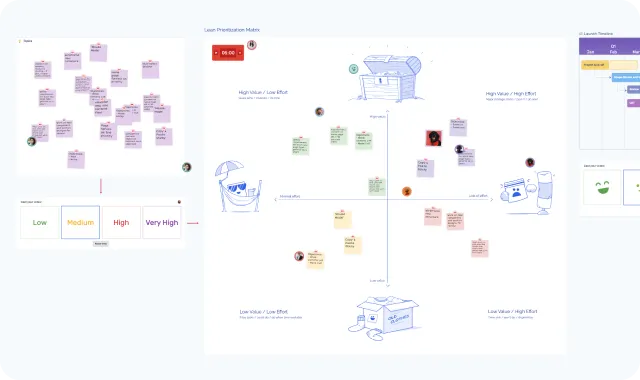
Templates
Retrium has roughly 10–15 built-in retro techniques: Mad/Sad/Glad, Start/Stop/Continue, 4Ls, Sailboat, Lean Coffee, custom columns, and more. They’re typical for the retro format.
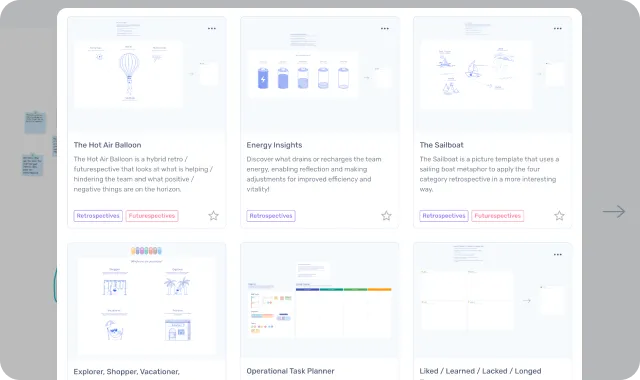
Ludi has 125+ templates spanning retros, sprint planning, estimation, workshops, icebreakers, team health, story mapping, and more. Teams can save their own custom templates to a shared Team Template Library.
If you only run retros, 10–15 techniques may be enough. If you run multiple ceremony types and want variety, Ludi’s library is significantly broader.
Action Tracking
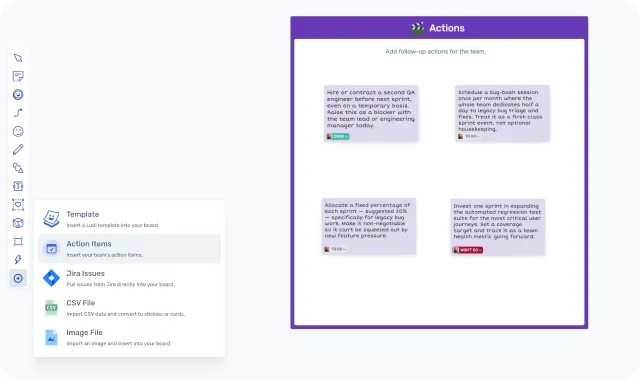
Both tools have solid action tracking with assignees and carry-forward between sessions.
Where Retrium pulls ahead: action completion rate tracking over time. Dashboards showing what percentage of actions get done, by team, across sprints. That’s compelling data for agile coaches managing multiple teams.
Ludi’s action tracking includes assignees, due dates, and automated email reminders — the mechanics that help actions actually get completed. But it doesn’t yet offer the same longitudinal analytics.
Integrations
Both tools integrate with Jira. Retrium’s Jira integration pushes actions to Jira (one-way). It also connects with MS Teams and Slack.
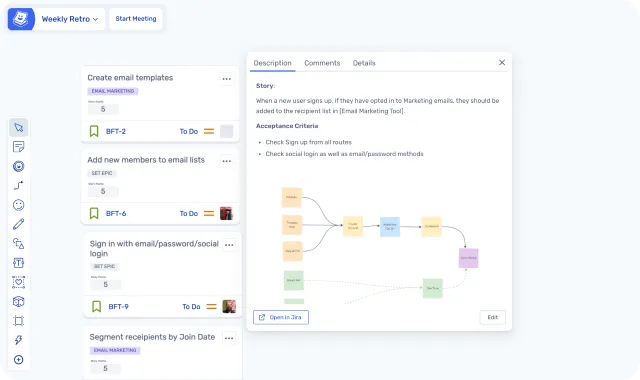
Ludi’s Jira integration is two-way and in-depth: pull backlog items onto the board, estimate collaboratively, update description or fields, create new issues from stickies, and sync everything back. That’s Retrium’s action export versus Ludi’s full planning workflow.
Engagement
Retrium is functional. It does what it does, and it does it quietly. There are no engagement features — no icebreakers, no gadgets, nothing to break the ice at the start of a session.
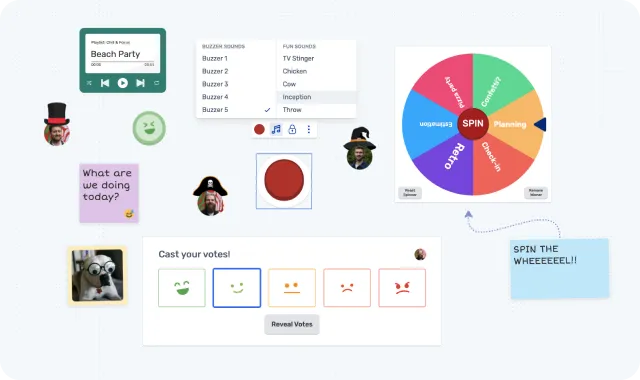
Ludi has a range of interactive features to engage the team and bring variety to a session: a jukebox, spinners, confetti cannons, hats, icebreakers, and interactive energizers. Remote meetings need energy, and a 30-second warmup at the start of a retro changes the dynamic of the whole session.
Use Case Comparison
Retrospectives
Both tools take retros seriously — both have private writing, grouping, voting, and a facilitated flow through phases. Both carry actions forward between sessions.
Retrium’s approach is extremely opinionated. It locks the whole team into each phase and advances them together. Pick a technique, and the tool runs the meeting for you. The guided workflow is simpler and requires less facilitation skill.
Ludi gives you the same structured flow but on a visual canvas. A Sailboat retro is an actual sailboat scene, not just three columns with nautical titles. When a session needs more than columns, you’re not hitting the walls of a form-based tool. Ludi gives the facilitator more control, 125+ formats versus Retrium’s 10–15, and a visual experience that keeps the team engaged.
Note on private writing: Retrium’s solution blurs other people’s stickies, which can be easily removed in browser developer tools — not ideal for technical audiences.
Verdict: Both run solid retros. Ludi for teams that want variety, flexibility, and a richer visual experience. Retrium for teams that want the tool to run the meeting automatically.
Sprint Planning and Estimation
Retrium doesn’t do sprint planning or estimation. Full stop. A Retrium customer needs a second tool for this.
Ludi has poker planning with Fibonacci and T-shirt sizing, capacity planning, sprint goal setting, and two-way Jira integration: pull backlog items onto the board, estimate collaboratively, create new issues from stickies, and sync story points back to Jira automatically — all on a visual canvas where the team can see and discuss the work together.
Verdict: Ludi. Retrium has no planning or estimation capability.
Team Health Checks
Retrium wins on depth. Team Radar tracks health dimensions over time with trend visualisations — useful for coaching and proving progress to leadership. It’s their strongest differentiator, and the longitudinal data creates genuine switching costs.
Ludi has health check templates you can run in a session, but the data doesn’t accumulate into the same longitudinal dashboard.
Verdict: Retrium for depth of health analytics over time. Ludi for teams who want health checks as part of a broader ceremony practice without the need for trend dashboards.
Workshops and Brainstorming
Retrium doesn’t do workshops or brainstorming sessions outside the retro format. There’s no canvas, no freeform layout, no multi-section sessions.
Ludi is a whiteboard. Workshops, brainstorming, Lean Coffee, Crazy 8’s, project kickoffs — all run natively on the same canvas your team already uses for retros.
Verdict: Ludi. Retrium has nothing to offer outside the retro format.
Story Mapping
Retrium has no story mapping capability.
Ludi’s freeform canvas supports story mapping with drag-and-drop cards, spatial organisation, and the ability to push and pull items from Jira. Teams that run story mapping sessions alongside their ceremonies don’t need a second tool.
Verdict: Ludi.
Pricing
For a single team of 10 people, the maths is close. Retrium Team costs $39/month (per room, unlimited users). Ludi Starter costs $40/month ($4/member × 10). Nearly identical at the entry tier — the difference is what each dollar buys.
Retrium’s $39 covers retros and team health. Ludi’s $40 covers retros, sprint planning, estimation, team health checks, workshops, brainstorming, and a full whiteboard canvas.
At scale, the comparison holds. Five teams of 10 people: Retrium Team is $195/month (5 rooms × $39); Ludi Starter is $200/month (50 members × $4). Still comparable — but Ludi covers every ceremony for every team at that price. Retrium covers retros only, and each team still needs another tool for planning and workshops.
One note on Retrium’s pricing advantage: per-room pricing means team size doesn’t matter within a room. A room with 5 people costs the same as a room with 20. For very large teams in a single room, Retrium can be cheaper per-person. Ludi charges per member regardless of team size.
| Ludi Starter | Ludi Business | Retrium Team | |
|---|---|---|---|
| Price | $4/member/month | $6/member/month | $39/month per room |
| Jira sync | Two-way | Push only | |
| Sprint planning | |||
| Team health | Templates | Templates | Team Radar with trend analytics |
| AI features | AI grouping | AI grouping | |
| Engagement |
What Customers Say
Ludi covers more than just retros
“I run retrospectives and interactive training sessions but also use Ludi to analyse the root causes of problems (like the 5 Whys), structure meetings with Lean Coffee, use sprint planning poker for estimation, or just for a brainstorming session.”
Veronica Onu, Agile Coach, Minsait
“We use Ludi for our retrospectives, but also for loads of other meetings. The team loves it!”
Siobhan He, Product Manager, EZ Ops
Used every week since 2021
“We’ve used Ludi every week since 2021. It helps us to run not only retros now, but all kinds of workshops and trainings.”
Baptiste Grand, Agile Coach, XITASO
“I tried a range of different retrospective tools and Ludi is the one that I came back to.”
Tim Gaye, Senior Software Engineering Manager, Kaluza
The tool teams keep coming back to
“Ludi is the one central tool in my work as an Agile Coach. I don’t dare think about doing retrospectives without it.”
Nadine Porkert, Agile Coach, XITASO
“We use Ludi for daily organization and planning of work, not just for meeting formats.”
Bernhard Unger-Weber, Scrum Master, ryd
Switching from Retrium
How to switch from Retrium to Ludi
If you’re currently using Retrium and considering a Retrium alternative:
- Start with one retro. Pick a template, share the link, and run your next retro in Ludi. You’ll see the difference in the first session: the canvas, the engagement features, the facilitation depth.
- No data migration needed. Your Retrium history stays in Retrium. Ludi is a fresh start with new sessions — you’re not moving data, you’re upgrading the experience.
- The team health gap is real. If you have months of Team Radar data in Retrium, that’s hard to walk away from. Some teams keep Retrium for health tracking while moving ceremonies to Ludi. Others accept the fresh start. Be honest about what you’d lose.
- Your team picks it up immediately. Double-click to add a sticky note. That’s the learning curve. No toolbar to learn, no canvas to navigate. Ludi auto-colours notes based on the section, so contributors just write.
- You gain everything else. Sprint planning, estimation, workshops, brainstorming, icebreakers — all the ceremonies Retrium couldn’t cover. One tool instead of two.
Final Verdict
Retrium does one thing well: structured retrospectives with analytics and team health tracking. If retro ROI reporting and longitudinal health data are your primary needs, it’s a solid tool, and Team Radar is hard to match.
But most agile teams need more than retros. Sprint planning, estimation, workshops, brainstorming, story mapping all need a tool too. With Retrium, you’re paying for one ceremony and buying a second tool for everything else. Ludi covers it all on one visual canvas, at roughly the same price, with deeper facilitation controls and meetings teams actually enjoy showing up to.
If you’re evaluating a Retrium alternative, Ludi can match Retrium’s retros. The question is whether paying the same price for one ceremony makes sense when you could have them all.
Frequently asked questions
Last updated: March 2026. Pricing and features verified against retrium.com and ludi.co.