Email Sequence Planning Template
Plan and structure effective email sequences that guide new customers to value. This template helps product and marketing teams map out onboarding series, trial sequences, and nurture campaigns with strategic content distribution.
What Is Email Sequence Planning?
Email sequence planning is the process of strategically designing a series of automated emails that guide recipients through a specific journey—whether that's product onboarding, feature adoption, or conversion nurturing. Rather than sending isolated messages, you're crafting a connected story that delivers the right information at the right time.
This template provides a visual framework for planning email sequences of any length (typically 7, 14, or 30 days). It helps teams think holistically about their messaging strategy, ensuring content is balanced, valuable, and never overwhelming. By mapping content ideas to calendar days before writing a single word, you can spot gaps, avoid repetition, and build sequences that actually drive user engagement.
Benefits & When to Use
Use this template when you need to:
- Design trial onboarding sequences that activate new users
- Plan feature adoption campaigns that educate existing customers
- Structure nurture sequences that move leads through your funnel
- Rebuild underperforming email series with better content balance
- Coordinate cross-functional efforts between product, marketing, and customer success teams
This approach prevents common pitfalls like front-loading too much information, repeating the same message types, or losing momentum mid-sequence. You'll see your entire email journey at once, making it easier to create strategic delays, build narrative arcs, and time behavioral triggers effectively.
How to Run an Email Sequence Planning Session
Total Time: 90-120 minutes
1. Set context and goals (10 minutes)
Start by aligning on the sequence purpose and target audience. Discuss what "success" looks like for this email series—whether that's activation, feature adoption, upgrade conversion, or something else. Clarify the sequence length based on your trial period or campaign duration.
2. Generate content ideas (20-30 minutes)
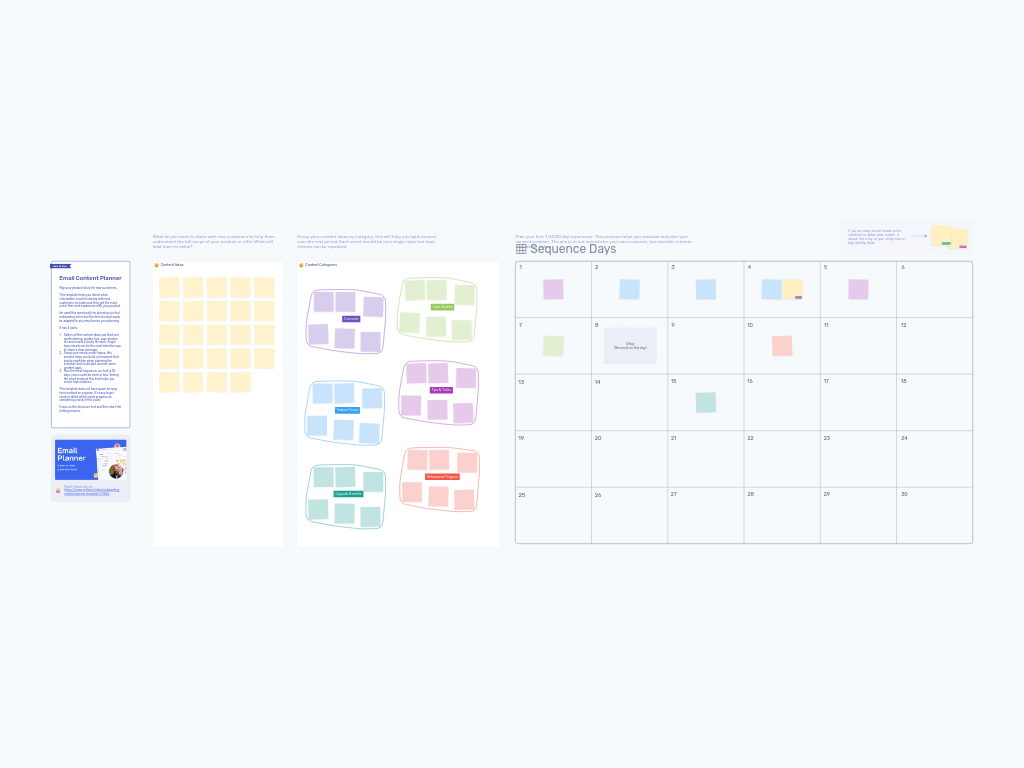
Working in the Content Ideas zone (left side), have team members create sticky notes for every piece of content that might be valuable to share. Each sticky represents a single-topic email idea. Don't worry about sequence order yet—just capture everything from feature highlights and tips to case studies and upgrade prompts. Encourage quantity over quality at this stage.
3. Categorize content by theme (15-20 minutes)
Move to the Content Categories zone (middle section) where you'll find color-coded topic areas. Group your content ideas under relevant categories:
- Concepts (purple) - Core ideas and foundational knowledge
- Case Studies (light green) - Customer stories and proof points
- Tips & Tricks (purple) - Practical usage advice and best practices
- Feature Focus (blue) - Specific functionality and capabilities
- Behavioral Triggers (red) - Action-based or engagement-driven messages
- Upgrade Benefits (teal) - Value propositions for premium features
Feel free to modify these categories to match your product and messaging strategy. This grouping helps you visualize content balance and identify gaps.
4. Map content to sequence days (30-40 minutes)
In the Sequence Days frame (right side), drag content stickies from your categories onto specific days in your timeline. The template includes a 30-day grid, but you can focus on whatever duration makes sense for your sequence.
Consider these factors while planning:
- Start with high-value, activation-focused content in the first few days
- Alternate between educational and promotional content
- Build strategic delays into your sequence (use the diamond shape to mark no-email days)
- Repeat content categories across the sequence, but not back-to-back
- Plan behavioral triggers for specific milestones (tag these with action conditions)
- End with clear calls to action that drive your desired outcome
Pro tip: Use tags on sticky notes to indicate emails triggered by specific user behaviors (e.g., "No Activity" or "Action X" tags for conditional content).
5. Review and refine (10-15 minutes)
Step back and review your complete sequence. Look for patterns, pacing issues, or gaps in your narrative. Ask: Does this sequence tell a coherent story? Are we overwhelming recipients at any point? Do we maintain engagement throughout? Make adjustments to improve flow and balance.
6. Document next steps (5-10 minutes)
Agree on who will write each email and set deadlines. Remember: this template intentionally avoids long-form content creation. You're building the strategic framework first—detailed copywriting comes next.
Tips for a Successful Session
Keep emails focused on single topics. The most effective sequence emails deliver one clear message rather than cramming multiple concepts into a single send.
Don't skip the categorization step. Grouping content by theme before sequencing helps you spot when you're leaning too heavily on one type of message. Balance keeps sequences engaging.
Visualize the entire journey before writing. It's tempting to start drafting email copy immediately, but mapping the structure first prevents costly rewrites later. Resist the urge to get detailed too soon.
Consider user state and context. A user on Day 1 is in exploration mode. By Day 14, they're evaluating whether to commit. By Day 28, they're making a decision. Match your content to where they are mentally.
Build in breathing room. Not every day needs an email. Strategic delays can actually improve engagement by preventing inbox fatigue.
Use behavioral triggers strategically. Tag emails that should only send based on user actions (or inaction). This personalizes the sequence without requiring multiple versions.
Invite diverse perspectives. Bring together product, marketing, customer success, and even sales team members. Each sees different parts of the customer journey and can contribute valuable content ideas.
Test and iterate. After launching your sequence, track open rates, click rates, and conversion metrics by email position. Use this data to refine your sequence structure in future planning sessions.