Pricing and Packaging Planning Template
Defining product pricing tiers isn't just about splitting features across columns in a spreadsheet. The most successful pricing strategies clearly articulate why each tier exists and which customer segment it serves. This template helps product teams align value propositions with pricing tiers, ensuring each plan speaks directly to its intended audience.
What Is Pricing and Packaging Planning?
Pricing and packaging planning is the strategic process of organizing your product features into distinct tiers that match different customer needs and willingness to pay. Rather than creating arbitrary feature divisions, this approach starts with customer segments and builds pricing packages around the value each group seeks.
This template focuses on use-case-based pricing (like Free, Standard, Premium, and Enterprise tiers) rather than pure usage-based pricing models. It's designed for SaaS products, software platforms, and digital services where customers select a plan based on their needs rather than paying solely for consumption.
Benefits & When to Use
Use this template when you need to:
- Launch a new product and establish your initial pricing structure
- Reevaluate existing pricing tiers that aren't converting as expected
- Align your product, marketing, and sales teams on tier positioning
- Justify why each pricing tier exists beyond just feature access
- Prepare competitive positioning and differentiation strategies
- Plan feature releases and determine which tier should receive them
Product managers, product marketing teams, and go-to-market leaders will find this especially valuable during product planning cycles, pre-launch phases, or when refreshing positioning to address market changes.
How to Run a Pricing and Packaging Session
Time Required: 90-120 minutes
Step 1: Define Your Customer Segments (20-25 minutes)
Start with the customer, not the features. For each pricing tier in your template:
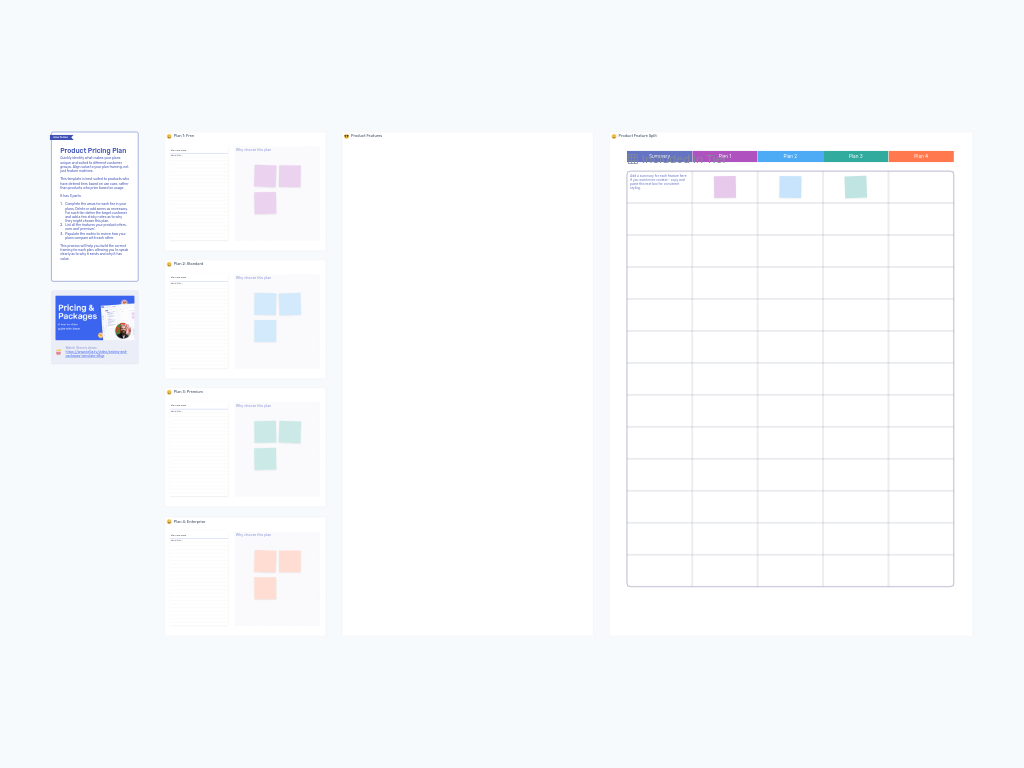
- Fill in the "Plan Use Case" card with a clear description of your target customer for this tier
- Add sticky notes under "Why choose this plan" describing the value proposition from the customer's perspective
- Focus on outcomes and benefits, not just feature lists
The template provides four tiers by default (Free, Standard, Premium, Enterprise), but add or remove zones based on your actual pricing structure.
Step 2: List Your Product Features (15-20 minutes)
In the "Product Features" zone, catalog all features your product offers or plans to offer:
- Include both core features and premium capabilities
- Add brief summaries for complex features if needed (use the text box template provided for consistent styling)
- Don't worry about organizing them yet—just get everything visible
Step 3: Map Features to Tiers (30-40 minutes)
Using the "Product Feature Split" matrix, indicate which features belong in which tier:
- Place colored sticky notes in the grid where features align with specific plans
- Each plan has a matching color to make visual scanning easier
- Look for patterns—are some tiers feature-rich while others feel empty?
- Consider feature access restrictions (view-only vs. full access) where appropriate
Step 4: Review and Refine (20-30 minutes)
Step back and evaluate your pricing structure as a whole:
- Does each tier have a coherent value story?
- Are there clear upgrade paths that incentivize moving to higher tiers?
- Would your target customer for each tier actually need and pay for what's included?
- Are you inadvertently creating tiers that cannibalize each other?
Make adjustments based on the team's insights. This often means moving features between tiers or reframing how you describe tier value propositions.
Step 5: Document Next Steps (5-10 minutes)
Capture action items and decisions:
- Which features need development to support the pricing strategy?
- What messaging needs to be created for marketing materials?
- Who needs to validate this pricing structure (finance, sales, leadership)?
- When will you revisit and adjust based on market feedback?
Tips for a Successful Session
Include diverse perspectives. Bring together product management, marketing, sales, and customer success. Each team sees customer value differently, and those perspectives prevent blind spots in your pricing strategy.
Start with data if you have it. Review existing conversion rates, customer feedback, and competitive pricing before the session. If you're designing pricing for a new product, research competitor positioning and run customer discovery interviews first.
Resist feature-based thinking. The most common mistake is building tiers solely around "more features = higher price." Instead, think about jobs to be done. A Free user and an Enterprise user often want to accomplish fundamentally different things with your product.
Test your upgrade incentives. Once you've mapped features to tiers, imagine you're a customer at each level. What would make you upgrade? If the answer is "nothing compelling," you have a problem.
Consider the "Goldilocks effect." Most customers gravitate toward middle-tier options. Make sure your mid-tier plan is genuinely attractive and well-positioned, not just a way station between extremes.
Plan for flexibility. Markets change, and what seems like perfect pricing today may need adjustment in six months. Build in review cycles and be prepared to iterate based on customer response and competitive pressure.
Address the elephant in the room early. If your team has strong disagreements about pricing philosophy (like whether to offer a free tier at all), surface and work through those debates before diving into feature mapping. Otherwise, you'll revisit the same conflicts repeatedly throughout the session.
This template works best when you view it as a conversation starter rather than a final deliverable. The real value comes from the strategic discussions it prompts about customer value, competitive positioning, and product strategy.