

Ludi vs Microsoft Whiteboard: Which Is Better for Agile Teams?
Microsoft Whiteboard is a collaborative canvas included free with Microsoft 365. It’s fine for sketching basic ideas during a Teams call. Ludi is an online whiteboard for agile teams, purpose-built for retrospectives, sprint planning, estimation sessions, and team health checks. They sound similar. They’re not.
If someone in your organisation is asking “why not just use the whiteboard we already have?” — this page gives that question a proper answer.
What is Ludi?
Ludi is an online whiteboard for agile teams — a visual canvas purpose-built for retrospectives, sprint planning, backlog estimation, team health checks, and workshops.
Agile teams use Ludi to run remote ceremonies that feel less like a chore — with fun touches, flexible facilitation, and everything you need to reflect, decide, and act.
What is Microsoft Whiteboard?
Microsoft Whiteboard is a collaborative canvas included free with Microsoft 365. It provides an infinite drawing surface with sticky notes, shapes, text, and pen tools, primarily designed for light sketching and brainstorming during Teams meetings.
Microsoft appears to be scaling it back rather than investing in it, with Microsoft Loop becoming the preferred lightweight collaboration surface.
Ludi vs Microsoft Whiteboard: See the Difference
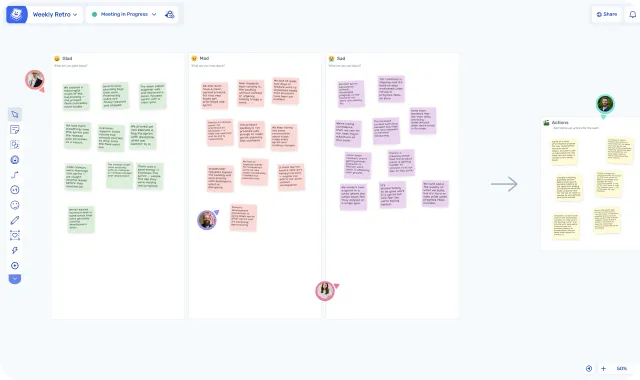
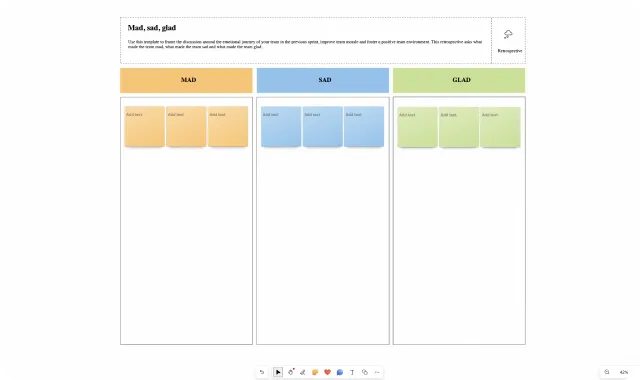
| Ludi | Microsoft Whiteboard | |
|---|---|---|
| What is it | Online whiteboard for agile teams | Basic collaborative canvas |
| Built for | Retros, sprint planning, estimation, health checks, workshops | Light brainstorming and sketching during Teams calls |
| Team type | Agile teams that need facilitation, structure, and outcomes | Teams that need a quick shared surface inside Microsoft 365 |
| Key use case | Structured agile ceremonies with facilitation control | Freeform sketching and note-taking during meetings |
| Price | $4–$6/member/month | Free with Microsoft 365 |
| Free to try | 30-day free trial, no card required | Free with M365 subscription |
| Core agile ceremonies | ||
| Other collaborative sessions | ||
| Meeting facilitation | ||
| Private writing | ||
| Anonymous authorship | ||
| Voting | ||
| Action tracking | ||
| Rich template library | 125+ templates | ~60 templates |
| Jira integration | ||
| Planning poker | ||
| Engagement features | ||
| AI features | ||
| Teams integration | Coming Soon |
In-Depth Feature Comparison
Facilitation
Microsoft Whiteboard has some basic canvas controls: lock objects, countdown timer, Follow mode, laser pointer. These help manage a shared surface, but that’s table stakes for a collaborative tool.
What’s missing is the next level. There’s no way to hide and reveal sections of the board to run a phased session, or control what participants see before you’re ready. No readiness checks. No structured flow from one activity to the next. The facilitator can point at things and lock things, but they can’t orchestrate a meeting with stages.
Ludi’s Activity Frames are designated board sections that can be hidden, revealed, and jumped to. The facilitator controls which frames are visible, herds participants to the current one, and sets the pace. Host controls let you lock content, run readiness checks, manage participant tools, and reveal notes when the group is ready. The difference is between managing a canvas and running a session.
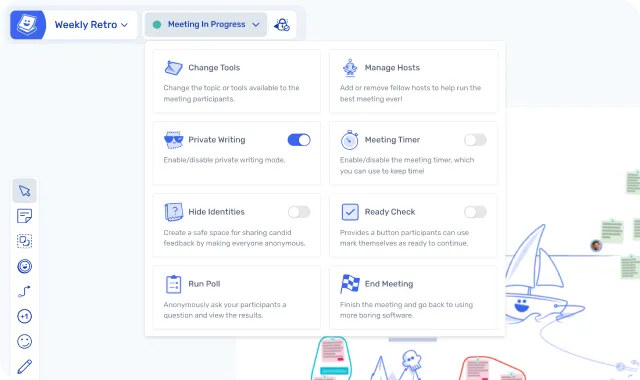
Private Writing and Anonymity
This is the feature that drives people away from Microsoft Whiteboard.
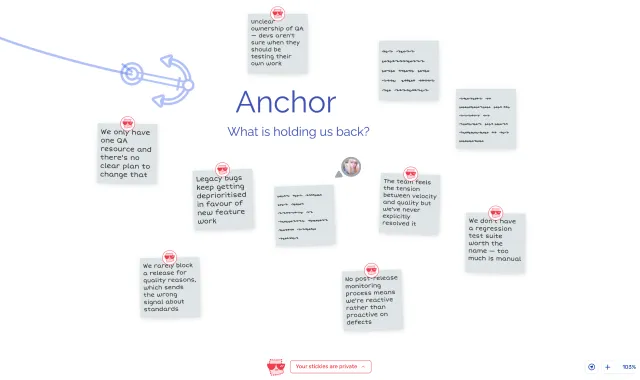
Without private writing, the first person to post a note anchors the conversation. Quieter team members don’t contribute honestly when they can see what everyone else has already written. You don’t get different perspectives.
Microsoft Whiteboard does have an “anonymous authorship” toggle that hides who wrote a note, but everyone still sees what everyone writes in real time. It solves attribution fear but not anchoring bias.
In Ludi, everyone writes independently. Each participant reveals their own notes when ready, and the host can reveal all as a fallback. Anonymous mode removes names entirely. Private writing prevents anchoring. Anonymous authorship prevents attribution fear. Ludi has both. Microsoft Whiteboard has one.
”MS got it wrong: too much customisation where you don’t need it, and none where you do. For example, I cannot privately write my notes without others seeing them.”
— Jasper Sander, Principal PM, ModuleWorks
Action Tracking
If your retro produces action items in Microsoft Whiteboard, they stay on the board. And in most teams’ experience, they stay there permanently. Loop task lists exist but they’re generic, with no retro-to-retro continuity.
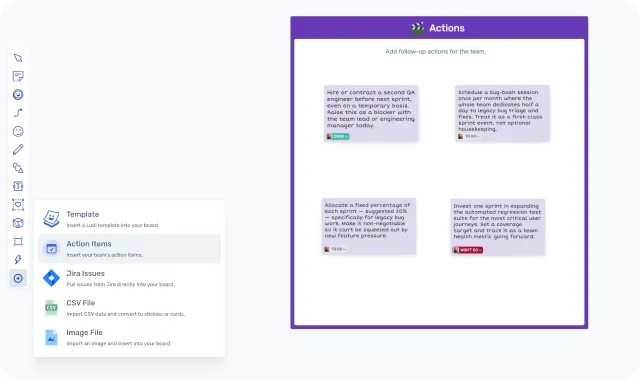
In Ludi, any sticky note can become an action with an assignee, due date, and automated email reminders. Actions carry forward into the next meeting board, so the team reviews last sprint’s commitments before starting a new retro. There’s a dedicated action dashboard for managing actions across all boards.
If your retros regularly produce actions that nobody follows up on, this is the feature that changes that.
Templates
Microsoft Whiteboard has ~60 templates across 9 categories, including 8 retrospective templates (4Ls, Mad/Sad/Glad, Sailboat, Start/Stop/Continue, and others). The quantity isn’t the issue. The quality is. Every retro template is the same format: coloured column headers with sticky notes on a grey canvas. The Sailboat has a small clipart illustration; the rest are identical layouts with different headings.
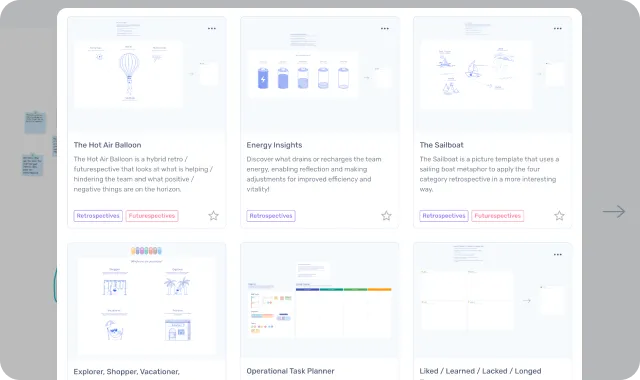
Ludi has 125+ templates across retrospectives, sprint planning, estimation, health checks, brainstorming, story mapping, and workshops. A Sailboat retro is an illustrated sailboat, not three columns with nautical headings. Sticky notes auto-assign colours by zone, and each person gets unique handwriting so contributions feel personal and the board is immediately scannable.
The difference is visible in the first five seconds.
Integrations
Microsoft Whiteboard integrates deeply with the Microsoft ecosystem: Teams, Loop components, OneDrive. It has no project management integrations.
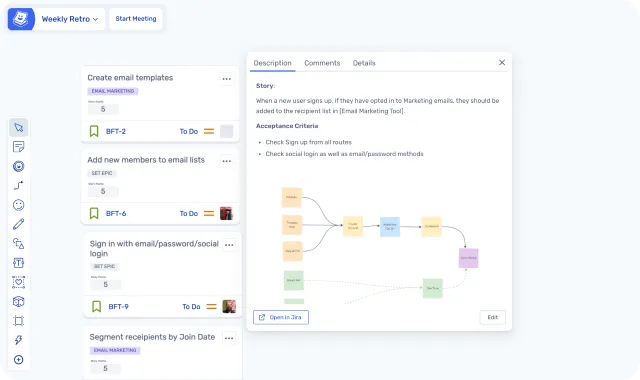
Ludi integrates with Jira (two-way sync on the Business plan) for backlog collaboration, estimation, issue creation, and sprint planning. Pull stories from your backlog, estimate together on the board, discuss scope in context, and push results back to Jira automatically. There’s a Teams integration in the works, but for now Ludi runs in a browser tab.
Engagement
Microsoft Whiteboard has reaction stickers and GIFs. And that’s it.
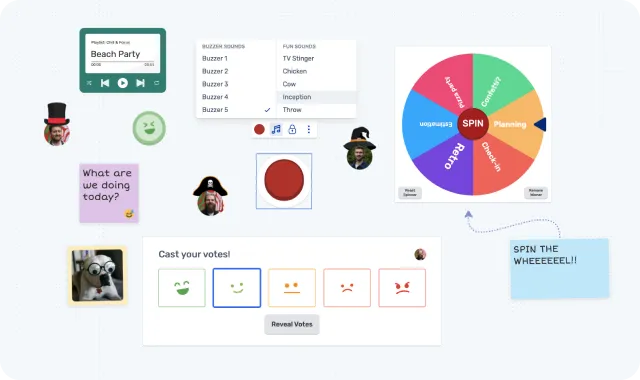
Remote ceremonies need energy to work. Teams that enjoy using a tool will participate more earnestly. Ludi has icebreaker activities, confetti cannon, virtual hats, a jukebox, spinner, buzzer, reactions, and gestures. They sound whimsical, but there’s a serious point: a 60-minute retro at the end of a sprint, on the fifth video call of the day, needs something to keep people present.
”Our engineering team has used Ludi for years. We love it! They’ve thought through all the small things that make a retro fun, as opposed to using a generic whiteboarding application. For us, it’s the small things. Hats, confetti, slaps.”
— Anthony, CTO, Zable Health
Use Case Comparison
Retrospectives
Ludi, and it’s not close.
Microsoft Whiteboard has 8 retro templates, but they’re all the same thing: coloured column headers with sticky notes on a grey canvas. The template gives you a layout. Everything else — the facilitation, the pacing, the outcomes — is on you.
Ludi was built for retrospectives from day one. Pick from dozens of designed retro formats, guide your team through each phase with Activity Frames, use private writing for honest input, group related notes with Topics, vote to prioritise what matters, and close with tracked actions so outcomes actually happen. The visual design matters too: illustrated templates, auto-assigned colours, unique handwriting per person. It makes the board feel alive rather than clinical.
Verdict: Ludi for any team running structured retrospectives. Microsoft Whiteboard if all you need is a blank surface to type notes onto during a Teams call.
Sprint Planning and Estimation
Microsoft Whiteboard has no estimation or planning poker capability. There’s a sprint planning template layout, but no estimation mechanics, no Jira connection, and no way to pull backlog items onto the board.
Ludi has built-in planning poker with Fibonacci and T-shirt sizing and two-way Jira sync. Pull stories from your backlog, estimate together on the board, discuss scope in context, and push results back to Jira automatically.
Verdict: Ludi. Microsoft Whiteboard has no capability here.
Brainstorming and Whiteboarding
This is the one area where Microsoft Whiteboard is actually designed to work. If your team needs a quick shared surface to throw ideas around during a Teams call, Microsoft Whiteboard handles that fine.
Ludi does brainstorming too, and adds voting, grouping, and private writing to make it more structured. But if all you need is a freeform canvas inside Teams, Microsoft Whiteboard is adequate. If you want useful results from the brainstorm, Ludi is the tool you need.
Verdict: Microsoft Whiteboard if you want something quick and already in Teams. Ludi if you want the brainstorm to produce something actionable.
Workshops
Microsoft Whiteboard has no workshop facilitation. No way to guide participants through phases, no way to hide and reveal sections, no activity frames. It does have a timer. But if you’re running anything more structured than “everyone add notes to this canvas in 5 minutes,” you’ll be fighting the tool.
Ludi’s Activity Frames let facilitators build multi-phase workshops where each section is hidden until it’s time. Participants are herded to the current exercise, and the facilitator controls the pace. You can run a structured workshop without any participant needing to understand the tool beforehand.
Verdict: Ludi. Microsoft Whiteboard cannot run a structured workshop.
Team Health Checks
Microsoft Whiteboard has no team health check capability. No health check templates, no structured rating mechanics, and no way to track health over time.
Ludi has dedicated health check templates (Spotify Health Check, Squad Health Check, and others) where team members rate dimensions privately and discuss the results as a group. It’s one of the things agile teams do regularly that a basic canvas simply cannot support well.
Verdict: Ludi. Microsoft Whiteboard has nothing here.
Pricing
Microsoft Whiteboard is free with any Microsoft 365 plan (starting from Business Basic at ~$6/user/month). There’s nothing additional to buy.
Ludi starts at $4/member/month (Starter plan, billed annually). For a team of 10, that’s $40/month. The Business plan ($6/member/month) adds Jira integration, unlimited team spaces, and guest collaborators.
There’s a 30-day free trial with full access to everything, no credit card required. After the trial, boards are preserved in read-only mode. Nothing is deleted.
| Ludi Starter | Ludi Business | Microsoft Whiteboard | |
|---|---|---|---|
| Price | $4/member/month | $6/member/month | Free with Microsoft 365 |
| Jira sync | Two-way | ||
| Private writing | |||
| Voting | |||
| Action tracking | |||
| Planning poker | |||
| AI features | AI grouping | AI grouping |
What Customers Say
Jasper Sander, Principal PM, ModuleWorks
Jasper’s team switched after finding Microsoft Whiteboard’s approach fundamentally wrong for facilitated sessions:
“MS got it wrong: too much customisation where you don’t need it, and none where you do. For example, I cannot privately write my notes without others seeing them.”
“You may find that a team that is experienced in Scrum is actually fine with using worse tools like MS Whiteboard because they’re experienced in their process, but for the teams who are being introduced to a new framework, Ludi is best for them because it just works, and is easy.”
Switched from Teams Whiteboard
This customer came from Teams Whiteboard and needed private writing for their retrospectives:
“The Teams whiteboard functionalities do not match with my needs, specially the possibility to hide the stickies.”
Teams Whiteboard isn't enough
“Microsoft Whiteboard can be a real pain in the *ss.”
Ben Gussey, Sydney Trains
“I have tried to push for the purchase of another tool, but got a No Go because the Group tool is supposed to be Microsoft Whiteboard.”
Cynthia, Scrum Master
Final Verdict
Microsoft Whiteboard does what it does, and its biggest advantage is that it’s already there and already free. That’s genuine, and we won’t pretend otherwise. But if you’re running meetings that need facilitation, honest input, creativity, and tracked actions, Microsoft Whiteboard isn’t an alternative to Ludi. It’s a different category of tool.
The capability gap is too wide for the price difference to close it. “We already have it” and “it’s the right tool” are different statements. If your retros or workshops need to produce results that last beyond the meeting, Ludi is worth a 30-day trial.