Landing Page Content Mapping
Map your website content strategy by connecting customer jobs-to-be-done with your product features. This structured template helps product and marketing teams align on what content resonates with each user segment before building landing pages.
What Is Landing Page Content Mapping?
Landing Page Content Mapping is a planning framework based on the Jobs To Be Done (JTBD) methodology. Instead of guessing what content belongs on your landing pages, this template helps you systematically connect your product features to the specific problems your customers are trying to solve.
The template provides a structured workspace where teams can identify customer segments, outline their core jobs-to-be-done, and then map relevant product features or content that directly addresses those needs. This approach ensures your landing pages speak directly to user motivations rather than just listing features.
Benefits & When to Use
Use this template when you're:
- Building new landing pages for different user segments
- Redesigning existing pages that aren't converting
- Launching a product and need to prioritize messaging
- Aligning marketing and product teams on positioning
The key benefit is clarity. By forcing teams to articulate the specific jobs customers are hiring your product to do, you naturally filter out irrelevant content and surface what truly matters to each segment. This prevents feature-dump landing pages that try to speak to everyone and end up resonating with no one.
Product managers, marketers, and designers benefit from having a shared understanding of why certain content choices make sense for specific audiences.
How to Run a Landing Page Content Mapping Session
Total time: 60-90 minutes
Step 1: Identify Your Customer Segments (10 minutes)
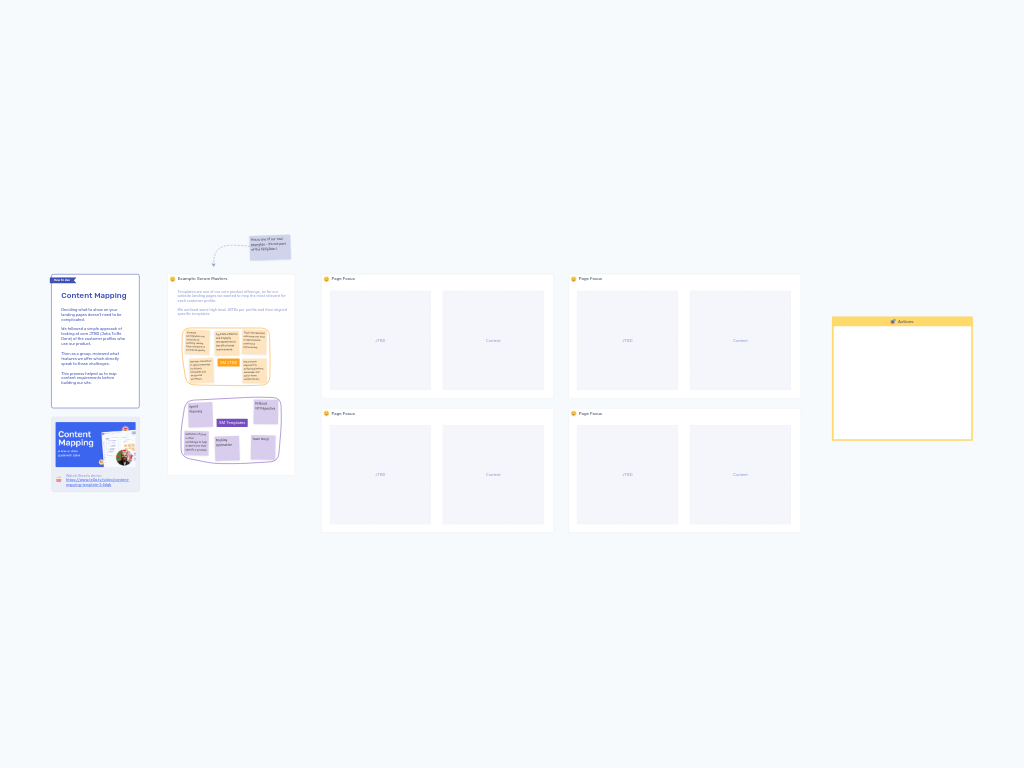
Start by creating zones for each distinct user persona or customer segment you're targeting. In the example provided, one segment is "Scrum Masters," but you might have segments like "Enterprise Buyers," "Individual Contributors," or "Small Team Leaders."
Focus on 2-4 key segments rather than trying to cover every possible user type.
Step 2: Define Jobs To Be Done for Each Segment (20 minutes)
For each customer segment, brainstorm the core jobs they're trying to accomplish when they might turn to your product. These aren't product features—they're outcomes or problems.
Use sticky notes in one color (like orange in the example) to capture each JTBD. For Scrum Masters, examples might include:
- "Facilitate effective retrospectives to identify process improvements"
- "Ensure team alignment by surfacing blockers collaboratively"
- "Track retrospective outcomes over time to demonstrate continuous improvement"
Aim for 4-6 jobs per segment. Be specific about the context and desired outcome.
Step 3: Map Features or Content to Each JTBD (20 minutes)
Using a different colored sticky note (like purple in the example), identify which product features, templates, or content pieces directly support each job-to-be-done.
Draw connections or group related items. In the Scrum Master example, templates like "Sailboat Retrospective," "Sprint Planning," and "Team Mood" map directly to the facilitation and alignment jobs.
This step often reveals gaps where you have jobs but no supporting content, or features that don't clearly solve any identified job.
Step 4: Prioritize Content for Each Landing Page (15-20 minutes)
For each customer segment, move the most critical JTBD and their supporting features into the "Page Focus" section. This represents what will actually appear on that segment's landing page.
Use the two-column structure to organize:
- Left side: The job or problem statement
- Right side: The content or features that address it
Not everything from your brainstorm will make it to this section—that's the point. Choose the 2-3 most compelling jobs and their strongest supporting content.
Step 5: Define Actions (10-15 minutes)
Capture specific next steps in the Actions zone:
- Who writes the copy for each section?
- What screenshots or demos do you need?
- Are there content gaps that need new features or materials?
- When will you test this content with actual users?
Assign owners and deadlines before ending the session.
Tips for a Successful Session
Start with research, not assumptions. If you have customer interviews, support tickets, or user research, review it before the session. Real customer language for their jobs-to-be-done is more powerful than your internal terminology.
Keep segments distinct. If two customer segments have identical jobs-to-be-done, they might actually be the same segment. Look for meaningful differences in context, goals, or constraints.
Focus on jobs, not demographics. "Scrum Master" is a role, but the job isn't "being a Scrum Master"—it's what they're trying to accomplish in that role. Stay focused on the functional job.
Use the "hire/fire" test. For each JTBD, ask: "Would someone hire our product specifically to accomplish this job?" If not, refine the statement until it's concrete enough.
Challenge feature-first thinking. Teams often want to start by listing features and then finding jobs that fit. Resist this. Starting with jobs ensures you're solving real problems, not justifying existing features.
One person per segment can help. If you have someone on the team who was previously a Scrum Master (or whatever segment you're targeting), have them lead the JTBD brainstorm for that section. Their lived experience is invaluable.