Simple Launch Plan Template
A Simple Launch Plan template provides a structured approach to coordinating all the moving parts of a product, feature, or project launch. This visual planning tool helps teams capture every task, assign ownership, and sequence work across time to ensure nothing falls through the cracks when go-live day arrives.
What Is a Simple Launch Plan?
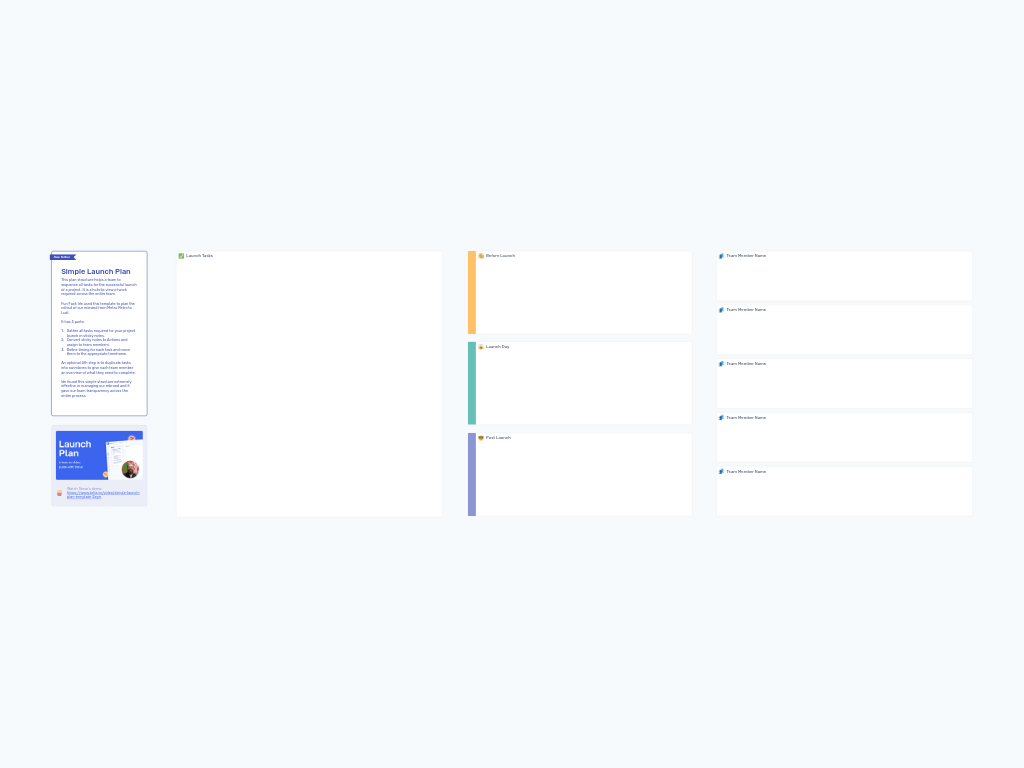
A Simple Launch Plan is a collaborative planning framework that organizes launch activities across three critical time phases: Before Launch, Launch Day, and Post Launch. Rather than scattering tasks across multiple tools or documents, this template centralizes all launch-related work in a single visual workspace where the entire team can see who's doing what and when.
The template works by transforming brainstormed tasks into actionable items with clear owners and deadlines. What makes this approach "simple" isn't that launches are easy—it's that the structure removes complexity from the planning process itself. You're left with a clear, scannable view of your entire launch timeline that anyone on the team can understand at a glance.
Ludi used this exact template to coordinate our rebrand from Metro Retro to Ludi, managing tasks across engineering, marketing, customer success, and operations. The transparency it provided kept our distributed team aligned throughout the process.
Benefits & When to Use
Use a Simple Launch Plan when you need to coordinate work across multiple team members or departments for any significant release or rollout. This template shines in situations where:
- You're launching a new product, feature, or major update
- Multiple team members need visibility into launch tasks across different functions
- You need to sequence dependencies and ensure pre-launch tasks are completed before go-live
- Accountability matters—you want clear ownership for every launch activity
- You're rebranding, restructuring, or making other organization-wide changes
The benefits of using this structured approach include:
- Complete visibility: Everyone sees the full scope of launch work, not just their piece
- Clear accountability: Every task has an owner, eliminating confusion about who's responsible
- Timeline clarity: Visual time phases help teams understand sequencing and deadlines
- Reduced launch risk: Nothing gets forgotten when all tasks are captured in one place
- Team alignment: Shared understanding of what needs to happen and when
This template works equally well for major product launches and smaller feature releases—scale the detail to match your needs.
Template Structure
The Simple Launch Plan is organized into four distinct sections:
Launch Tasks Collection Area
A central zone where your team captures all tasks required for launch. This is your brainstorming space—everything goes here initially, regardless of timing or ownership.
Time-Based Lanes
Three horizontal swimlanes organize tasks by when they need to happen:
- Before Launch 🧐: Pre-launch preparation, testing, documentation, and setup work
- Launch Day 😱: Activities that happen during the actual go-live moment
- Post Launch 😎: Follow-up tasks, monitoring, and post-launch activities
Team Member Swimlanes (Optional)
Additional horizontal lanes at the bottom let you duplicate tasks and organize by individual team member. This gives each person a personalized view of their launch responsibilities.
How to Run a Launch Planning Session
Total Time: 60-90 minutes for initial planning
1. Gather All Launch Tasks (15-20 minutes)
Have your team brainstorm every task required for a successful launch. Work together to capture these as sticky notes in the Launch Tasks collection area. Encourage broad thinking across all functions—engineering, design, marketing, sales, support, operations, and any other relevant areas.
Don't worry about order, timing, or assignments yet. Just get everything out of people's heads and onto the board. Prompt the team with questions like "What needs to be ready before we launch?" and "What might we regret not doing?"
2. Convert to Actions and Assign Owners (20-25 minutes)
Go through each sticky note and convert it to an Action item in Ludi. As you convert each task, assign it to a specific team member. If a task requires multiple people, break it into smaller tasks with individual owners.
This step transforms vague ideas into concrete commitments. Make sure every action has a clear owner who will be responsible for its completion.
3. Sequence Tasks by Time Phase (15-20 minutes)
Move each action from the Launch Tasks area into the appropriate time-based lane:
- Tasks that must be completed before launch day go into Before Launch
- Activities happening during the actual go-live go into Launch Day
- Follow-up and monitoring tasks go into Post Launch
Within each lane, arrange tasks left-to-right to show sequence. Tasks on the left should happen first, while tasks on the right happen later in that phase.
4. Create Team Member Views (10-15 minutes, optional)
Duplicate tasks into the Team Member swimlanes to give each person a personalized view of their responsibilities. This optional step is particularly valuable for larger launches where individuals may lose track of their specific commitments among all the team activity.
5. Review and Refine (10-15 minutes)
Walk through the entire plan as a team. Check for:
- Missing tasks or dependencies
- Unrealistic assignments or timing
- Bottlenecks where too much falls on one person or time period
- Tasks that should be broken into smaller steps
Set dates for check-in meetings as you approach launch to review progress and adjust as needed.
Tips for a Successful Launch Planning Session
Start comprehensive, then prioritize. It's better to capture everything during brainstorming and cut tasks later than to miss something critical. Once everything is visible, you can have honest conversations about what's truly essential versus nice-to-have.
Be specific with action items. "Update documentation" is vague. "Update API documentation for the three new endpoints in the developer portal" is actionable. The more specific your tasks, the easier they are to complete and check off.
Identify dependencies explicitly. Some tasks can't start until others finish. Use Ludi's linking or commenting features to call out dependencies so team members know what they're waiting on.
Schedule regular check-ins. Don't create this plan and then ignore it until launch day. Schedule weekly or bi-weekly reviews to update progress, address blockers, and adjust timing as reality unfolds.
Consider a launch rehearsal. For significant launches, add a "rehearsal" or "dry run" task to your Before Launch lane. Walking through launch day activities in advance can surface issues you hadn't considered.
Don't overstuff Launch Day. If your Launch Day lane is packed with dozens of tasks, you're probably setting yourself up for chaos. Most launch day activities should be executing pre-prepared work, not creating new things under pressure.
Keep the plan visible. This template works best when it stays at the center of your launch coordination. Reference it in team meetings, link to it from other tools, and encourage team members to update it as they complete tasks.
The beauty of this template is its flexibility—you can adapt it to launches of any size or complexity. Whether you're shipping a minor feature update or orchestrating a company-wide transformation, this simple structure keeps everyone aligned and moving in the same direction.