Workstream Planning Template
Coordinate complex initiatives across multiple areas of your business with the Workstream Planning template for Ludi. This structured framework helps product and dev teams visualize parallel efforts, identify dependencies, and prioritize work across different focus areas—from data infrastructure to content strategy to process improvements.
What Is Workstream Planning?
Workstream planning is a strategic approach to managing multiple concurrent initiatives within a product or development organization. Instead of viewing your team's work as a single backlog, this template helps you organize efforts into distinct workstreams—separate areas of focus that each address specific business needs or product goals.
Each workstream follows a consistent planning structure: defining the problem space, identifying tasks, articulating outcomes, and committing to specific actions. This parallel framework makes it easier to spot resource conflicts, understand cross-functional dependencies, and make informed decisions about where to invest your team's effort.
Benefits & When to Use Workstream Planning
Use this template when you're managing a team that needs to address multiple priorities simultaneously. It's particularly valuable when:
- Your team is tackling improvements across different domains (infrastructure, user experience, content, process)
- You need visibility into how resources are allocated across various initiatives
- Stakeholders require a high-level view of progress in different areas
- You're planning quarterly objectives and need to balance competing priorities
- Multiple sub-teams or squads need to coordinate their efforts
The template brings clarity to complex planning situations by providing a consistent structure across all workstreams. Rather than comparing individual tasks, you can evaluate entire initiatives based on their potential outcomes and strategic importance.
How to Run a Workstream Planning Session
Total time: 90-120 minutes (depending on number of workstreams)
1. Identify and define your workstreams (20 minutes)
Start by determining which areas of your business or product need focused attention. Each workstream should represent a distinct focus area with its own goals and challenges.
For each workstream:
- Give it a clear, descriptive name (e.g., "Data Analytics," "Content Production," "Website Optimization")
- Write a brief description explaining why this area needs attention
- Include context about the current state and what problem you're trying to solve
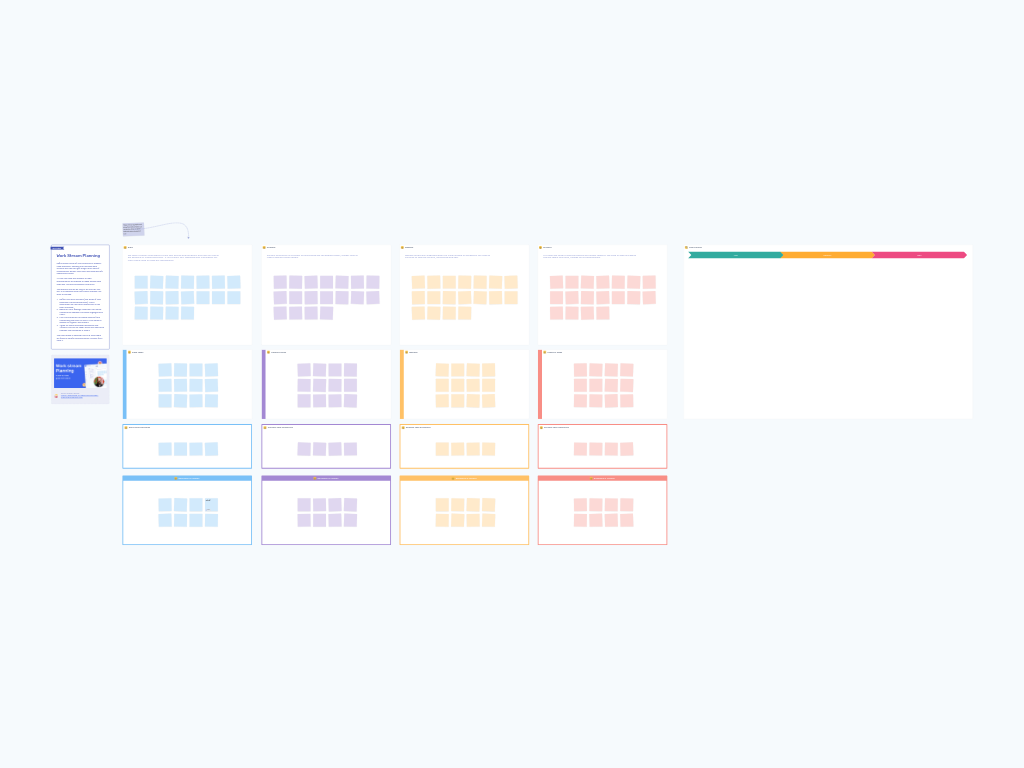
The template provides four workstream columns by default, but you can add or remove columns based on your needs.
2. Brainstorm tasks for each workstream (25 minutes)
Within each workstream column, identify the specific tasks or initiatives that would address the issues you've outlined. Use the sticky notes in the "Tasks" section to capture individual items.
Consider:
- What concrete work would move this workstream forward?
- Are there quick wins available alongside longer-term efforts?
- What dependencies exist between tasks?
Don't worry about prioritization yet—focus on getting a comprehensive view of possible work.
3. Define outcomes for each task set (20 minutes)
In the "Task Outcomes" section for each workstream, articulate what success looks like. What would completing these tasks actually achieve?
This step is crucial because it shifts the conversation from outputs (tasks completed) to outcomes (value delivered). Clear outcomes make prioritization decisions more straightforward and help the team stay focused on impact rather than just activity.
4. Set immediate decisions and actions (20 minutes)
Based on your understanding of outcomes, identify concrete decisions you can make and actions you can commit to right now. Use the "Decisions & Actions" section for each workstream to capture these commitments.
Be specific:
- Who will own each action?
- What's the timeframe?
- What does "done" look like?
These become your starting point for moving from planning to execution.
5. Prioritize across workstreams (25 minutes, optional)
Once you've populated all workstreams, move to the "Task Priority" section on the right side of the board. This area provides three priority lanes: High, Medium, and Low.
Review the actions from each workstream and drag them into the appropriate priority lane. This cross-workstream view helps you:
- Identify resource constraints
- Balance short-term and long-term work
- Make trade-offs based on strategic importance
- Communicate priorities to stakeholders
Consider both urgency and impact when assigning priorities. High-priority items should have clear, measurable outcomes and contribute directly to strategic goals.
Tips for a Successful Workstream Planning Session
Keep workstreams focused and distinct. If two workstreams feel too similar or have significant overlap, consider combining them. Each should have a clear owner and purpose.
Start with context. Before diving into tasks, make sure everyone understands why each workstream exists. Share relevant data, customer feedback, or strategic context that explains the importance of each area.
Involve the right people. Include representatives from each workstream who understand both the current challenges and potential solutions. This ensures you're working with accurate information and building buy-in from the start.
Be realistic about capacity. When prioritizing in step 5, consider your team's actual available capacity. It's better to commit fully to fewer high-priority items than to spread resources too thin across many initiatives.
Make outcomes measurable. Vague outcomes like "improve the website" don't help with prioritization or progress tracking. Instead, aim for specific, measurable outcomes like "increase mobile conversion rate by 15%" or "reduce data pipeline processing time by 30%."
Review and update regularly. Workstream planning isn't a one-time exercise. Schedule regular check-ins (monthly or quarterly) to review progress, adjust priorities, and add new tasks as circumstances change.
Use the visual layout to your advantage. The vertical structure of each workstream makes it easy to trace the connection from problem to task to outcome to action. Use this visual flow during presentations to stakeholders or when onboarding new team members.
Don't let perfect be the enemy of good. You don't need complete information in every section to make this template valuable. Start with what you know and refine as you learn more through execution.